
Shinco 868 DVD Player
4. Mega Drive Tests
Review Pages
Shinco 868 DVD Player - Page 4
Mega Drive Tests
 Shinco
at 868 model added Mega Drive support playback! How can this be possible? Simple.
Shinco added Mega drive console INSIDE the new model! That means that there
is no software emulator inside and the playback is perfect. The Shinco 868 comes
with 9 CDs of GameVCDs (as Shinco calls the mega drive ROMs CDs), which brings
up the total number of games to 428. All 9 CDs come in one fancy box (also contains
a list of the games at Japanese language . You can get the full list in English
over here).
Shinco
at 868 model added Mega Drive support playback! How can this be possible? Simple.
Shinco added Mega drive console INSIDE the new model! That means that there
is no software emulator inside and the playback is perfect. The Shinco 868 comes
with 9 CDs of GameVCDs (as Shinco calls the mega drive ROMs CDs), which brings
up the total number of games to 428. All 9 CDs come in one fancy box (also contains
a list of the games at Japanese language . You can get the full list in English
over here).
 If
we take a look over Shinco GameVCD we see that the CD contains 3 folders (GCD,
Menu, Program). The GCD folder 2 files (AINFO.GCD and ENTRIES.GCD). The Menu
folder contains 9 files (ITEM00.dat – ITEM09.DAT) and finally the Program folder
contains all the ROMs (named GAME01.DAT.etc). The structure of the CD reminds
VCD but it's not the same.. The actual formatting of contains 3 data (mode2)
tracks. The following information was collected using CDR Diagnostics:
If
we take a look over Shinco GameVCD we see that the CD contains 3 folders (GCD,
Menu, Program). The GCD folder 2 files (AINFO.GCD and ENTRIES.GCD). The Menu
folder contains 9 files (ITEM00.dat – ITEM09.DAT) and finally the Program folder
contains all the ROMs (named GAME01.DAT.etc). The structure of the CD reminds
VCD but it's not the same.. The actual formatting of contains 3 data (mode2)
tracks. The following information was collected using CDR Diagnostics:
 ISO-9660
data track
ISO-9660
data track
Volume ID: HAWK_99_CD1
System ID: IBM PC
Publisher: ANDREW THINA / DANNY LIM
Data preparer: ANDREW THINA / DANNY LIM
Application: CDRITE PRE-MASTERING TOOL
Copyright file: OPTICS_STORAGE_PTE_LTD_1996
Abstract file: OPTICS_STORAGE_PTE_LTD
Bibliography file: OPTICS_STORAGE_PTE_LTD
As it seems the GameVCDs manufactured with special software from Shinco. We contacted Shinco to find out if we could make our own compilations of GameVCDs but no answer was returned . There is no way (for now) to make your own collection of GameVCDs unless Shinco releases the authoring software. The truth is that Shinco's GameVCDs are not licensed from Sega so maybe newer packages doesn't contain them. The GameVCDs however are easy to backup (even Plextor PX-40TS has a hard time to read them). Just do a simple CD to CD copy.
Update:
As Dave from Shinco DVD Info site told us, there is a utility that enables you to make YOUR own GameVCDs collection! Just download Game Generator v1.1b utility and read the included instructions: "..Put your favor Games file into the same directory with the CDRWIN image files provided from this software. Run the software, select this directory from the software. Then you can see the *.BIN file and how many Megabits in the screen. Press the 'GENERATE' button. Now the software automatic generate the image for you. Press 'EXIT' to exit the software. Use CDRWIN to burn the CD from the CUE file provided from this software...".
When you insert the GameVCD then you will see:
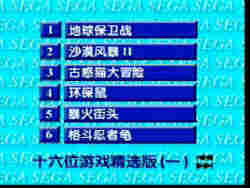
Unfortunately all titles are in Japanese language. We have no idea if you can change them. You can select any game by directly typing the number of the game (let's select 5) or you can browse the games list with (>>| or |<< keys from remote control:
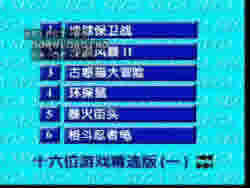
After the game is loaded you will see Sega's familiar logo and pressing start on the game pad the game will start playing. Notice that you can use original Sega's Mega drive control pads also. The Shinco 868 offers different outputs for game play (as we said before). What does this mean? Simple. You can load a game in memory, remove the GameVCD CD and insert a DVD Movie and watch/hear the movie (from S-VHS exit) at the same time you play Mega Drive games (from the composite exit)
 The
control pads are not the best we have tested but remember you can use original
Sega MD controls. They have the usual cross for navigation, 6 buttons and select,
play buttons. The game play of course is perfect as a real mega drive is included!
Playing old Mega drive games in TV brought us many good memories.
The
control pads are not the best we have tested but remember you can use original
Sega MD controls. They have the usual cross for navigation, 6 buttons and select,
play buttons. The game play of course is perfect as a real mega drive is included!
Playing old Mega drive games in TV brought us many good memories.
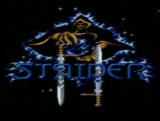
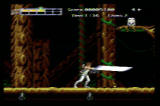
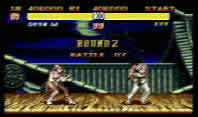
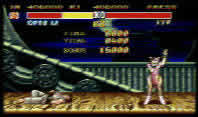
Let see some screenshots from real action:
|
|
|
|
|
|
Review Pages




