Breaking News

ASUS Hardware Showcase: AI Accelerators, Collector GPUs, and Esport Monitors Apple Unveils Major Hardware and Creative Suite Ecosystem Updates XPG Launches Third-Generation CORE REACTOR III for Next-Gen Power Safety TCL’s New Monitor Range Fits Every Kind of Gaming Setup Viltrox Launches AF 35mm F1.4 Pro FE/Z

logo

  • Share Us
    • Facebook
    • Twitter
  • Home
  • Home
  • News
  • Reviews
  • Essays
  • About
    • Submit News

    • Contact Us
    • Privacy

    • Promotion
    • Advertise

    • RSS Feed

Search form

NeoDigits X5000

Jan 2,2007 0

7. Conclusion


Review Pages

1. Introduction
2. Features
3. The Package
4. Power up the player
5. The Tests
6. Networking
7. Conclusion


The NeoDigits X5000 is equipped with both wired and wireless network connections. The wired networking works perfectly. The player automatically acquires its IP address and gateway and can connect to the Internet or local network. This is the preferred connection since you can view even WMV HD files over a wired connection.

Probably most of you, do have a wireless setup in your home and this player seems a very good candidate to stream your Video/Music files directly from your PC to your HDTV. For our tests, we used a laptop (Asus A6JA) and setup a connection between the two devices. First, you have to select the network type (infrastructure/ad-hoc) and set the same preferences on both devices. For the NeoDigits X5000, go to the Wireless menu and select "Wireless network" as the preferred connection. You can view other available wireless networks as well as select the security method (disabled, WEP, WPA). You probably want to use the WPA protection method since it offers the highest wireless security:

After pressing OK, you will notice at the bottom of your TV a message "Connection OK, Signal strength good/average/excellent, etc..". At the same time, our laptop was properly configured for networking, and the signal strength was excellent:

Before being able to use your PC as a media center, you have to install the Neodigits Helios NeoLink application. Of course, other similar applications will work just fine, but for our review we will stick to what Neodigits offers:
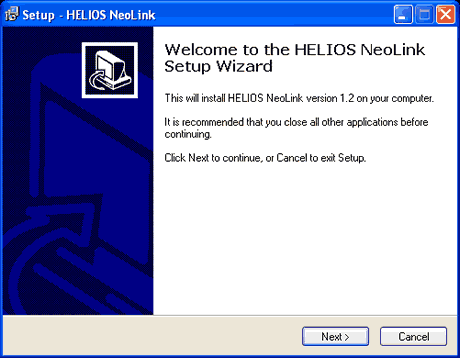
The setup procedure is straightforward, just go through the steps.
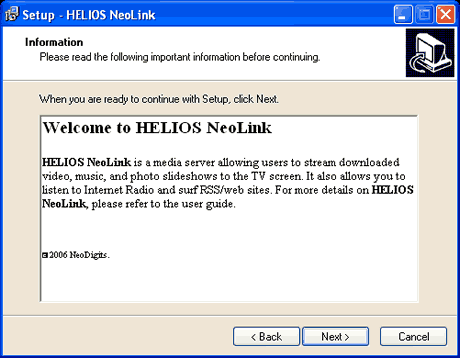
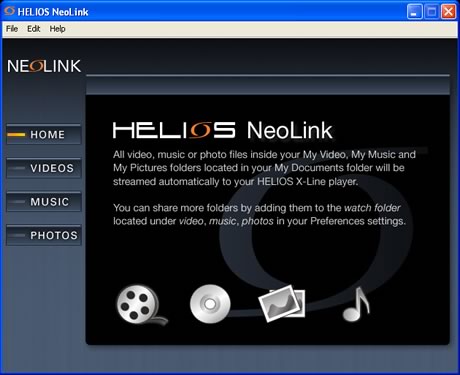
No reboot is needed. Now you can view the main screen for NeoLink. This is exactly the same screen you will view on your TV also!
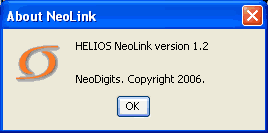
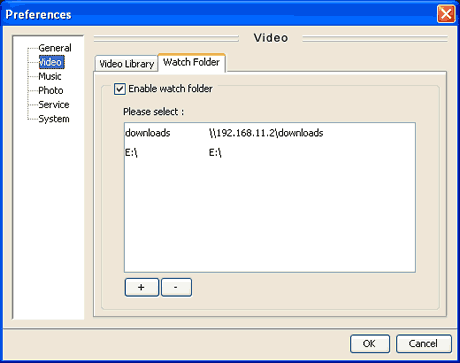
Let's see some basic preferences. We have already established a good and secure connection between our laptop and the X5000 device. As you can see, the software uses both our wired LAN IP and our wireless IP.

This means you can also "map" folders inside the local network and stream them to the X5000 device:
Going back to our X5000 device, we now have to add a NeoLink server. Just type a name and the server IP address (i.e. the PC IP assigned on the wireless network):
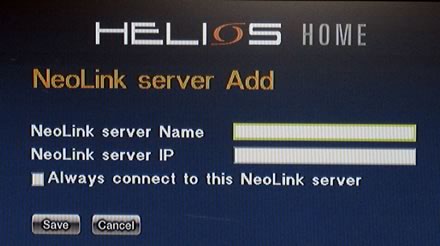
In our case, we used "1" as the name and the server IP was 169.254.209.107. The PC application "listens" to port 8000, so you have to unblock that port in case you are using some kind of firewall:
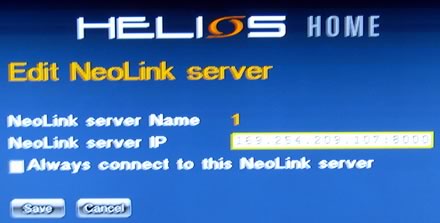
Now, on the main screen, you can see the PC link with the name "1".

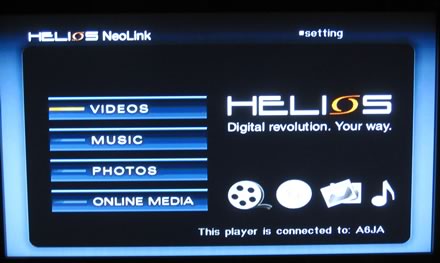
After selecting it, you are guided to the main screen of Helios NeoLink. There are four categories (Videos, Music, Photos, Online Media), you can select from.
Selecting Videos, drops down the list of available and recognizable video formats, either from a local HDD or through the local network (downloads folder):
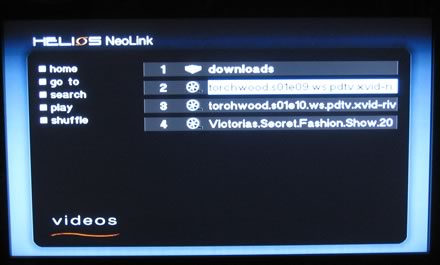
The performance using Wireless network varies, depending on the video file. Most users will stream DivX, Xvid files, so there is no problem there. However, with high bitrates or "complex" Video formats, like WMV HD, the sound was stuttering and the video wasn't smooth. For such cases, we recommend using the wired connection.

Using the online services, you can access for Yahoo! news for example:

While our X5000 was connected to the wireless network, we couldn't access several Internet sites or the Neodigits website. We don't know the exact cause of this behaviour but it may be a problem of the PC application or a network configuration problem...


Review Pages

1. Introduction
2. Features
3. The Package
4. Power up the player
5. The Tests
6. Networking
7. Conclusion


Pages

  • « first
  • ‹ previous
  • 1
  • 2
  • 3
  • 4
  • 5
  • 6
  • 7

neodigits

DVD players

HDMI

Tags: neodigits DVD players HDMI
Previous Post
Vibe V-moda Earphones
Next Post
ECS KN3SLI2 Motherboard

Related Posts

  • HDMI v2.1 Supports Resolutions Up to 10K and Dynamic HDR, New Ultra High Speed HDMI Cable Introduced

  • HDMI 2.1 Brings Higher Video Resolutions And Dynamic HDR

  • HDMI Releases Alternate Mode for USB Type-C Connector

  • DVD Players, Digital Cameras Will Soon Have The Fate Of Your Old TV

  • New HDMI Specification Enables Transmission of HDR Formats

  • Panasonic To Close DVD-player Factory In Slovakia

  • HDMI Version 2.0 Specifications Released, Supports Increased Bandwidth

  • NXP Delivers High-performance DisplayPort and HDMI Switches

Latest Reviews

be quiet! Light Wings Pro IO fan
Cooling Systems

be quiet! Light Wings Pro IO fan

Why Intelligent Firmware Matters More Than Peak Throughput in NAS Systems
Enterprise & IT

Why Intelligent Firmware Matters More Than Peak Throughput in NAS Systems

Fanxiang MP83 M.2 NVMe SSD Enclosure
Enterprise & IT

Fanxiang MP83 M.2 NVMe SSD Enclosure

Ugreen CM642 USB4.0 Enclosure
PC components

Ugreen CM642 USB4.0 Enclosure

be quiet! Dark Power 14 IO
PC components

be quiet! Dark Power 14 IO

Popular News

MSI’s Latest AMD X870E MAX & EVO Series Motherboards

MSI’s Latest AMD X870E MAX & EVO Series Motherboards

COLORFUL Launches iGame B850M ULTRA Series Micro-ATX Motherboards

COLORFUL Launches iGame B850M ULTRA Series Micro-ATX Motherboards

COLORFUL Presents Limited Edition Chitu MAG-60 Magnetic Keyboard Inspired by the Year of the Horse

COLORFUL Presents Limited Edition Chitu MAG-60 Magnetic Keyboard Inspired by the Year of the Horse

COLORFUL Launches iGame B850I MINI OC V14 Motherboard

COLORFUL Launches iGame B850I MINI OC V14 Motherboard

COLORFUL Launches the iGame X870E VULCAN W OC Motherboard

COLORFUL Launches the iGame X870E VULCAN W OC Motherboard

COLORFUL Presents iGame Z890 ULTRA-S W and iGame Z890M ULTRA Z Motherboards

COLORFUL Presents iGame Z890 ULTRA-S W and iGame Z890M ULTRA Z Motherboards

COLORFUL Expands B850 Motherboard Lineup with New CVN, Battle-Ax, and MEOW Models

COLORFUL Expands B850 Motherboard Lineup with New CVN, Battle-Ax, and MEOW Models

ASRock Adds Support for One Sub-Channel DRAM Module on Intel DDR5 Motherboards

ASRock Adds Support for One Sub-Channel DRAM Module on Intel DDR5 Motherboards

Main menu

  • Home
  • News
  • Reviews
  • Essays
  • About
    • Submit News

    • Contact Us
    • Privacy

    • Promotion
    • Advertise

    • RSS Feed
  • About
  • Privacy
  • Contact Us
  • Promotional Opportunities @ CdrInfo.com
  • Advertise on out site
  • Submit your News to our site
  • RSS Feed