Breaking News

SAMA Introduces the S32 WOOD, a Compact M-ATX Case Bundled with an 80 PLUS Gold PSU Thypoch Completes Simera-C Cine Prime Lineup with New 100mm T1.9 Lens CORSAIR Launches the RM1200e Power Supply with Built-in PinProtect GPU Overcurrent Protection and Platinum-certified Efficiency CORSAIR Changes the Game with PureVector, a Science-Based Personalized Aiming Technology, Launching Exclusively in the SABRE v3 PRO PureVector Mouse Series AMD FSR Upscaling 4.1 Boosts Frames and Image Quality on More Devices

logo

  • Share Us
    • Facebook
    • Twitter
  • Home
  • Home
  • News
  • Reviews
  • Essays
  • About
    • Submit News

    • Contact Us
    • Privacy

    • Promotion
    • Advertise

    • RSS Feed

Search form

Linux Raid Guide

Feb 14,2007 0

3. Kernel and modules


Review Pages

1. Introduction
2. Partitioning
3. Kernel and modules
4. Making the array
5. Performance


Untitled Document

You need to check whether your kernel includes RAID support. First try to load the raid modules, if necessary:

Then verify the existence of raid support. Try:

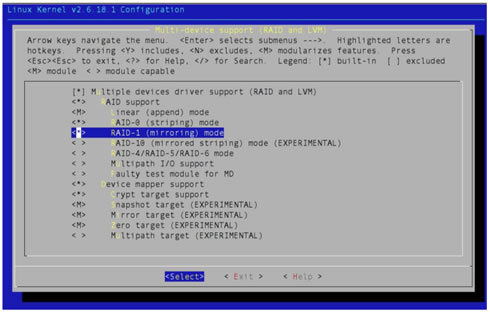
If /proc/mdstat is not available, or if line 32 does not show the [raid1] personality, you will need to enable the following options in your kernel (screen taken from 2.6.18.1) and recompile :

After kernel recompile and reboot, the /proc/mdstat file should be available and showing that you have 2 RAID “personalities” available: [raid0] and [raid1].  You could choose to install RAID support as modules, but since you're going to be using it all the time, it makes no difference if you include it in the kernel, as I did above. Note that the device mapper support is a different thing, but it's useful to have around, so you could just go ahead and install it for future use (encrypted volumes are an obvious application).

 

Review Pages

1. Introduction
2. Partitioning
3. Kernel and modules
4. Making the array
5. Performance


Pages

  • « first
  • ‹ previous
  • 1
  • 2
  • 3
  • 4
  • 5
  • next ›
  • last »

Linux

Tags: Linux
Previous Post
Motorola Q (Sprint Moto Q)
Next Post
Asus P5W64WS Pro

Related Posts

  • NVIDIA Accelerates Open Data Center Innovation

  • System76's Lemur Pro Linux Laptop Now Available

  • System76 Is Designing Its Own Keyboard

  • Microsoft Brings Microsoft Defender ATP to Linux, iOS and Android

  • Tuxedo Computers and Manjaro Team Up on New Linux Laptops

  • Huawei Unveils The openEuler CentOS-based Linux Distribution

  • Lazarus Group Targets Linux With New Malware

  • Microsoft Teams Available on Linux

Latest Reviews

be quiet! Light Wings Pro IO fan
Cooling Systems

be quiet! Light Wings Pro IO fan

Why Intelligent Firmware Matters More Than Peak Throughput in NAS Systems
Enterprise & IT

Why Intelligent Firmware Matters More Than Peak Throughput in NAS Systems

Fanxiang MP83 M.2 NVMe SSD Enclosure
Enterprise & IT

Fanxiang MP83 M.2 NVMe SSD Enclosure

Ugreen CM642 USB4.0 Enclosure
PC components

Ugreen CM642 USB4.0 Enclosure

be quiet! Dark Power 14 IO
PC components

be quiet! Dark Power 14 IO

Popular News

MSI’s Latest AMD X870E MAX & EVO Series Motherboards

MSI’s Latest AMD X870E MAX & EVO Series Motherboards

COLORFUL Launches iGame B850M ULTRA Series Micro-ATX Motherboards

COLORFUL Launches iGame B850M ULTRA Series Micro-ATX Motherboards

COLORFUL Presents Limited Edition Chitu MAG-60 Magnetic Keyboard Inspired by the Year of the Horse

COLORFUL Presents Limited Edition Chitu MAG-60 Magnetic Keyboard Inspired by the Year of the Horse

COLORFUL Launches iGame B850I MINI OC V14 Motherboard

COLORFUL Launches iGame B850I MINI OC V14 Motherboard

COLORFUL Launches the iGame X870E VULCAN W OC Motherboard

COLORFUL Launches the iGame X870E VULCAN W OC Motherboard

COLORFUL Presents iGame Z890 ULTRA-S W and iGame Z890M ULTRA Z Motherboards

COLORFUL Presents iGame Z890 ULTRA-S W and iGame Z890M ULTRA Z Motherboards

COLORFUL Expands B850 Motherboard Lineup with New CVN, Battle-Ax, and MEOW Models

COLORFUL Expands B850 Motherboard Lineup with New CVN, Battle-Ax, and MEOW Models

ASRock Adds Support for One Sub-Channel DRAM Module on Intel DDR5 Motherboards

ASRock Adds Support for One Sub-Channel DRAM Module on Intel DDR5 Motherboards

Main menu

  • Home
  • News
  • Reviews
  • Essays
  • About
    • Submit News

    • Contact Us
    • Privacy

    • Promotion
    • Advertise

    • RSS Feed
  • About
  • Privacy
  • Contact Us
  • Promotional Opportunities @ CdrInfo.com
  • Advertise on out site
  • Submit your News to our site
  • RSS Feed