
Keep Your Notes Online With Google Keep
Google has just released Google Keep, an app that lets you keep notes of things you need to remember and deliver them on the screen of your Android device.
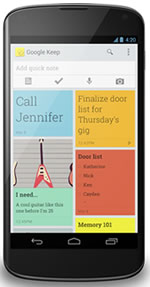 With Keep you can quickly jot ideas down when you think of them and even include checklists and photos to keep track of what's important to you. Your notes are stored in Google Drive and synced to all your devices so you can always have them at hand.
If it?s more convenient to speak than to type, Keep transcribes voice memos for you automatically. There's fast search to find what you're looking for and when you're finished with a note you can archive or delete it.
Changing priorities isn't a problem: just open Keep on your Android phone or tablet (there's a widget so you can have Keep front and center all the time) and drag your notes around to reflect what matters.
Google Keep is available on Google Play for devices running Android 4.0, Ice Cream Sandwich and above. You can access, edit and create new notes on the web at http://drive.google.com/keep and in the coming weeks you'll be able to do the same directly from Google Drive.
With Keep you can quickly jot ideas down when you think of them and even include checklists and photos to keep track of what's important to you. Your notes are stored in Google Drive and synced to all your devices so you can always have them at hand.
If it?s more convenient to speak than to type, Keep transcribes voice memos for you automatically. There's fast search to find what you're looking for and when you're finished with a note you can archive or delete it.
Changing priorities isn't a problem: just open Keep on your Android phone or tablet (there's a widget so you can have Keep front and center all the time) and drag your notes around to reflect what matters.
Google Keep is available on Google Play for devices running Android 4.0, Ice Cream Sandwich and above. You can access, edit and create new notes on the web at http://drive.google.com/keep and in the coming weeks you'll be able to do the same directly from Google Drive.