Breaking News

SAMA Introduces the S32 WOOD, a Compact M-ATX Case Bundled with an 80 PLUS Gold PSU Thypoch Completes Simera-C Cine Prime Lineup with New 100mm T1.9 Lens CORSAIR Launches the RM1200e Power Supply with Built-in PinProtect GPU Overcurrent Protection and Platinum-certified Efficiency CORSAIR Changes the Game with PureVector, a Science-Based Personalized Aiming Technology, Launching Exclusively in the SABRE v3 PRO PureVector Mouse Series AMD FSR Upscaling 4.1 Boosts Frames and Image Quality on More Devices

logo

  • Share Us
    • Facebook
    • Twitter
  • Home
  • Home
  • News
  • Reviews
  • Essays
  • About
    • Submit News

    • Contact Us
    • Privacy

    • Promotion
    • Advertise

    • RSS Feed

Search form

How Chrome's ad Filtering Works

How Chrome's ad Filtering Works

Enterprise & IT Feb 14,2018 0

Starting from February 15th, Google's Chrome web browser remove "intrusive" ads from sites that do not follow the Better Ads Standards, and the company explained how the new feature works.

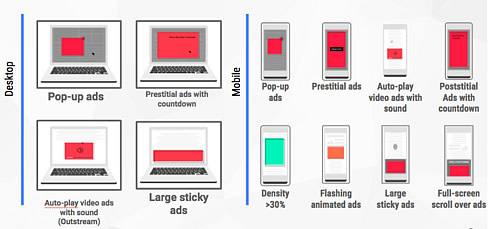
The Better Ads Standards are the result of public consumer research by the Coalition for Better Ads, an industry group focused on improving users' experience with online advertising. Over 40,000 internet users in North America and Europe participated in surveys where they were asked to evaluate how intrusive some ads were. The most intrusive ad experiences include prestitial ads (those full-page ads that block you from seeing the content on the page) and flashing animated ads.

According to Google, the majority of problematic ad experiences are controlled by the site owner - such as high ad density or prestitial ads with countdown.

Chrome evaluates how well sites comply with the Better Ads Standards, inform sites of any issues encountered, provide the opportunity for sites to address identified issues, and remove ads from sites that continue to maintain a problematic ads experience.

Sites are evaluated by examining a sample of pages from the site. Depending on how many violations of the Better Ads Standards are found, the site will be evaluated as having a status of Passing, Warning, or Failing.

The Ad Experience Report in Google's Search Console allows site owners to see their overall site evaluation status, as well as the specifics of any violations identified on their site.
At a technical level, when a Chrome user navigates to a page, Chrome's ad filter first checks if that page belongs to a site that fails the Better Ads Standards. If so, network requests on the page - such as those for JavaScript or images - are checked against a list of known ad-related URL patterns. If there is a match, Chrome will block the request, preventing the ad from displaying on the page. This set of patterns is based on the public EasyList filter rules, and includes patterns matching many ad providers including Google's own ad platforms, AdSense and DoubleClick. When at least one network request has been blocked, Chrome will show the user a message indicating that ad blocking has occurred as well as an option to disable this setting by selecting "allow ads on this site." For desktop users, the notification in Chrome's address bar will look similar to Chrome's existing pop-up blocker. Android users will see message in a small infobar at the bottom of their screen, and can tap on "details" to see more information and override the default setting.

Chrome will automatically block intrusive ads on sites that have been found to violate the Better Ads Standards, but users have the option to disable the feature by selecting "allow ads on this site."


Tags: Chrome browser
Previous Post
ISSCC: Samsung Working on 7-nm EUV SRAM, Intel Details 10-nm SRAM
Next Post
Panasonic Develops 8K Global Shutter Technology Using Organic-Photoconductive-Film CMOS Image Sensor

Related Posts

  • Google Adds More Intuitive Privacy and Security Controls in Chrome

  • Google is Temporarily Rolling Back SameSite Cookie Changes

  • Google to Resume Chrome and Chrome OS Release Updates

  • Google Pauses Chrome Updates; Firebase App Tools Under Investigation

  • Chrome 81 Adds Near Field Communications, Augmented Reality

  • Latest Google Chrome Browser Can Block Cross-site Tracking

  • Google Suspends Paid Chrome Extensions; Short-Term Payday Lending Apps Still Available on Google Play

  • Chrome Now Offers Better Password Protections

Latest News

SAMA Introduces the S32 WOOD, a Compact M-ATX Case Bundled with an 80 PLUS Gold PSU
Enterprise & IT

SAMA Introduces the S32 WOOD, a Compact M-ATX Case Bundled with an 80 PLUS Gold PSU

Thypoch Completes Simera-C Cine Prime Lineup with New 100mm T1.9 Lens
Cameras

Thypoch Completes Simera-C Cine Prime Lineup with New 100mm T1.9 Lens

CORSAIR Launches the RM1200e Power Supply with Built-in PinProtect GPU Overcurrent Protection and Platinum-certified Efficiency
PC components

CORSAIR Launches the RM1200e Power Supply with Built-in PinProtect GPU Overcurrent Protection and Platinum-certified Efficiency

CORSAIR Changes the Game with PureVector, a Science-Based Personalized Aiming Technology, Launching Exclusively in the SABRE v3 PRO PureVector Mouse Series
Gaming

CORSAIR Changes the Game with PureVector, a Science-Based Personalized Aiming Technology, Launching Exclusively in the SABRE v3 PRO PureVector Mouse Series

AMD FSR Upscaling 4.1 Boosts Frames and Image Quality on More Devices
GPUs

AMD FSR Upscaling 4.1 Boosts Frames and Image Quality on More Devices

Popular Reviews

Endorfy Thock V2 Wireless Keyboard

Endorfy Thock V2 Wireless Keyboard

SoundPeats Cove Pro

SoundPeats Cove Pro

The Quiet Technology Behind the Spin

The Quiet Technology Behind the Spin

Akaso Brave 8 Lite

Akaso Brave 8 Lite

SoundPeats C30

SoundPeats C30

Kioxia Exceria Plus G3 512GB microSD

Kioxia Exceria Plus G3 512GB microSD

be quiet! Dark Perk Mice

be quiet! Dark Perk Mice

XbotGo Chamaleon

XbotGo Chamaleon

Main menu

  • Home
  • News
  • Reviews
  • Essays
  • About
    • Submit News

    • Contact Us
    • Privacy

    • Promotion
    • Advertise

    • RSS Feed
  • About
  • Privacy
  • Contact Us
  • Promotional Opportunities @ CdrInfo.com
  • Advertise on out site
  • Submit your News to our site
  • RSS Feed