Breaking News

Fanatec and Trak Racer showcase the future of simulation at SimRacing Expo Frankfurt 2026 Razer Unveils the Barracuda V2 Pro ASUS Republic of Gamers Announces Bulwark Dock DG310 Akasa Announces Fermi CM5 Fanless Case for Raspberry Pi Compute Module 5 LG Electronics Advances the LG Sound Suite Experience With New DTS

logo

  • Share Us
    • Facebook
    • Twitter
  • Home
  • Home
  • News
  • Reviews
  • Essays
  • About
    • Submit News

    • Contact Us
    • Privacy

    • Promotion
    • Advertise

    • RSS Feed

Search form

Asus Extreme Striker

Jan 16,2007 0

3. Bios settings


Review Pages

1. Intro - Specs
2. Retail package
3. Bios settings
4. Installation
5. Benchmarks page 1
6. Benchmarks page 2
7. Benchmarks page 3
8. Benchmarks page 4
9. Benchmarks page 5
10. Benchmarks page 6
11. Overclocking
12. Final words


The BIOS is the usual ASUS. The first tab option includes the system time, date and storage devices:
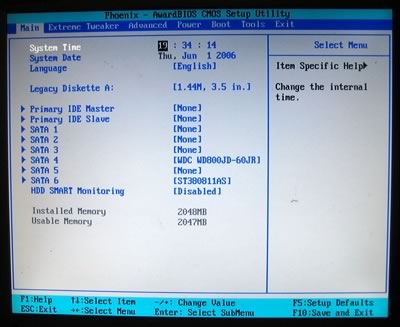
The second tab includes all major functions to control our board. There are several sub-menus:
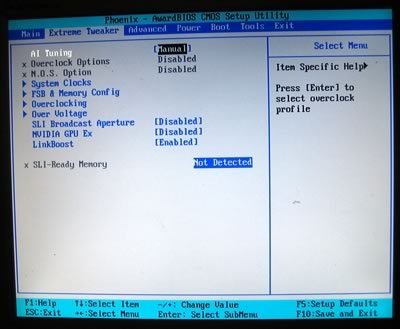
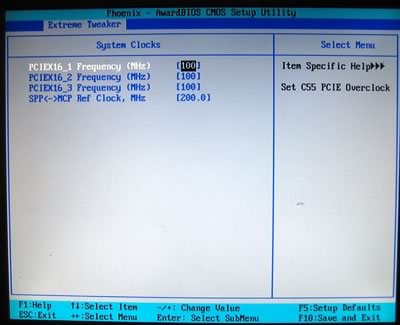
Let's start with the system clocks. Nothing fancy here, leave it at default settings:
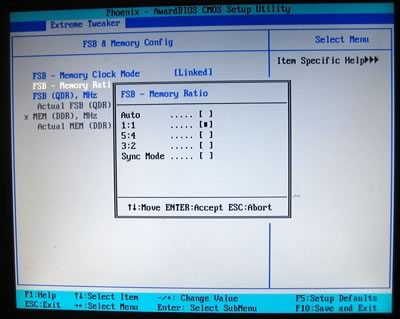
Passing to the FSB and Memory configuration, we can set the mode between FSB and memory. With the Nvidia 680i SLI, FSB and Memory can be "linked" or "unlinked", giving us more flexibility with overclocking. Note, that the FSB is displayed in QDR, which means, to get the real FSB you have to divide by four:

If the FSB and Memory are linked, there are 4 FSB:DRAM ratios available:
CPU, Memory, NB, SB voltages can be set according to the following table.

BIOS Setting Feature:
CPU bus frequency
133 to 750MHz in 1MHz steps
CPU voltage
0.83125V to 1.9000V in 0.0625V steps
DRAM voltage
1.85V to 3.425V in 0.25V steps
1.2V HT Voltage
1.20V to 1.95V in 0.05V steps
NB voltage
1.20V to 2.75V in 0.05V steps
SB voltage
1.50V to 1.85V in 0.05V steps

The ability to overclock the memory at a voltage up to 3.425V is impressive, and at the same time useless since memory modules will be fried! Looking at the overclocking tab, we find the CPU multiplier:
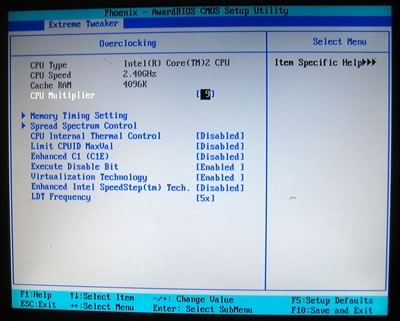
memory timings:

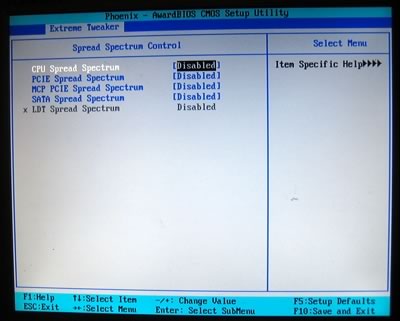
and spread spectrums (disable all):
 

Review Pages

1. Intro - Specs
2. Retail package
3. Bios settings
4. Installation
5. Benchmarks page 1
6. Benchmarks page 2
7. Benchmarks page 3
8. Benchmarks page 4
9. Benchmarks page 5
10. Benchmarks page 6
11. Overclocking
12. Final words


Pages

  • « first
  • ‹ previous
  • 1
  • 2
  • 3
  • 4
  • 5
  • 6
  • 7
  • 8
  • 9
  • …
  • next ›
  • last »

ASUS

Tags: ASUS
Previous Post
Asus P5N32-E SLI
Next Post
Apple's iPhone

Related Posts

  • ASUS Announces ExpertBook A7 (AMD)

  • ASUS ProArt RTX Spark Windows PCs Available for Immediate Pre-Order

  • ASUS Announces New 64GB Configuration of ASUS Ascent GX10

  • Announcing the New ASUS Googlebook 14

  • ASUS Announces Ascent QN10 Mini PC

  • ASUS Announces WiFi 8 Router

  • Asus announces ExpertBook B3 G2 and ExpertBook P3 G2

  • ASUS Announces Prime AP304 PC Case

Latest Reviews

Fanxiang MP83 M.2 NVMe SSD Enclosure
Enterprise & IT

Fanxiang MP83 M.2 NVMe SSD Enclosure

Ugreen CM642 USB4.0 Enclosure
PC components

Ugreen CM642 USB4.0 Enclosure

be quiet! Dark Power 14 IO
PC components

be quiet! Dark Power 14 IO

SanDisk High Endurance 512GB microSDXC
Cameras

SanDisk High Endurance 512GB microSDXC

Samsung PRO Ultimate 512GB microSDXC
Cameras

Samsung PRO Ultimate 512GB microSDXC

Popular News

MSI’s Latest AMD X870E MAX & EVO Series Motherboards

MSI’s Latest AMD X870E MAX & EVO Series Motherboards

COLORFUL Launches iGame B850M ULTRA Series Micro-ATX Motherboards

COLORFUL Launches iGame B850M ULTRA Series Micro-ATX Motherboards

COLORFUL Presents Limited Edition Chitu MAG-60 Magnetic Keyboard Inspired by the Year of the Horse

COLORFUL Presents Limited Edition Chitu MAG-60 Magnetic Keyboard Inspired by the Year of the Horse

COLORFUL Launches iGame B850I MINI OC V14 Motherboard

COLORFUL Launches iGame B850I MINI OC V14 Motherboard

COLORFUL Launches the iGame X870E VULCAN W OC Motherboard

COLORFUL Launches the iGame X870E VULCAN W OC Motherboard

COLORFUL Presents iGame Z890 ULTRA-S W and iGame Z890M ULTRA Z Motherboards

COLORFUL Presents iGame Z890 ULTRA-S W and iGame Z890M ULTRA Z Motherboards

COLORFUL Expands B850 Motherboard Lineup with New CVN, Battle-Ax, and MEOW Models

COLORFUL Expands B850 Motherboard Lineup with New CVN, Battle-Ax, and MEOW Models

ASRock Adds Support for One Sub-Channel DRAM Module on Intel DDR5 Motherboards

ASRock Adds Support for One Sub-Channel DRAM Module on Intel DDR5 Motherboards

Main menu

  • Home
  • News
  • Reviews
  • Essays
  • About
    • Submit News

    • Contact Us
    • Privacy

    • Promotion
    • Advertise

    • RSS Feed
  • About
  • Privacy
  • Contact Us
  • Promotional Opportunities @ CdrInfo.com
  • Advertise on out site
  • Submit your News to our site
  • RSS Feed