
Philips JR24CDRW
1. Introduction
Review Pages
Philips JR24CDRW external CD-RW - Page 1
Introduction
 External
drives are usually addressed to office and desktop users who need a portable
and easy to install CD recorder. The most of the drives are connected to your
PC through USB or FireWire interfaces, providing fast transfer rates and plug
&play features. Philips presents the new "JackRabbit" external
CD-RW recorder taking advantage of the high speed USB2.0 interface, and offers
24x recording speeds among with 12x rewriting and 40x reading. We examine the
performance of the new drive and compare it with another external USB recorder
from LiteOn, the already tested LiteOn LXR 24101A.
External
drives are usually addressed to office and desktop users who need a portable
and easy to install CD recorder. The most of the drives are connected to your
PC through USB or FireWire interfaces, providing fast transfer rates and plug
&play features. Philips presents the new "JackRabbit" external
CD-RW recorder taking advantage of the high speed USB2.0 interface, and offers
24x recording speeds among with 12x rewriting and 40x reading. We examine the
performance of the new drive and compare it with another external USB recorder
from LiteOn, the already tested LiteOn LXR 24101A.
Features
 The
drive supports 24x writing (Z-CLV), 12x re-writing, has a 8MB Buffer, "Seamless
Link " as the main anti-buffer under run technology and "Thermo Balanced
Writing" system for optimal recording.
The
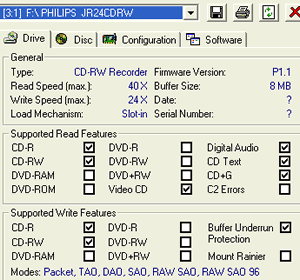
drive supports 24x writing (Z-CLV), 12x re-writing, has a 8MB Buffer, "Seamless
Link " as the main anti-buffer under run technology and "Thermo Balanced
Writing" system for optimal recording.
The maximum reading speed of the drive is 40x (CAV). The exact writing speeds are 4x, 12x,16x (CLV), 24x , (Z-CLV). The re-writing speeds are 4x, 8x 10x and 12x (CLV). These specifications are applied only when the drive is connected through USB 2.0 interface.
Lastly, the drive supports all the known writing modes (DAO, SAO, TAO and RAW), among with packet write and overburning options.
The Z-CLV writing strategy of Philips JR24CDRW is recognized in the CDSpeed graph below. The drive starts writing at 16x for 16min and then shifts up to 24x for the rest of the recording process, giving a 21.83x average writing speed.

Blue Button
 Newer
drive types will have a button with the Blue Button-logo next to it. This button
is placed on the right side of the drive. Pressing this button on your drive
brings up a window with useful access buttons for several web sites and disc
applications.
Newer
drive types will have a button with the Blue Button-logo next to it. This button
is placed on the right side of the drive. Pressing this button on your drive
brings up a window with useful access buttons for several web sites and disc
applications.
We installed the software that comes with the installation CD-ROM. After installing, we pressed the Blue Button with the logo next to it on the drive. We could also double-click the Blue Button icon in the Windows system tray or restart the Blue Button program via the 'Programs/Philips external drive' program group. This opened a window with three buttons.

In the interface window, you will see a number of buttons and a menu bar. Clicking the first and the second buttons will open your Internet browser and link you to the Philips PC Peripherals product information web page.
When you click the third button an application program associated with the type of disc in the drive opens. By default, if a CD-R/RW disc is inserted in the drive, clicking the third button will Start a recorder / rewriter application. If a CD-ROM, CD Audio is inserted, a Media Player for an audio disc a Video CD or a disc explorer program for a data disc will be launched. Of course, the application allows user to determine the preferences associated with the third button.
As a second option, keeping the Blue Button pressed for 2 seconds or more opens your Internet browser program and points you directly to a drive support website for downloading the latest firmware for your drive automatically.
The package
 The
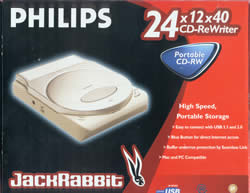
package supplied contained: the external drive, 1 piece of Philips 80min multispeed
CD-R blank and a application CD-ROM. The CD-ROM contains an installation wizard,
a help file, Roxio v5.1.1104a recording software, Blue Button application software
and setup analyzer. You will also find the USB cable and the AC/DC power adapter
with the power cord.
The
package supplied contained: the external drive, 1 piece of Philips 80min multispeed
CD-R blank and a application CD-ROM. The CD-ROM contains an installation wizard,
a help file, Roxio v5.1.1104a recording software, Blue Button application software
and setup analyzer. You will also find the USB cable and the AC/DC power adapter
with the power cord.
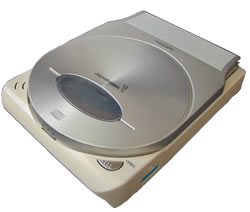
As you can see the drive is white, and the Lid Cover (top-opened tray) is silver colored with the "Jackrabbit" logo in the middle of it. The green "busy" LED and the red Write/Rewrite LED among with the open button are placed on the front of the drive.

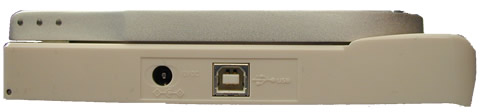
In the left side of the drive there are the USB interface and the power connectors.
Installation
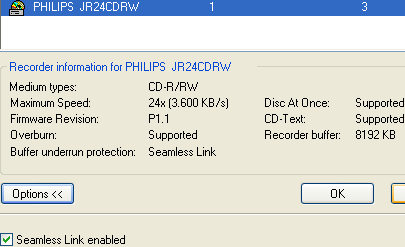
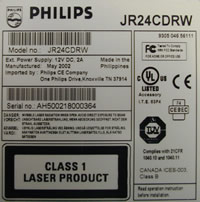
The drive was identified as "PHILIPS JR24CDRW". The tests were made under Win XP operation system. PHILIPS JR24CDRW is a May 2002 model with firmware revision vP1.1 installed. We used the newer build of Nero (5.5.8.2), InCD (3.31), and CloneCD (4.0.1.6) for our recording tests.
Review Pages





