Breaking News

Xiaomi and Leica Camera AG Present the Xiaomi 17 Series Sandisk and SK hynix Begin Global Standardization of Next-Generation Memory Solution, High Bandwidth Flash (HBF) Samsung Brings Satellite Communication Support to Galaxy Smartphones Across the Globe vivo Announces MWC 2026 Attendance and sets to Showcase New Flagship X300 Ultra Razer Elevates Everyday Carry with the Laptop Sleeve 16” with Wireless Charging

logo

  • Share Us
    • Facebook
    • Twitter
  • Home
  • Home
  • News
  • Reviews
  • Essays
  • Forum
  • Legacy
  • About
    • Submit News

    • Contact Us
    • Privacy

    • Promotion
    • Advertise

    • RSS Feed
    • Site Map

Search form

Microsoft's Windows Terminal Available in the Store

Microsoft's Windows Terminal Available in the Store

Enterprise & IT Jun 22,2019 0

Microsoft released the Windows Terminal app preview It's available in the Microsoft Store for Windows 10 users for free for those running the Windows 10 May Update/1903 (or higher).

Announced at Build 2019 in May, Windows Terminal is a terminal application for developers who use Command Prompt, PowerShell and the Windows 10 Windows Subsystem for Linux. You will now be able to open any number of tabs, each connected to a command-line shell or app of your choice, e.g. Command Prompt, PowerShell, Ubuntu on WSL, a Raspberry Pi via SSH, etc.
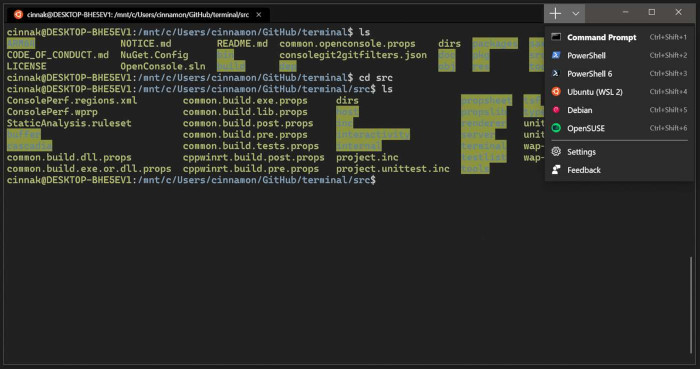
The Windows Terminal uses a GPU accelerated DirectWrite/DirectX-based text rendering engine. This new text rendering engine will display text characters, glyphs, and symbols present within fonts on your PC, including CJK ideograms, emoji, powerline symbols, icons, programming ligatures, etc.

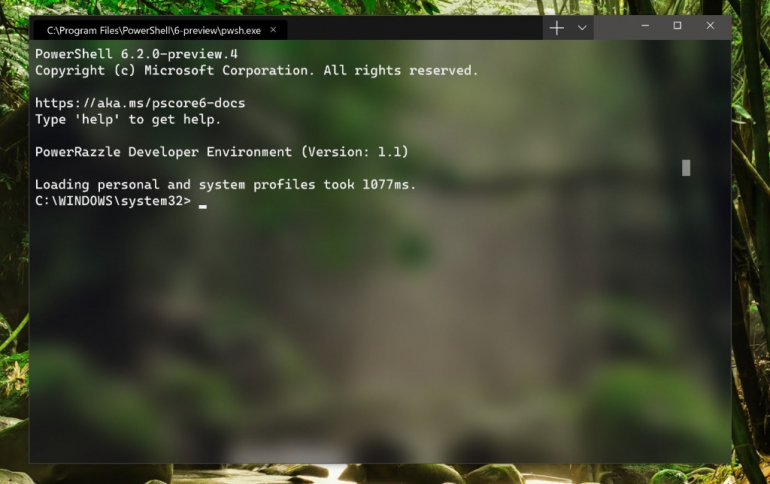
Using Terminal’s configuration mechanism, you will be able to create multiple “profiles” for each shell/app/tool you want to use, whether it be PowerShell, Command Prompt, Ubuntu, or even SSH connections to Azure or IoT devices. These profiles can have their own combination of font styles and sizes, color themes, background blur/transparency levels, etc.

The current preview version of the app still has "many usability issues," including the absence of assistive technology.

Tags: windows 10
Previous Post
Cyber Security Firm Claims That Tesla Cars Are Vulnerable to GPS Spoofing Attacks
Next Post
Dell Brings OLEDs to Laptops With New XPS 15 Model

Related Posts

  • Windows Search to Show COVID19 Info in Search, Your Phone App Lets You Control Music Apps

  • Microsoft Brings More Widgets for Apps to The Xbox Game Bar

  • Microsoft Says Hackers Take Advantage of Windows Vulnerability

  • Microsoft Says Coronavirus Will Impact Windows 10 Updates

  • Windows 10 is Powering 1 Billion Active Devices

  • Windows 10 Critical Security Update Patches SMB Vulnerability

  • Microsoft Discloses Unpatched Critical SMB Vulnerability in Windows

  • Microsoft Announces a Cloud-based Print Solution

Latest News

Xiaomi and Leica Camera AG Present the Xiaomi 17 Series
Smartphones

Xiaomi and Leica Camera AG Present the Xiaomi 17 Series

Sandisk and SK hynix Begin Global Standardization of Next-Generation Memory Solution, High Bandwidth Flash (HBF)
Enterprise & IT

Sandisk and SK hynix Begin Global Standardization of Next-Generation Memory Solution, High Bandwidth Flash (HBF)

Samsung Brings Satellite Communication Support to Galaxy Smartphones Across the Globe
Smartphones

Samsung Brings Satellite Communication Support to Galaxy Smartphones Across the Globe

vivo Announces MWC 2026 Attendance and sets to Showcase New Flagship X300 Ultra
Smartphones

vivo Announces MWC 2026 Attendance and sets to Showcase New Flagship X300 Ultra

Razer Elevates Everyday Carry with the Laptop Sleeve 16” with Wireless Charging
Enterprise & IT

Razer Elevates Everyday Carry with the Laptop Sleeve 16” with Wireless Charging

Popular Reviews

be quiet! Dark Mount Keyboard

be quiet! Dark Mount Keyboard

Terramaster F8-SSD

Terramaster F8-SSD

be quiet! Light Mount Keyboard

be quiet! Light Mount Keyboard

Soundpeats Pop Clip

Soundpeats Pop Clip

Akaso 360 Action camera

Akaso 360 Action camera

Dragon Touch Digital Calendar

Dragon Touch Digital Calendar

be quiet! Pure Loop 3 280mm

be quiet! Pure Loop 3 280mm

Noctua NF-A12x25 G2 fans

Noctua NF-A12x25 G2 fans

Main menu

  • Home
  • News
  • Reviews
  • Essays
  • Forum
  • Legacy
  • About
    • Submit News

    • Contact Us
    • Privacy

    • Promotion
    • Advertise

    • RSS Feed
    • Site Map
  • About
  • Privacy
  • Contact Us
  • Promotional Opportunities @ CdrInfo.com
  • Advertise on out site
  • Submit your News to our site
  • RSS Feed