
Microsoft Drops Aero UI in Windows 8
Microsoft's Windows 8 operating system will not feature the "Aero" user interface known from the Windows 7, choosing to implement the less power-demanding Metro-style apporach.
In a blog post, Jensen Harris, the director of program management for Windows 8's user experience team, said that the new operating system's look-and-feel, its graphics user interface, would be "clean and crisp," and would do away with the "glass and reflections" that marked Aero.
"In the end, we decided to bring the desktop closer to the Metro aesthetic, while preserving the compatibility afforded by not changing the size of window chrome, controls, or system UI," said Harris. "We have moved beyond Aero Glass -- flattening surfaces, removing reflections, and scaling back distracting gradients."
Harris did not give reasons for dropping Aero from the desktop, other than Microsoft's desire to shift it closer to the new Metro design philosophy.
Microsoft's Windows 8 OS will feature two graphical interfaces - the traditional desktop and the tablet-optimized Metro-style. The new GUI will appear in the final form of the OS, scheduled for release later this year and not in the Release Preview release, coming the first week of June.
"While a few of these visual changes are hinted at in the upcoming Release Preview, most of them will not yet be publicly available," Harris added.
He also outlined the goals of the Windows 8 GUI redesign. These were applied to Metro, live tiles, touch-based devices and to mobile devices where battery power is tight.
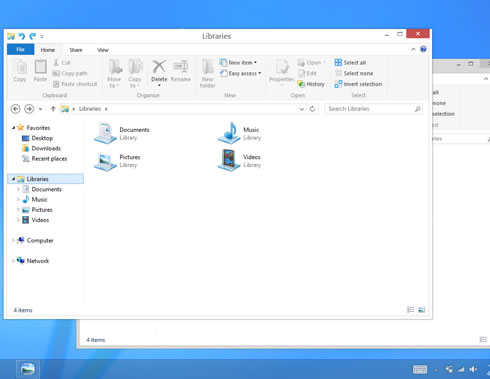
In Windows 8, Microsoft said it has applied the principles of "clean and crisp" when updating window and taskbar chrome. The company squared off the edges of windows and the taskbar and removed all the glows and gradients found on buttons within the chrome. The company also removed any shadows and transparency. The default window chrome is white, and the taskbar continues to blend into the desktop wallpaper, but appears less complicated overall.
Microsoft also updated the appearance of most common controls, such as buttons, check boxes, sliders, and the Ribbon. Colors were also twaeked to make them "feel more neutral."
Obviously, all these graphical changes and the the dumping of the Aero UI has to with power saving. Toward this direction, Microsoft has also decided to limit Windows 8 so that only two Metro app would run simultaneously in a side-by-side view.
Harris added that Microsoft would include tutorials with Windows 8 to show users how to manipulate both the desktop and Metro interfaces.
"In the end, we decided to bring the desktop closer to the Metro aesthetic, while preserving the compatibility afforded by not changing the size of window chrome, controls, or system UI," said Harris. "We have moved beyond Aero Glass -- flattening surfaces, removing reflections, and scaling back distracting gradients."
Harris did not give reasons for dropping Aero from the desktop, other than Microsoft's desire to shift it closer to the new Metro design philosophy.
Microsoft's Windows 8 OS will feature two graphical interfaces - the traditional desktop and the tablet-optimized Metro-style. The new GUI will appear in the final form of the OS, scheduled for release later this year and not in the Release Preview release, coming the first week of June.
"While a few of these visual changes are hinted at in the upcoming Release Preview, most of them will not yet be publicly available," Harris added.
He also outlined the goals of the Windows 8 GUI redesign. These were applied to Metro, live tiles, touch-based devices and to mobile devices where battery power is tight.
In Windows 8, Microsoft said it has applied the principles of "clean and crisp" when updating window and taskbar chrome. The company squared off the edges of windows and the taskbar and removed all the glows and gradients found on buttons within the chrome. The company also removed any shadows and transparency. The default window chrome is white, and the taskbar continues to blend into the desktop wallpaper, but appears less complicated overall.
Microsoft also updated the appearance of most common controls, such as buttons, check boxes, sliders, and the Ribbon. Colors were also twaeked to make them "feel more neutral."
Obviously, all these graphical changes and the the dumping of the Aero UI has to with power saving. Toward this direction, Microsoft has also decided to limit Windows 8 so that only two Metro app would run simultaneously in a side-by-side view.
Harris added that Microsoft would include tutorials with Windows 8 to show users how to manipulate both the desktop and Metro interfaces.