Breaking News

ASUS Announces T1 GeForce RTX 5070 and RTX 5060 Ti Graphics Cards COLORFUL Launches iGame B850M ULTRA Series Micro-ATX Motherboards Sony Unveils 1000X THE COLLEXION Samsung Launches Next-Gen Odyssey, ViewFinity and The Movingstyle Essential Monitors LG Electronics Introduces World’s First Native 1000Hz Full HD Gaming Monitor

logo

  • Share Us
    • Facebook
    • Twitter
  • Home
  • Home
  • News
  • Reviews
  • Essays
  • Forum
  • Legacy
  • About
    • Submit News

    • Contact Us
    • Privacy

    • Promotion
    • Advertise

    • RSS Feed
    • Site Map

Search form

Lexar 64GB Jumpdrive S45 review

Mar 24,2016 0

2. Using the device, transfer tests


Review Pages

1. Meet the Lexar 64GB Jumpdrive S45
2. Using the device, transfer tests
3. Summary


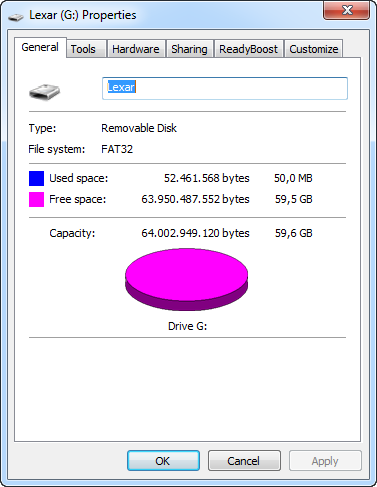
Let's plug the Lexar 64GB Jumpdrive S45 into a USB 3.0 port of our PC through USB 3.0 plug. Windows 7 immediately recognized the device, which comes factory formatted with the FAT32 file system. The drive includes the EncryptStick Lite software, which occupies almost 50MB of the drive's total 64GB nominal capacity.

We are ready to run some benchmarks with the drive.

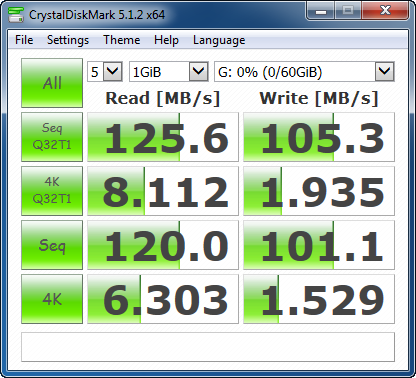
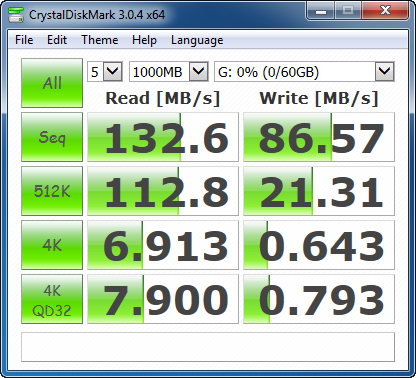
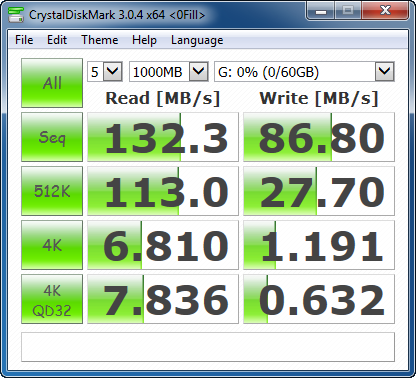
The CrystalDiskMark 3.0.2e x64 edition benchmark topped at 133 MB/sec for the sequential read test and was at the range of 85-100 MB/sec for sequential write. The performance was also high for the category while accessing 512K files (112.8 Mb/s), although writing was slower at 21-25 MB/s.

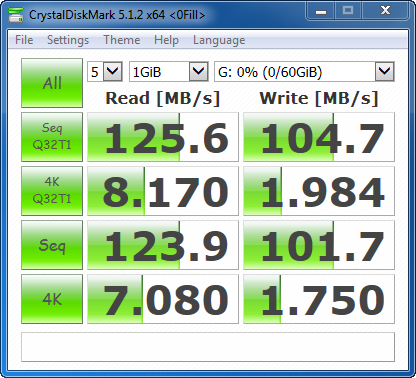
Reading small 4K/4K QD32 files was not very fast, mainly in the writing part. The drive will write and read files in a similar manner whether they can be compressed or not:
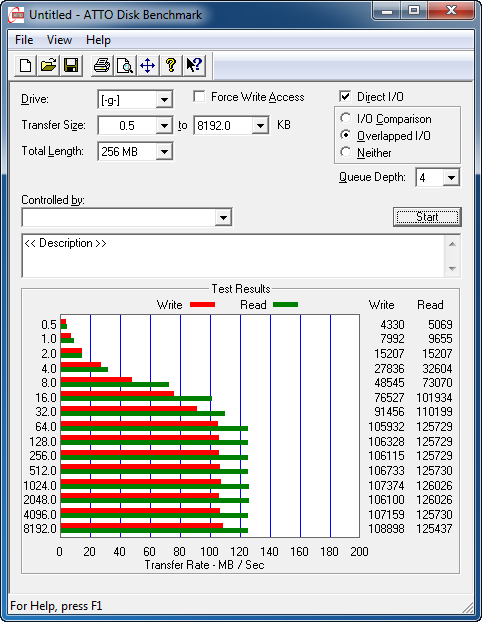
The ATTO Disk Benchmark returned similar sequential read/write speeds, and showed a relatively consistent reading and writing performance of the drive with files larger than 64KB:
 

Real world tests

Howe about using the drive in casual everyday tasks? We moved some Mp3s, videos and a bunch of small files from our computer's internal SSD to the plugged Lexar 64GB Jumpdrive S45, and vide versa. Here are the results:

Write to the Lexar 64GB Jumpdrive S45:

  • 1.4GB of MP3 files: 28 seconds ~ 50 MB/s
  • 2.6GB of images: 2 min 45 sec ~ 15,7 MB/s
  • MKV video file 3.5GB: 52 sec ~ 67.3 MB/s
  • Small files 550 MB - 50,000 files: 6 mins ~ 0.3 MB/s

Read from the Lexar 64GB Jumpdrive S45:

  • 1.4GB MP3 files: 11 seconds ~127MB/s
  • 2.6GB of images: 23 sec ~ 113 MB/s
  • MKV video file 3.5GB: 24 sec ~ 145.8 MB/s
  • Small files 550 MB - 50,000 files: 39 sec ~14.1 MB/s


Review Pages

1. Meet the Lexar 64GB Jumpdrive S45
2. Using the device, transfer tests
3. Summary


Pages

  • « first
  • ‹ previous
  • 1
  • 2
  • 3
  • next ›
  • last »

Lexar

Tags: Lexar
Previous Post
Lexar Professional 1800x microSDXC 64GB UHS-II review
Next Post
Kingston HyperX Cloud II Headset review

Related Posts

  • Lexar expands SILVER PLUS series with new 2TB microSDXC UHS-I card

  • Lexar Enters Its Next Era at CES 2026

  • Lexar Unveils Industry’s First AI Storage Core for Next Generation Edge AI Devices

  • Lexar presents new products at Gamescom 2025

  • Lexar Launches the NM990 PCIe 5.0 SSD

  • New Lexar ES5 Magnetic Portable SSD is A Game-Changer for Creators On-the-Go

  • Lexar Introduces Innovative Product Lines at Computex 2025

  • Lexar Announces ARMOR GOLD and SILVER PRO SDXC UHS-II Cards

Latest Reviews

The Technology Stack Behind Modern Digital Gaming Platforms
Consumer Electronics

The Technology Stack Behind Modern Digital Gaming Platforms

be quiet! Dark Rock Pro 6
Cooling Systems

be quiet! Dark Rock Pro 6

How Online Casinos Use Encryption, Verification, and Risk Controls to Build User Trust
Enterprise & IT

How Online Casinos Use Encryption, Verification, and Risk Controls to Build User Trust

Why Low-Latency Infrastructure Matters More Than Raw Specs
Enterprise & IT

Why Low-Latency Infrastructure Matters More Than Raw Specs

In the Age of AI Phishing, the Best User Experience Might Be the One That Feels Safest
Enterprise & IT

In the Age of AI Phishing, the Best User Experience Might Be the One That Feels Safest

Popular News

TEAMGROUP Launches EXPERT P34F Find My External SSD

TEAMGROUP Launches EXPERT P34F Find My External SSD

CORSAIR announces Vanguard Pro 96 and Vanguard 96 Gaming Keyboards

CORSAIR announces Vanguard Pro 96 and Vanguard 96 Gaming Keyboards

Samsung announces Galaxy Tab S11 and Galaxy S25 FE series

Samsung announces Galaxy Tab S11 and Galaxy S25 FE series

Viltrox Showcases Upcoming Lens Lineup and New TTL Flash at IBC 2025

Viltrox Showcases Upcoming Lens Lineup and New TTL Flash at IBC 2025

MSI Launches FORGE GK600 TKL WIRELESS Special Edition Compact Mechanical Keyboard

MSI Launches FORGE GK600 TKL WIRELESS Special Edition Compact Mechanical Keyboard

Panasonic Introduces the First Ultra-Telephoto Zoom Lens in the LUMIX S Series

Panasonic Introduces the First Ultra-Telephoto Zoom Lens in the LUMIX S Series

MSI Launches DATAMAG 40Gbps Magnetic Portable SSD

MSI Launches DATAMAG 40Gbps Magnetic Portable SSD

Viltrox Joins the L-Mount Alliance, Expanding Creative Possibilities

Viltrox Joins the L-Mount Alliance, Expanding Creative Possibilities

Main menu

  • Home
  • News
  • Reviews
  • Essays
  • Forum
  • Legacy
  • About
    • Submit News

    • Contact Us
    • Privacy

    • Promotion
    • Advertise

    • RSS Feed
    • Site Map
  • About
  • Privacy
  • Contact Us
  • Promotional Opportunities @ CdrInfo.com
  • Advertise on out site
  • Submit your News to our site
  • RSS Feed