Breaking News

ASUS Hardware Showcase: AI Accelerators, Collector GPUs, and Esport Monitors Apple Unveils Major Hardware and Creative Suite Ecosystem Updates XPG Launches Third-Generation CORE REACTOR III for Next-Gen Power Safety TCL’s New Monitor Range Fits Every Kind of Gaming Setup Viltrox Launches AF 35mm F1.4 Pro FE/Z

logo

  • Share Us
    • Facebook
    • Twitter
  • Home
  • Home
  • News
  • Reviews
  • Essays
  • About
    • Submit News

    • Contact Us
    • Privacy

    • Promotion
    • Advertise

    • RSS Feed

Search form

Kiss DP-1504

Jun 14,2004 0

5. Built in HD


Review Pages

1. Introduction
2. Unpacking - Control Menu
3. DivX - Xvid
4. Reading Tests
5. Built in HD
6. Error Correction Tests
7. Conclusion


Kiss DP-1504 DVD Player - page 4

Built in HD

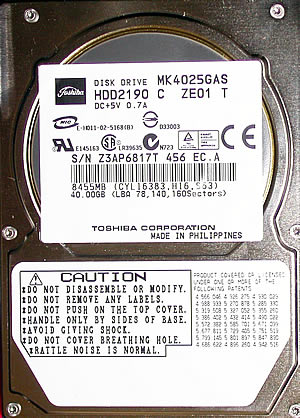
The main difference between the DP-1500 and the DP-1504 is the existnce of the Hard Disk. In our case the capasity of the HD was 40GB. The Hard Disk is manufactured from Toshiba and its specifications are:

- 2.5-inch 40 GB Capacity
- 2 ms Track to Track seek
- 1 Platter
- 12 ms Average Seek Time
- 8 MByte Data Buffer Capacity
- ATA-2/3/4/5/6 supported
- UDMA 100 supported
- 9.5 mm Height
- 69.85 mm Width
- 100.0 mm Depth
- 94 g Weight
- 300,000 hours MTBF
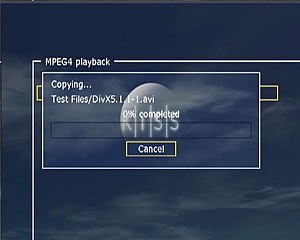
You can copy files from a media inserted or use the ethernet connection to put in files from a PC. Those can be either Audio files as well as Video or Pictures. The copy procedure is very simple. In addition with the same way you can delete the files you don't want any more.
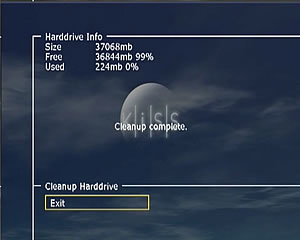
There is also the ability for the user to totaly erase the contents of the HD, format, from the Hard Disk's info menu. Below you can watch the cleanup procedure.

As soon as the format is finish you see the above screen.

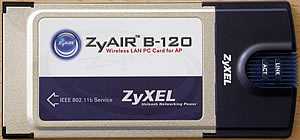
In order to copy files on the HD of the DP-1504, you must install the PC-Link software, from the CD, which included in the retail package. In that case you can use both ethernet and wirless connections. In the last case you also need the card below and the Access Point( not included in retail package). The connection can be straight from DP-1504 to a PC with a cross cable or the wirless card or by using a router.

 

Review Pages

1. Introduction
2. Unpacking - Control Menu
3. DivX - Xvid
4. Reading Tests
5. Built in HD
6. Error Correction Tests
7. Conclusion


Pages

  • « first
  • ‹ previous
  • 1
  • 2
  • 3
  • 4
  • 5
  • 6
  • 7
  • next ›
  • last »

Tags:
Previous Post
Plasmon UDO30I external SCSI Drive
Next Post
Pioneer DVR-S706-J

Related Posts

Latest Reviews

be quiet! Light Wings Pro IO fan
Cooling Systems

be quiet! Light Wings Pro IO fan

Why Intelligent Firmware Matters More Than Peak Throughput in NAS Systems
Enterprise & IT

Why Intelligent Firmware Matters More Than Peak Throughput in NAS Systems

Fanxiang MP83 M.2 NVMe SSD Enclosure
Enterprise & IT

Fanxiang MP83 M.2 NVMe SSD Enclosure

Ugreen CM642 USB4.0 Enclosure
PC components

Ugreen CM642 USB4.0 Enclosure

be quiet! Dark Power 14 IO
PC components

be quiet! Dark Power 14 IO

Popular News

MSI’s Latest AMD X870E MAX & EVO Series Motherboards

MSI’s Latest AMD X870E MAX & EVO Series Motherboards

COLORFUL Launches iGame B850M ULTRA Series Micro-ATX Motherboards

COLORFUL Launches iGame B850M ULTRA Series Micro-ATX Motherboards

COLORFUL Presents Limited Edition Chitu MAG-60 Magnetic Keyboard Inspired by the Year of the Horse

COLORFUL Presents Limited Edition Chitu MAG-60 Magnetic Keyboard Inspired by the Year of the Horse

COLORFUL Launches iGame B850I MINI OC V14 Motherboard

COLORFUL Launches iGame B850I MINI OC V14 Motherboard

COLORFUL Launches the iGame X870E VULCAN W OC Motherboard

COLORFUL Launches the iGame X870E VULCAN W OC Motherboard

COLORFUL Presents iGame Z890 ULTRA-S W and iGame Z890M ULTRA Z Motherboards

COLORFUL Presents iGame Z890 ULTRA-S W and iGame Z890M ULTRA Z Motherboards

COLORFUL Expands B850 Motherboard Lineup with New CVN, Battle-Ax, and MEOW Models

COLORFUL Expands B850 Motherboard Lineup with New CVN, Battle-Ax, and MEOW Models

ASRock Adds Support for One Sub-Channel DRAM Module on Intel DDR5 Motherboards

ASRock Adds Support for One Sub-Channel DRAM Module on Intel DDR5 Motherboards

Main menu

  • Home
  • News
  • Reviews
  • Essays
  • About
    • Submit News

    • Contact Us
    • Privacy

    • Promotion
    • Advertise

    • RSS Feed
  • About
  • Privacy
  • Contact Us
  • Promotional Opportunities @ CdrInfo.com
  • Advertise on out site
  • Submit your News to our site
  • RSS Feed