
DatOptic SpeedBurn24 CD-RW
2. Installation
DatOptic SpeedBurn24 - Page 2
DatOptic's 1394-IDE Bridge Board FireWire to ATA/ATAPI card
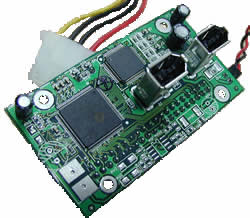 With
the integrated Serial Bus Protocol (SBP-2 Target Revision 4), the 13940-IDE
uses generic FireWire/IEEE-1394 device drivers available in the Win9x, Win2k
and MacOS 8.6 or higher operating systems.
With
the integrated Serial Bus Protocol (SBP-2 Target Revision 4), the 13940-IDE
uses generic FireWire/IEEE-1394 device drivers available in the Win9x, Win2k
and MacOS 8.6 or higher operating systems.
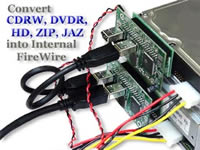
The 13940-IDE is appropriate interface for applications in removable media drives such as: CD-ROM, CD-R, CD-RW, DVD, DVD-RAM, Tape back-up and Hard disk drives. These peripherals can be quickly converted to plug-and-play FireWire versions. Both of ATA and ATAPI devices are supported.
 DAT
Optic Inc. 1394-IDE Bridge board provides an up to 400mbps data connection between
ATA/ATAPI peripheral devices and 1394/FireWire computer ports. This offers vendors
the opportunity to continue to take advantage of the ATA/ATAPI low cost while
presenting high performance, hot swappable devices into PC and MAC rapidly expanding
1394/FireWire markets.
DAT
Optic Inc. 1394-IDE Bridge board provides an up to 400mbps data connection between
ATA/ATAPI peripheral devices and 1394/FireWire computer ports. This offers vendors
the opportunity to continue to take advantage of the ATA/ATAPI low cost while
presenting high performance, hot swappable devices into PC and MAC rapidly expanding
1394/FireWire markets.
DatOptic states that "...When using the converted IDE device to FireWire
device with our Internal FireWire Bridge Adapter, your computer will gain back
up 85% of CPU's power. Computer now can run faster, smoother, and better. In
addition, with our Internal FireWire Bridge Adapter computer system is no longer
subject to four IDE devices and IRQ limitation. Now you can have up to 63 Internal
or External IDE devices with only ONE IRQ..."
- Specifications
|
Operating Temperature Operating Humidity Dimension IDE peripherals Operating System IDE Interface IEEE 1394 Interface
Connectors
Power Requirement |
0 C to 50 C 5% to 95% non-condensing 7.3(L)cm x 4.4 (W)cm CD-ROM, CD-R, CD-RW, DVD-ROM, DVD-RAM, Hard Disk, MO Drive, Jaz, Zip, Tape Back up. Win98SE, ME, Win 2000, MAC 8.6 or higher ATAPI/ATA-66. P/N: 1394-IDE IEEE 1394-1995, IEEE 1394a compliant. Support data transfer rate up to 100, 200, 400 MBps. SBP-2 Target Revision 4 compliant. 40-pin IDE connector x 1 5V/ DC ; 130mA ~ 200mA |
- Installation
We installed the drive through the FireWire interface and Windows Millennium recognized the drive as "Lite-On 24102B". The drive was originally flashed with v5S.01, and we attempted to upgrade it to the new v5S.54. Unfortunately, the firmware installer failed to recognize the SpeedBurn24 drive. For that propose we flashed it after connecting the drive through the IDE interface.

As Nero reports, the new firmware version installed is the 5S54. In the picture there are also showed the other known features supported by the drive.
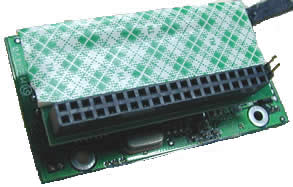 Apart
from the external drive installation, in order to test the DatOptic IDE to Firewire
card, we had to install the card on the back of an IDE drive. Beginning from
the card, we could say that it is has a delicate structure and users should
be careful when they will try to place the card.
Apart
from the external drive installation, in order to test the DatOptic IDE to Firewire
card, we had to install the card on the back of an IDE drive. Beginning from
the card, we could say that it is has a delicate structure and users should
be careful when they will try to place the card.
The front of the adapter has two Firewire connectors, to be connected to your PC Firewire card. On the back of the adapter you will find the IDE connector in which you should plug the IDE device in. The adapter is powered by the PC through a regular power cable similar to those you normally power all the internal devices on your computer.
With careful handles, we attached the adapter card on the back of an IDE drive. AS shown in the picture, we connected the Firewire and power cables to the PC. Have in mind, that the jumper setting on the drive for this connection is not "master" or "slave" but the "cable select".

The drive was not identified immediately after the connection, but some seconds later. The drive is now ready for use.




