Breaking News

ZOTAC GAMING Launches GeForce RTX 5080 SOLID CORE OC 20th Anniversary Edition Google Unveils Pixel 11 Series, Pixel 11 Pro Fold, Pixel Watch 5, and Pixel Tag Insta360 Expands Its Content Creation Ecosystem with Flagship X6 8K 360 Camera and Next-Generation Audio Solutions Razer Unveils the Artisan Keycap – Triple-Headed Snake Edition Razer Unveils the Naga V3 Pro

logo

  • Share Us
    • Facebook
    • Twitter
  • Home
  • Home
  • News
  • Reviews
  • Essays
  • About
    • Submit News

    • Contact Us
    • Privacy

    • Promotion
    • Advertise

    • RSS Feed

Search form

Chrome OS Now Offers More Control For Music and Podcasts

Chrome OS Now Offers More Control For Music and Podcasts

PC components Dec 17,2019 0

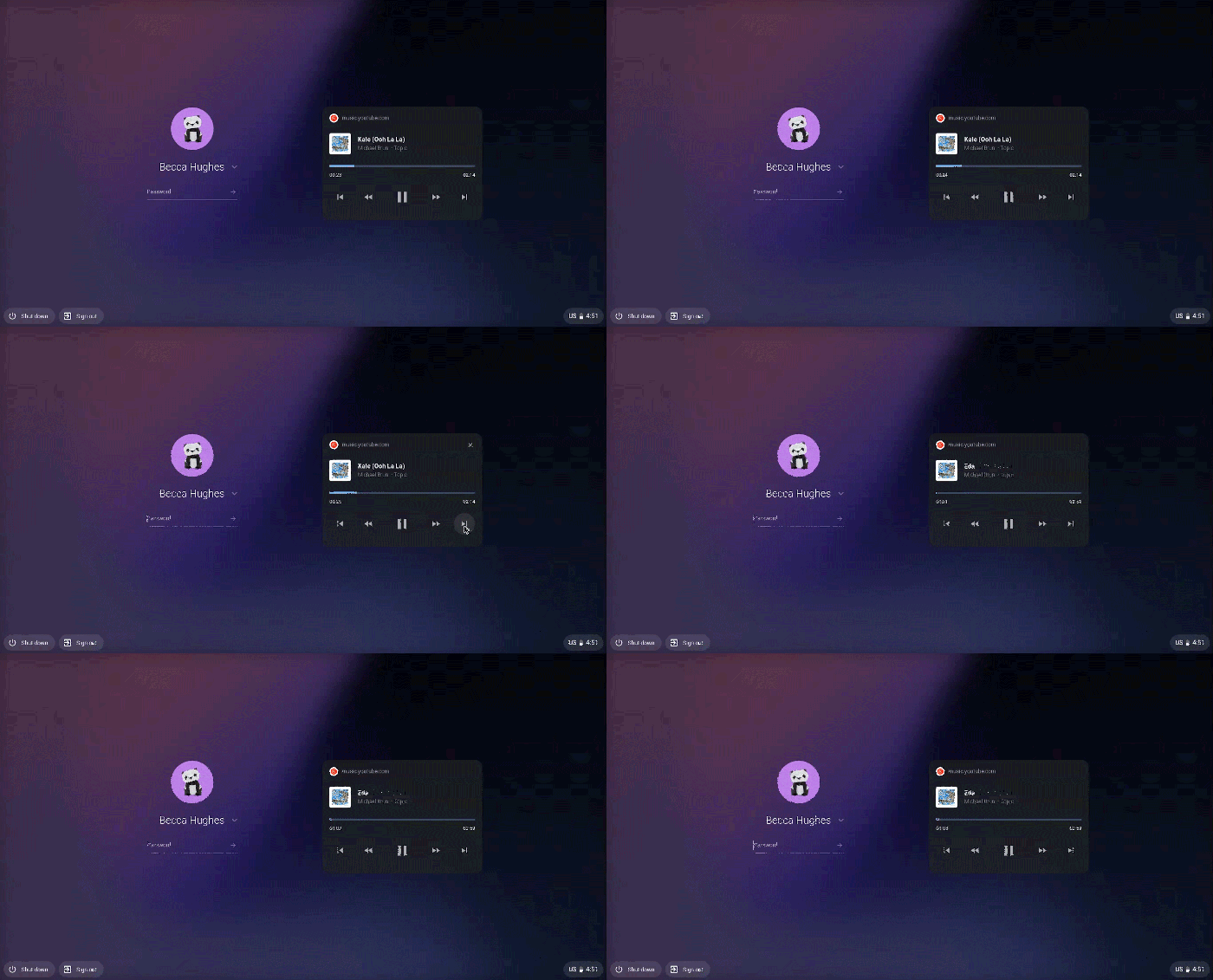
With the latest Chrome OS update, ou can control your music or podcasts from the lock screen, and manage your privacy settings across apps more easily.

The latest Chrome OS update brings controls for music and podcasts to your Chromebook’s lock screen, making it easier for you to control your audio content while your device is locked. Now, if you’re hosting a party and are using your Chromebook as a speaker, you can quickly skip to the next song or pause content without needing to unlock your device. This new feature works with YouTube Music, Spotify, iHeartRadio, dozens of other apps, and any media played through Chrome browser.
Now you can see and manage the settings for different types of apps on Chromebook — Play Store apps, web applications, system apps and more — all in one place.

There’s now a dedicated “Manage your apps” button within the homepage of your Settings. Click it and you’ll land on a menu that gives you a holistic view of the apps on your Chromebook.

Tags: chrome OSChromebooks
Previous Post
Facebook Tests New Fact-checking Program
Next Post
YouTube Music Creates Playlists Mixed For You

Related Posts

  • Celebrating update 100 with new Chromebook features

  • Lenovo Chromebook Duet Now Available in North America

  • Chromebooks May Account 25% of Total Notebook Shipments for The First Time

  • HP Announces New Chromebooks and Thin Client Solutions

  • New Chrome OS Brings Easy Navigation in Chromebook Tablet Mode

  • Samsung Galaxy Chromebook Now Available

  • Google to Resume Chrome and Chrome OS Release Updates

  • HP Unveils New Chromebooks at BETT 2020

Latest News

ZOTAC GAMING Launches GeForce RTX 5080 SOLID CORE OC 20th Anniversary Edition
GPUs

ZOTAC GAMING Launches GeForce RTX 5080 SOLID CORE OC 20th Anniversary Edition

Google Unveils Pixel 11 Series, Pixel 11 Pro Fold, Pixel Watch 5, and Pixel Tag
Smartphones

Google Unveils Pixel 11 Series, Pixel 11 Pro Fold, Pixel Watch 5, and Pixel Tag

Insta360 Expands Its Content Creation Ecosystem with Flagship X6 8K 360 Camera and Next-Generation Audio Solutions
Cameras

Insta360 Expands Its Content Creation Ecosystem with Flagship X6 8K 360 Camera and Next-Generation Audio Solutions

Razer Unveils the Artisan Keycap – Triple-Headed Snake Edition
Gaming

Razer Unveils the Artisan Keycap – Triple-Headed Snake Edition

Razer Unveils the Naga V3 Pro
Gaming

Razer Unveils the Naga V3 Pro

Popular Reviews

Endorfy Thock V2 Wireless Keyboard

Endorfy Thock V2 Wireless Keyboard

Dragon Touch Digital Calendar

Dragon Touch Digital Calendar

be quiet! Pure Loop 3 280mm

be quiet! Pure Loop 3 280mm

Soft2bet and the unseen hardware that makes instant play possible

Soft2bet and the unseen hardware that makes instant play possible

The Quiet Technology Behind the Spin

The Quiet Technology Behind the Spin

SoundPeats Cove Pro

SoundPeats Cove Pro

Akaso Brave 8 Lite

Akaso Brave 8 Lite

Kioxia Exceria Plus G3 512GB microSD

Kioxia Exceria Plus G3 512GB microSD

Main menu

  • Home
  • News
  • Reviews
  • Essays
  • About
    • Submit News

    • Contact Us
    • Privacy

    • Promotion
    • Advertise

    • RSS Feed
  • About
  • Privacy
  • Contact Us
  • Promotional Opportunities @ CdrInfo.com
  • Advertise on out site
  • Submit your News to our site
  • RSS Feed