Breaking News

Club 3D Announced their first new products of 2026 Samsung 2026 OLED TVs and Monitors Are NVIDIA G-SYNC Compatible for Elite Gaming Performance Kioxia and Sandisk Extend Yokkaichi Joint Venture Agreement Through 2034 KIOXIA Unveils EXCERIA PRO G2 SD Memory Card Series Leica announces Noctilux-M 35 f/1.2 ASPH

logo

  • Share Us
    • Facebook
    • Twitter
  • Home
  • Home
  • News
  • Reviews
  • Essays
  • Forum
  • Legacy
  • About
    • Submit News

    • Contact Us
    • Privacy

    • Promotion
    • Advertise

    • RSS Feed
    • Site Map

Search form

be quiet! Pure Rock 2 FX

Aug 1,2022 0

3. Installation process


Review Pages

1. Introduction
2. Retail Package
3. Installation process
4. Performance
5. Conclusion


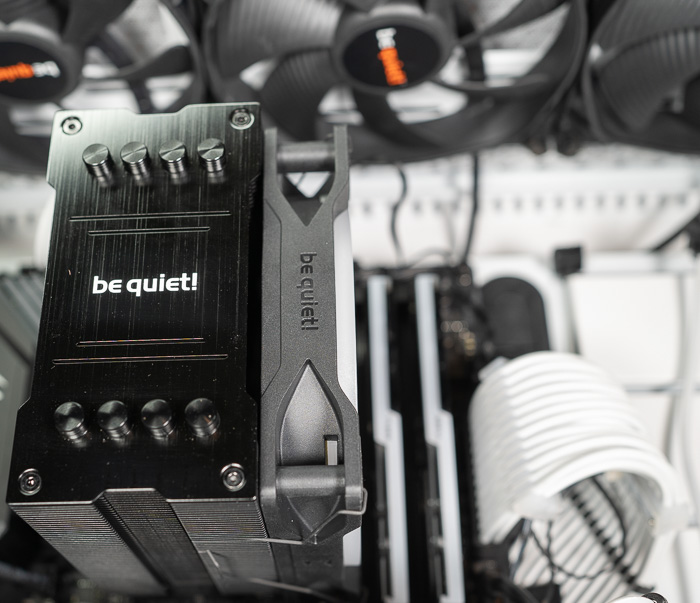
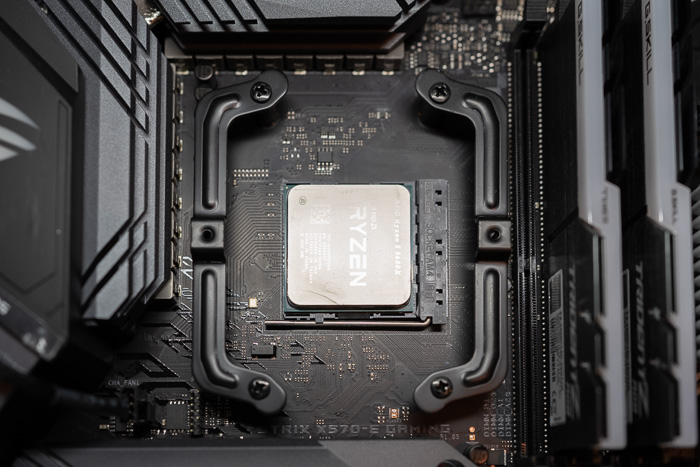
Installing the CPU cooler requires several steps. For our tests we used an AMD4 CPU (AMD Ryzen 5600X), so we had either view the online video from be quiet! or simply read the included manual some basic steps are mentioned below:

1. To permit mounting of the cooler please remove both the plastic retainers of the AMD retention module. The factory fitted backplate affixed to the rear side of the motherboard will be needed for subsequent installation of the cooler.

2. Place the 4x AMD spacer nuts onto the backplate bolts protruding through the front side and affix both short AMD mounting brackets with the AMD backplate screws.

3. First remove the protective foil from the underside of the cooler. Spread the thermal paste on the surface of the CPU. The amount supplied is sufficient for one or two applications.

4. Position the cooler mounting bridge centrally on the cooler. Next place the cooler unit onto the CPU. Loosen both heatpipe caps that are found in the middle of the topside of the cooler

5. Insert the Intel/AMD mounting bridge fastening screws from above into the cooler mounting bridge and then screw these alternately tight. You can use the cross-tip screwdriver for this. Subsequently retighten both heatpipe caps on the topside of the cooler.

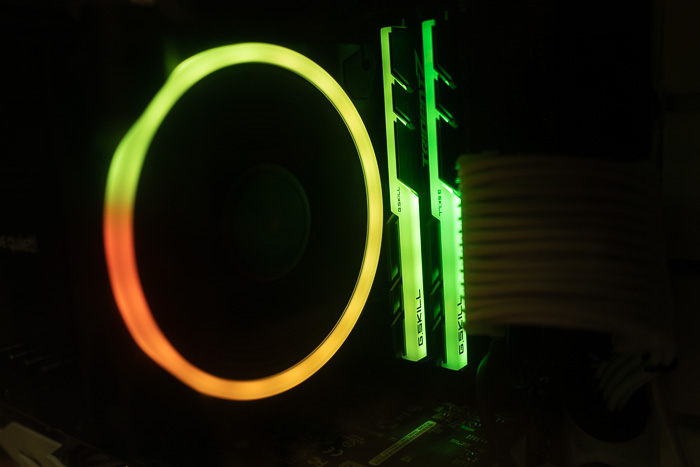
6. Fasten the 120mm fan using fan clips onto the front side of the cooler. Connect the fan cable to the CPU
fan connector on the motherboard.
 

Review Pages

1. Introduction
2. Retail Package
3. Installation process
4. Performance
5. Conclusion


Pages

  • « first
  • ‹ previous
  • 1
  • 2
  • 3
  • 4
  • 5
  • next ›
  • last »

be quiet!

Tags: be quiet!
Previous Post
be quiet! Pure Loop 2 FX (280mm)
Next Post
be quiet! Silent Wings Pro 4

Related Posts

  • be quiet! Power Zone 2 1200W

  • be quiet! enters high-end gaming mouse market with Dark Perk Ergo and Dark Perk Sym

  • be quiet! announces new Power Zone 2 1200W and Pure Power 13 M 1200W

  • be quiet! at CES 2026

  • be quiet! Dark Power 14 1000Watt

  • be quiet! Light Base 500 LX

  • be quiet! raises the bar with the new Dark Power 14 power supply series

  • be quiet! elevates compact cooling with Pure Rock Slim 3

Latest Reviews

be quiet! Power Zone 2 1200W
PC components

be quiet! Power Zone 2 1200W

The Difference Between American and European Stakes and Why It Changes How People Bet
Enterprise & IT

The Difference Between American and European Stakes and Why It Changes How People Bet

Endorfy Thock V2 Wireless Keyboard
PC components

Endorfy Thock V2 Wireless Keyboard

Noctua NH-D15 G2 Chromax.Black
Cooling Systems

Noctua NH-D15 G2 Chromax.Black

EnGenius ECW520 AP
Enterprise & IT

EnGenius ECW520 AP

Popular News

COLORFUL Introduces CVN B850I GAMING FROZEN Motherboard

COLORFUL Introduces CVN B850I GAMING FROZEN Motherboard

COLORFUL Presents CVN X870 ARK FROZEN Motherboard for AMD Ryzen 9000 CPUs

COLORFUL Presents CVN X870 ARK FROZEN Motherboard for AMD Ryzen 9000 CPUs

TEAMGROUP Launches EXPERT P34F Find My External SSD

TEAMGROUP Launches EXPERT P34F Find My External SSD

ASRock AM5 Motherboards Now Fully Support AMD Ryzen 9 9950X3D & 9900X3D Processors

ASRock AM5 Motherboards Now Fully Support AMD Ryzen 9 9950X3D & 9900X3D Processors

Samsung announces Galaxy Tab S11 and Galaxy S25 FE series

Samsung announces Galaxy Tab S11 and Galaxy S25 FE series

Viltrox Showcases Upcoming Lens Lineup and New TTL Flash at IBC 2025

Viltrox Showcases Upcoming Lens Lineup and New TTL Flash at IBC 2025

CORSAIR announces Vanguard Pro 96 and Vanguard 96 Gaming Keyboards

CORSAIR announces Vanguard Pro 96 and Vanguard 96 Gaming Keyboards

Panasonic Introduces the First Ultra-Telephoto Zoom Lens in the LUMIX S Series

Panasonic Introduces the First Ultra-Telephoto Zoom Lens in the LUMIX S Series

Main menu

  • Home
  • News
  • Reviews
  • Essays
  • Forum
  • Legacy
  • About
    • Submit News

    • Contact Us
    • Privacy

    • Promotion
    • Advertise

    • RSS Feed
    • Site Map
  • About
  • Privacy
  • Contact Us
  • Promotional Opportunities @ CdrInfo.com
  • Advertise on out site
  • Submit your News to our site
  • RSS Feed