Breaking News

SAMA Introduces the S32 WOOD, a Compact M-ATX Case Bundled with an 80 PLUS Gold PSU Thypoch Completes Simera-C Cine Prime Lineup with New 100mm T1.9 Lens CORSAIR Launches the RM1200e Power Supply with Built-in PinProtect GPU Overcurrent Protection and Platinum-certified Efficiency CORSAIR Changes the Game with PureVector, a Science-Based Personalized Aiming Technology, Launching Exclusively in the SABRE v3 PRO PureVector Mouse Series AMD FSR Upscaling 4.1 Boosts Frames and Image Quality on More Devices

logo

  • Share Us
    • Facebook
    • Twitter
  • Home
  • Home
  • News
  • Reviews
  • Essays
  • About
    • Submit News

    • Contact Us
    • Privacy

    • Promotion
    • Advertise

    • RSS Feed

Search form

Asus P5N32-E SLI

Jan 22,2007 0

2. What's in the box


Review Pages

1. Features
2. What's in the box
3. Bios
4. Installation
5. Benchmarks - page 1
6. Benchmarks - page 2
7. Benchmarks - page 3
8. Benchmarks - page 4
9. Benchmarks - page 5
10. Benchmarks - page 6
11. Overclocking
12. Final thoughts


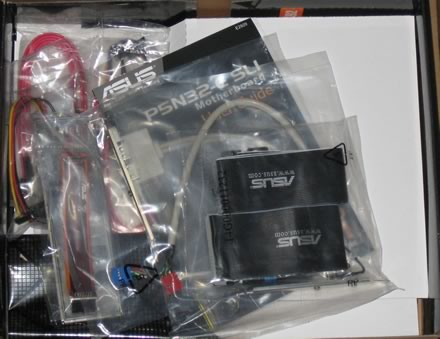
The Asus P5N32-E SLI retail package costs around US$274.99 - $299.99 for the US market and around €240 for Europe, making it an affordable solution for power users:

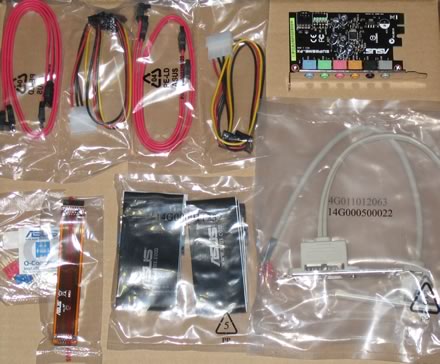
The package includes all information on the board's design and special features. Below is a list of what's included in the retail package:

  • 1x UltraDMA 133/100/66 cable
  • 1x FDD cable
  • 2x SATA cables
  • 2x SATA power cables
  • 1x I/O Shield
  • 1x printed user's manual
  • 1x USB2.0 port module
  • 1x 3in1 Q-connector
  • 1x SLI adaptor
  • 1x Serial port module
  • 1x CD-ROM with InterVideo® Media Launcher (WinDVD Creator 2, InterVideo PhotoAlbum, DiscMaster 2.5 Platinum, DVD Copy 2.5 Platinum)
  • 1x CD-ROM with drivers

The sound card is based on the Soundmax chipset and is an add-on card which needs to be installed.
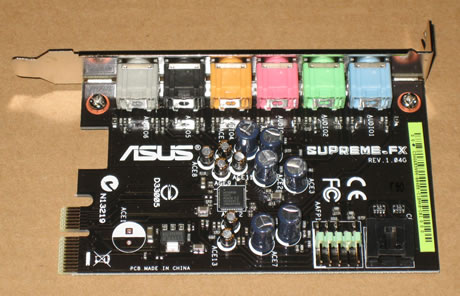
There are 6 ports offered for up to 8 channels of output along with microphone and line-in.
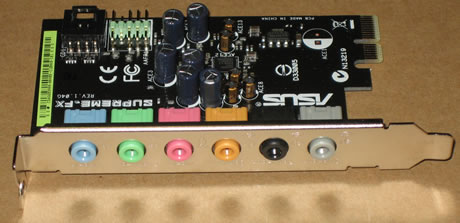
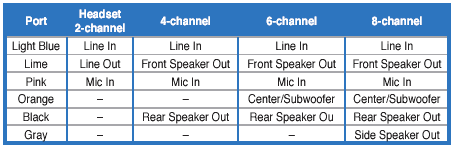
The installation slot is right next the first PCI-E slot.
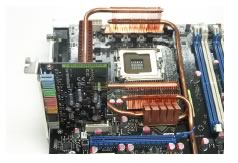
The board is densely packed with components but connections and slots are colour coded for easy identification.
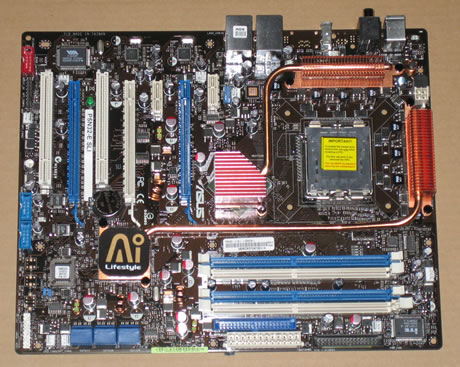
Let's zoom in on the CPU area.
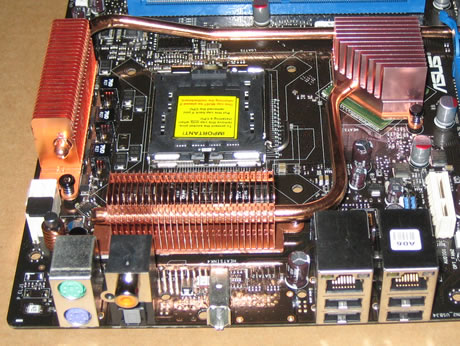
We can clearly see the passive cooling solution. As Asus comments "...The Heat Pipe design effectively directs the heat generated by the chipsets to the heatsink near the back IO ports, where it can be carried away by existing airflow from CPU fan or bundled optional fan...". Any nearby capacitors are low profile so there shouldn't be any problem with 3rd party (larger) cooling solutions. However, we noticed that with the passive cooling, the northbridge chipset still gets quite hot. Perhaps a fan here would help reduce the heat (and possibly help boost overclocking) although it would add to the noise.

The Asus P5N32-E SLI provides four banks for memory modules:
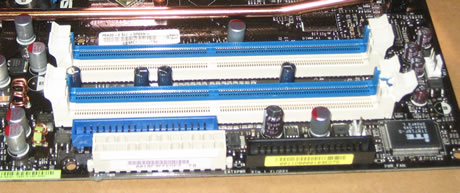
Click to Enlarge!

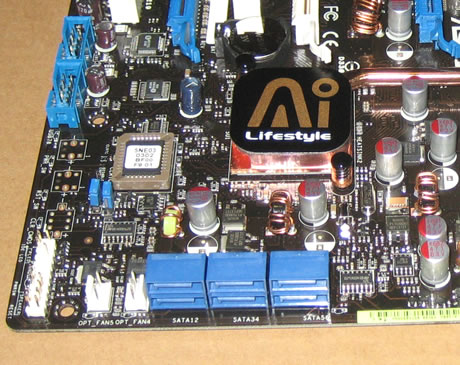
Moving to the southbridge, we can see a passive heatsink in use here as well. There are six SATA 2 connections in this region but are well clear of any components:
The Asus P5N32-E SLI supports Nvidia's SLI. There are 3x PCI-E x16 slots, two for SLI and one for a physics card. Both the blue PCI-E lanes work at the full 16x, while the white at 8x. There is plenty of space between the three PCI-E slots so no problems should arise with extra large VGA cards:
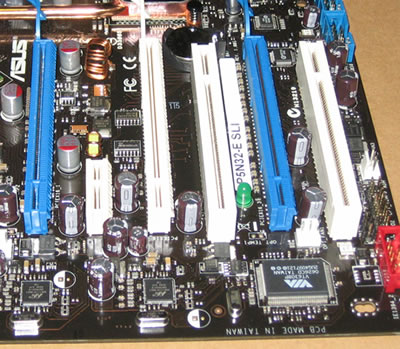
There are also several extra connections for USB, Front Panel Audio, COM2 and Firewire. Asus has include all port modules in the retail package. The back I/O panel has the usual connections:

  • 1 x PS/2 Keyboard port(purple)
  • 1 x PS/2 Mouse port(green)
  • 1 x Optical + 1 x Coaxial S/PDIF Output
  • 2 x LAN (RJ45) port
  • 4 x USB 2.0/1.1 ports
  • 1 x IEEE1394a port

 

Review Pages

1. Features
2. What's in the box
3. Bios
4. Installation
5. Benchmarks - page 1
6. Benchmarks - page 2
7. Benchmarks - page 3
8. Benchmarks - page 4
9. Benchmarks - page 5
10. Benchmarks - page 6
11. Overclocking
12. Final thoughts


Pages

  • « first
  • ‹ previous
  • 1
  • 2
  • 3
  • 4
  • 5
  • 6
  • 7
  • 8
  • 9
  • …
  • next ›
  • last »

ASUS

Tags: ASUS
Previous Post
Fun With Linux Cpufreq Driver
Next Post
Asus Extreme Striker

Related Posts

  • ASUS Announces ExpertBook A7 (AMD)

  • ASUS ProArt RTX Spark Windows PCs Available for Immediate Pre-Order

  • ASUS Announces New 64GB Configuration of ASUS Ascent GX10

  • Announcing the New ASUS Googlebook 14

  • ASUS Announces Ascent QN10 Mini PC

  • ASUS Announces WiFi 8 Router

  • Asus announces ExpertBook B3 G2 and ExpertBook P3 G2

  • ASUS Announces Prime AP304 PC Case

Latest Reviews

be quiet! Light Wings Pro IO fan
Cooling Systems

be quiet! Light Wings Pro IO fan

Why Intelligent Firmware Matters More Than Peak Throughput in NAS Systems
Enterprise & IT

Why Intelligent Firmware Matters More Than Peak Throughput in NAS Systems

Fanxiang MP83 M.2 NVMe SSD Enclosure
Enterprise & IT

Fanxiang MP83 M.2 NVMe SSD Enclosure

Ugreen CM642 USB4.0 Enclosure
PC components

Ugreen CM642 USB4.0 Enclosure

be quiet! Dark Power 14 IO
PC components

be quiet! Dark Power 14 IO

Popular News

MSI’s Latest AMD X870E MAX & EVO Series Motherboards

MSI’s Latest AMD X870E MAX & EVO Series Motherboards

COLORFUL Launches iGame B850M ULTRA Series Micro-ATX Motherboards

COLORFUL Launches iGame B850M ULTRA Series Micro-ATX Motherboards

COLORFUL Presents Limited Edition Chitu MAG-60 Magnetic Keyboard Inspired by the Year of the Horse

COLORFUL Presents Limited Edition Chitu MAG-60 Magnetic Keyboard Inspired by the Year of the Horse

COLORFUL Launches iGame B850I MINI OC V14 Motherboard

COLORFUL Launches iGame B850I MINI OC V14 Motherboard

COLORFUL Launches the iGame X870E VULCAN W OC Motherboard

COLORFUL Launches the iGame X870E VULCAN W OC Motherboard

COLORFUL Presents iGame Z890 ULTRA-S W and iGame Z890M ULTRA Z Motherboards

COLORFUL Presents iGame Z890 ULTRA-S W and iGame Z890M ULTRA Z Motherboards

COLORFUL Expands B850 Motherboard Lineup with New CVN, Battle-Ax, and MEOW Models

COLORFUL Expands B850 Motherboard Lineup with New CVN, Battle-Ax, and MEOW Models

ASRock Adds Support for One Sub-Channel DRAM Module on Intel DDR5 Motherboards

ASRock Adds Support for One Sub-Channel DRAM Module on Intel DDR5 Motherboards

Main menu

  • Home
  • News
  • Reviews
  • Essays
  • About
    • Submit News

    • Contact Us
    • Privacy

    • Promotion
    • Advertise

    • RSS Feed
  • About
  • Privacy
  • Contact Us
  • Promotional Opportunities @ CdrInfo.com
  • Advertise on out site
  • Submit your News to our site
  • RSS Feed