Breaking News

ASUS Unveils ExpertBook B3 G2 Conner Introduces the World's First "Pocket Cloud" via Kickstarter Pioneer announces microSD for dashcam God of War Greek trilogy remake in development & God of War Sons of Sparta out now Sony Launches WF-1000XM6 Truly Wireless Earbuds

logo

  • Share Us
    • Facebook
    • Twitter
  • Home
  • Home
  • News
  • Reviews
  • Essays
  • Forum
  • Legacy
  • About
    • Submit News

    • Contact Us
    • Privacy

    • Promotion
    • Advertise

    • RSS Feed
    • Site Map

Search form

Asus P5N32-E SLI

Jan 22,2007 0

11. Overclocking


Review Pages

1. Features
2. What's in the box
3. Bios
4. Installation
5. Benchmarks - page 1
6. Benchmarks - page 2
7. Benchmarks - page 3
8. Benchmarks - page 4
9. Benchmarks - page 5
10. Benchmarks - page 6
11. Overclocking
12. Final thoughts


The Asus P5N32-E SLI has all the potential to become an overclocking champion. Nvidia 680i SLI offers many options from within the BIOS to optimize voltages, CPU multiplier and FSB. You need to note the capability to set memory voltages up to 3.45V, which at such high voltages will "fry" your memory modules so take care, but it is a good option for experienced overclockers. The memory settings from within the BIOS offer the option of having the FSB and memory linked or unlinked, and don't forget you can run at 1T with this board. Great help for overclockers too. Finally, if something is not configured properly in the BIOS settings, the board will resume in 90% of cases. So there's no need to do a CMOS clear.

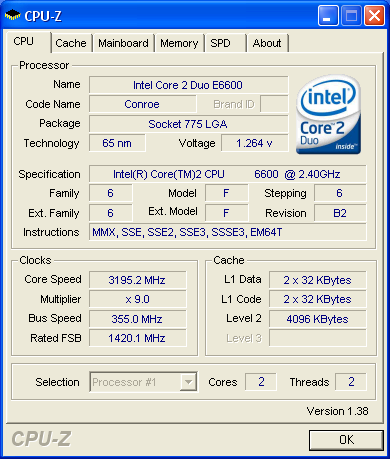
Let's now move on to our results. Keeping the CPU multiplier at 9x, we got a stable system at 355FSB, which is somewhat higher than with the P5B Deluxe (350FSB).
Lowering the CPU multiplier to 6x, we could manage a stable system at 425FSB. The system was able to reach as high as 480, but stability was an issue.
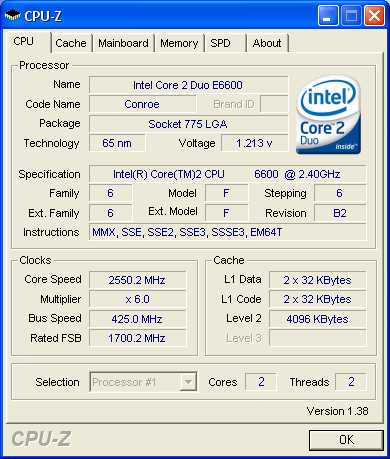
Having read other users reports, this board can definitely go up to 500+FSB (with the proper voltage tweaks and the selected CPU/RAM combination). Overall, we are very impressed with the overclocking capabilities of this board.

Below are our settings, that reached 425MHZ FSB

AI Tuning: Manual
Nvidia GPU Ex: Disabled
LinkBoost: Disabled

FSB - Memory Clock Mode: Unlinked
x FSB - Memory Ratio: N/A
FSB (QDR), Mhz: 1700 (means 425FSB)
Actual FSB (QDR), Mhz: 1700
MEM (DDR), Mhz: 800 (means 400mhz speeds)
Actual MEM (DDR), Mhz: 880.2

Vcore Voltage: AUTO
Memory Voltage: 2AUTO
1.2v HT Voltage: AUTO
NB Core Voltage: AUTO
SB Core Voltage: AUTO
CPU VTT Voltage: AUTO
DDRII Controller Ref Voltage: AUTO
DDRII Channel A Ref Voltage: AUTO
DDRII Channel B Ref Voltage: AUTO

tCL (CAS Latency): 4
tRCD: 4
tRP: 4
tRAS: 8
Command Per Clock (CMD): 2 clock (2T)

Advance Memory Settings
tRRD: AUTO
tRC: AUTO
tWR: AUTO
tWTR: AUTO
tREF: AUTO
Async Latency: AUTO

CPU Spread Spectrum: Disabled
PCIE Spread Spectrum: Disabled
MCP PCIE Spread Spectrum: Disabled
SATA Spread Spectrum: Disabled
LDT Spread Spectrum: Disabled

CPU Internal Thermal Control: Disabled
Limit CPUID MaxVal: Disabled
Enhanced C1 (C1E): Disabled
Execute Disable Bit: Disabled
Virtualization Technology: Disabled
Enhanced Intel Speedstep Tech: Disabled
LDT Frequency: 5x

PCIEX16_1 Frequency (Mhz): 100
PCIEX16_2 Frequency (Mhz): 100
PCIEX16_3 Frequency (Mhz): 100
SPP<->MCP Ref Clock, Mhz: 200


Review Pages

1. Features
2. What's in the box
3. Bios
4. Installation
5. Benchmarks - page 1
6. Benchmarks - page 2
7. Benchmarks - page 3
8. Benchmarks - page 4
9. Benchmarks - page 5
10. Benchmarks - page 6
11. Overclocking
12. Final thoughts


Pages

  • « first
  • ‹ previous
  • …
  • 4
  • 5
  • 6
  • 7
  • 8
  • 9
  • 10
  • 11
  • 12
  • next ›
  • last »

ASUS

Tags: ASUS
Previous Post
Fun With Linux Cpufreq Driver
Next Post
Asus Extreme Striker

Related Posts

  • ASUS Unveils ExpertBook B3 G2

  • Announcing ASUS ExpertBook B5 G2

  • ASUS Unveils Mac-Friendly Features on ProArt Displays to Enhance Workflows

  • Asus at CES 2026

  • ASUS Announces ProArt PF120 Case Fan

  • ASUS Announces Prime AP303 Compact Mid-Tower ATX Case

  • ASUS TUF Gaming Unveils Call of Duty Black Ops 7 Edition AMD Radeon RX 9070 XT

  • ASUS Announces October Availability of ProArt Display 8K PA32KCX

Latest Reviews

Asustor AS5404T 4-Bay NAS System
Enterprise & IT

Asustor AS5404T 4-Bay NAS System

be quiet! Pure Power 13M 1200W
PC components

be quiet! Pure Power 13M 1200W

Server-Side Gaming Why Canadian Online Casinos Are Abandoning Local Clients for HTML5 Clouds
Enterprise & IT

Server-Side Gaming Why Canadian Online Casinos Are Abandoning Local Clients for HTML5 Clouds

Airfanta 3 Pro Air
Consumer Electronics

Airfanta 3 Pro Air

Akaso Brave 8 Lite
Cameras

Akaso Brave 8 Lite

Popular News

COLORFUL Introduces CVN B850I GAMING FROZEN Motherboard

COLORFUL Introduces CVN B850I GAMING FROZEN Motherboard

COLORFUL Presents CVN X870 ARK FROZEN Motherboard for AMD Ryzen 9000 CPUs

COLORFUL Presents CVN X870 ARK FROZEN Motherboard for AMD Ryzen 9000 CPUs

TEAMGROUP Launches EXPERT P34F Find My External SSD

TEAMGROUP Launches EXPERT P34F Find My External SSD

Samsung announces Galaxy Tab S11 and Galaxy S25 FE series

Samsung announces Galaxy Tab S11 and Galaxy S25 FE series

Viltrox Showcases Upcoming Lens Lineup and New TTL Flash at IBC 2025

Viltrox Showcases Upcoming Lens Lineup and New TTL Flash at IBC 2025

CORSAIR announces Vanguard Pro 96 and Vanguard 96 Gaming Keyboards

CORSAIR announces Vanguard Pro 96 and Vanguard 96 Gaming Keyboards

Panasonic Introduces the First Ultra-Telephoto Zoom Lens in the LUMIX S Series

Panasonic Introduces the First Ultra-Telephoto Zoom Lens in the LUMIX S Series

MSI Launches DATAMAG 40Gbps Magnetic Portable SSD

MSI Launches DATAMAG 40Gbps Magnetic Portable SSD

Main menu

  • Home
  • News
  • Reviews
  • Essays
  • Forum
  • Legacy
  • About
    • Submit News

    • Contact Us
    • Privacy

    • Promotion
    • Advertise

    • RSS Feed
    • Site Map
  • About
  • Privacy
  • Contact Us
  • Promotional Opportunities @ CdrInfo.com
  • Advertise on out site
  • Submit your News to our site
  • RSS Feed