Breaking News

ASUS Unveils Mac-Friendly Features on ProArt Displays to Enhance Workflows Ricoh announces GR IV Monochrome Acer ProDesigner PE320QX monitor excels at tests! MSI announces Roamii BE Pro Mesh WiFi 7 System Samsung Mobile Gaming Hub Reshapes Personalized Play

logo

  • Share Us
    • Facebook
    • Twitter
  • Home
  • Home
  • News
  • Reviews
  • Essays
  • Forum
  • Legacy
  • About
    • Submit News

    • Contact Us
    • Privacy

    • Promotion
    • Advertise

    • RSS Feed
    • Site Map

Search form

MSI's revolutionary invention MSI CPU clip

MSI's revolutionary invention MSI CPU clip

Enterprise & IT Jun 25,2004 0

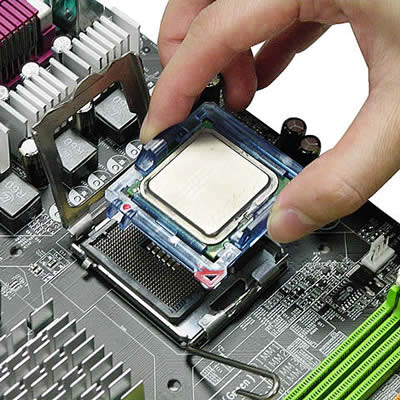
The MSI CPU clip is the easiest and simplest tool that helps users avoid improper installation of Intel's newest LGA775 processor, first introduced with 915 platforms. The new installation for LGA775 processors is a revolutionary alternative to conventional CPU installation. Since the socket 775 is comprised of sensitive arrays of pins, improper or careless installation may cause permanent harm to the CPU. In some cases users may accidentally damage the socket simply by adjusting the position of the CPU. So, how do you install the LGA775 processor quickly and safely? Simple! With MSI's newest user-friendly tool called MSI CPU clip. Users can use this tool to remove the protective cover of Intel's LGA775 CPU and easily situate the CPU clip module and CPU on the 775 socket before gently pushing it down into the socket. Users can complete this hassle-free installation in just a few seconds. Without the CPU clip, users may need to adjust the CPU using their fingers, and this procedure can take a while.
Tags: MSI
Previous Post
This week's news, reviews and press releases from around the web
Next Post
Maxtor Launches Third-Generation MaXLine Drive With Native Command Queuing and Additional SATA II Features

Related Posts

  • MSI announces Roamii BE Pro Mesh WiFi 7 System

  • MSI Unveils the GeForce RTX 5090 32G LIGHTNING Z

  • MSI announces new MEG X and MPG 341CQR QD-OLED X36 monitors

  • MSI announces new 32-inch 4K QD-OLED monitors

  • MSI’s Latest AMD X870E MAX & EVO Series Motherboards

  • MSI Unveils the AI-Ready Cubi Z AI Series Mini PC

  • MSI Clarifies GeForce RTX 5090 Is Not Officially Sold in China

  • MSI Launches Its First Back-Connection Graphics Card—GeForce RTX 5070 Ti 16G VENTUS 3X PZ Series

Latest News

ASUS Unveils Mac-Friendly Features on ProArt Displays to Enhance Workflows
Enterprise & IT

ASUS Unveils Mac-Friendly Features on ProArt Displays to Enhance Workflows

Ricoh announces GR IV Monochrome
Cameras

Ricoh announces GR IV Monochrome

Acer ProDesigner PE320QX monitor excels at tests!
GPUs

Acer ProDesigner PE320QX monitor excels at tests!

MSI announces Roamii BE Pro Mesh WiFi 7 System
Enterprise & IT

MSI announces Roamii BE Pro Mesh WiFi 7 System

Samsung Mobile Gaming Hub Reshapes Personalized Play
Smartphones

Samsung Mobile Gaming Hub Reshapes Personalized Play

Popular Reviews

be quiet! Dark Mount Keyboard

be quiet! Dark Mount Keyboard

Terramaster F8-SSD

Terramaster F8-SSD

be quiet! Light Mount Keyboard

be quiet! Light Mount Keyboard

Soundpeats Pop Clip

Soundpeats Pop Clip

Akaso 360 Action camera

Akaso 360 Action camera

Dragon Touch Digital Calendar

Dragon Touch Digital Calendar

be quiet! Pure Loop 3 280mm

be quiet! Pure Loop 3 280mm

Noctua NF-A12x25 G2 fans

Noctua NF-A12x25 G2 fans

Main menu

  • Home
  • News
  • Reviews
  • Essays
  • Forum
  • Legacy
  • About
    • Submit News

    • Contact Us
    • Privacy

    • Promotion
    • Advertise

    • RSS Feed
    • Site Map
  • About
  • Privacy
  • Contact Us
  • Promotional Opportunities @ CdrInfo.com
  • Advertise on out site
  • Submit your News to our site
  • RSS Feed