Thermal Hero Paste
6. Tests
For our tests we used an open test air test system, to avoid interference from case fans. Then we set room temperature around 23 Celsius via A/C control. All tests are done with exactly the same system, operating system, drivers, and software running in the background. CPU fans were controlled via software with exactly the same curve fan and the following test system based upon AMD 7950X:
- CPU: AMD Ryzen 9 7950X
- Open Case: StreaCom BC1 V2 Bench Table
- Motherboard: Asus ProArt X670E-CREATOR WIFI with 1905 BIOS
- Memory: 2x24GB Crucial DDR5-6000 CL48 (EXPO Profile)
- PSU: be quiet! Dark Pro 13 1300Watt
- Main Storage: Samsung 980Pro 1TB
- VGA: MSI GeForce RTX 4090 SUPRIM X 24G
- Operating system: Windows 11 x64 + latest motherboard/AMD chipset drivers installed (DirectStorage enabled drive)
- Software: OCCT Enterprise Edition v12.1.16 (2 sec interval monitor)
- Ambient room temperature ~ 23 Celsius (with AC climate control) - Environment Temperature measurements: Precision Gold N09AQ Envirometer Meter
We performed four tests depending on the CPU TDP load that can be set under Bios-> AI Tweaker-> Precision Boost Overdrive->AMD Eco Mode->
- cTDP 65Watt (real 90Watt)
- cTDP 105Watt (real 145watt)
- cTDP 170Watt (normal AMD 7950X operating from 175watt up to 185watt depending Boost)
- cTDP 222Watt (via PBO at auto)
while we set the following voltages for all tests.
- CPU Core Voltage: Auto
- CPU SOC Voltage: 1.25V
- CPU VDDIO / MC Voltage: Auto
- Misc Voltage: 1.10V
At the OCCT software, we performed the Stability Test->CPU Test 15mins duration with various settings to get the maximum thermal production from the AMD 7950X.
Tests Disclaimer: Despite placing CPU voltages manually, the motherboard may supply the CPU with slightly different voltages, resulting in some cases higher temperatures that also result in higher working temperatures. Our results are valid with the above test system and using other variations may result in different results. Using other stress test software may also introduce different test results.
Before each run, we clean the CPU surface with 95% isopropyl alcohol and paper roll and we apply each thermal paste with the same methodology (central dot, small X lines, and small dots) to cover the full surface of the CPU area.
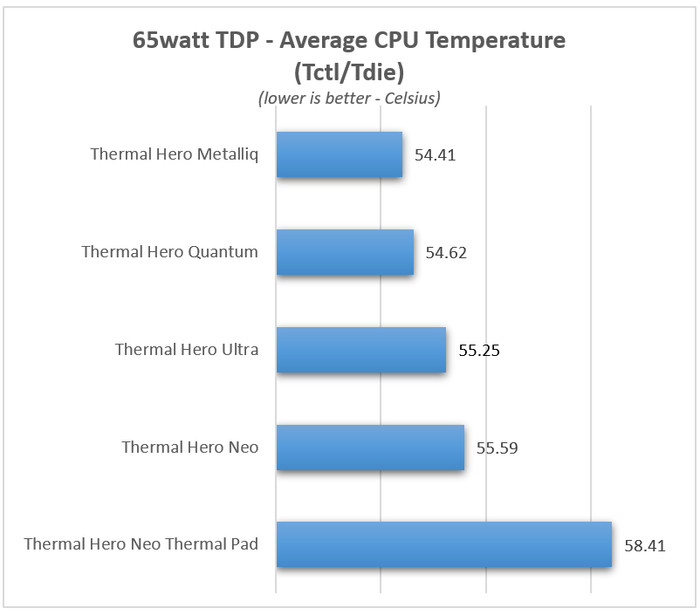
Starting from the low 65watt AMD Eco TDP, we used the following OCCT settings
- Instruction Set: Auto
- Data Set: Large
- Mode: Normal
- Load Type: Variable
- Thread Settings: Auto
The Metalliq and the Quantum and really close, while the Ultra/Nero is close and the Thermal Pad has the "worse" performance, due to its thickness.
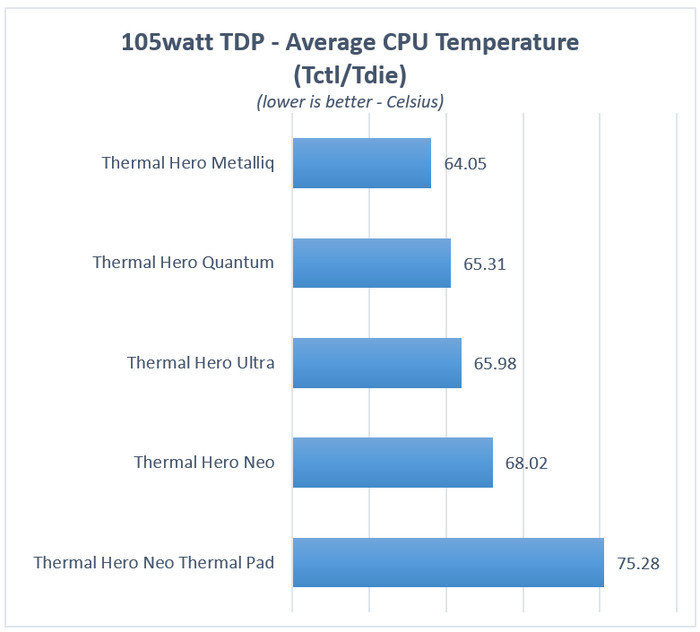
At the 105watt AMD Eco TDP setting, we used the following OCCT settings
- Instruction Set: Auto
- Data Set: Large
- Mode: Normal
- Load Type: Variable
- Thread Settings: Auto
Again the Metalliq, Quantum, and Ultra are close, while the Nero starts to fall behind with around 4 Celsius performance difference from the rest. The Neo Thermal Pad 0.5mm thickness showed "worse" performance than we expected.
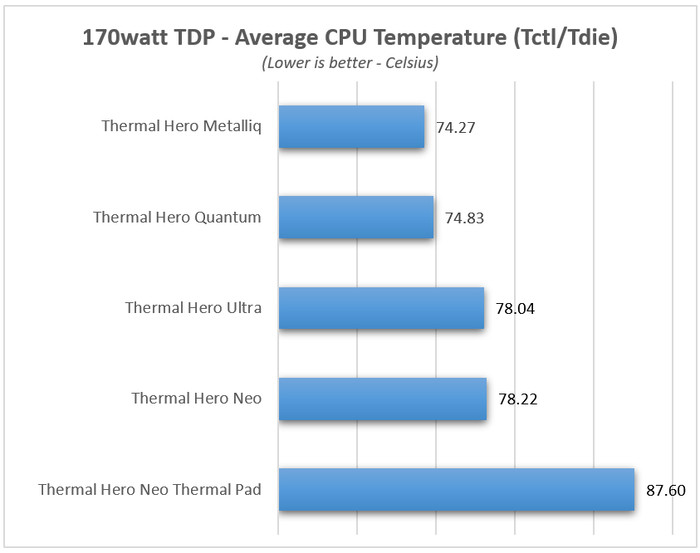
At the 170watt AMD TDP setting (normal AMD 7950X running TDP), we used the following OCCT settings
- Instruction Set: SSE
- Data Set: Large
- Mode: Normal
- Load Type: Variable
- Thread Settings: Auto
At this TDP, the Metalliq and the Quantum are very close, while the Ultra/Neo starts to show a similar performance, while the thermal pad had a much higher performance than we hoped so.
At the 222watt AMD TDP setting, we used the following OCCT settings
- Instruction Set: SSE
- Data Set: Small
- Mode: Extreme
- Load Type: Steady
- Thread Settings: Auto
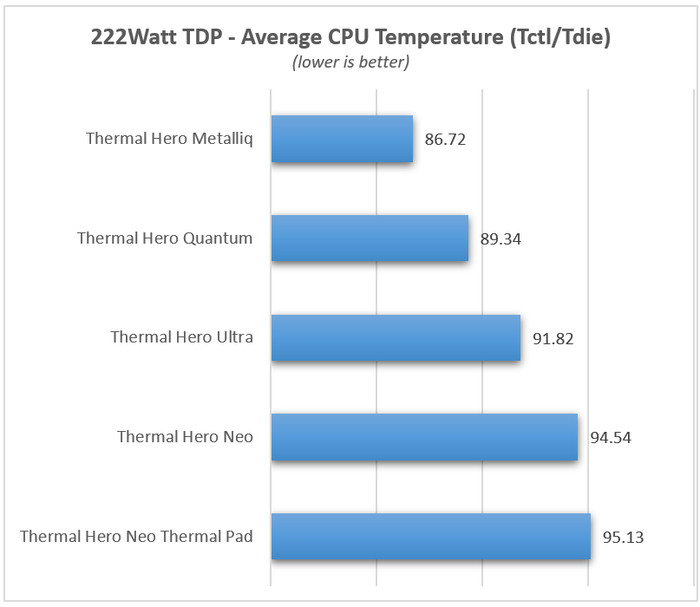
At the maximum possible TDP with the AMD 7950X, we start to see the performance differences between the various Thermal pastes. The Metalliq being a metal liquid thermal paste, has the best performance with 86.72 Average CPU Temperature, the Quantum has around a 3 Celsius difference, while the Ultra passes 91 Celsius. The Neo and Thermal Pad seems to reach 95 Celsius, and while the system didn't introduce thermal throttle, we don't suggest them for overclockers.