
Breaking News

SAMA Introduces the S32 WOOD, a Compact M-ATX Case Bundled with an 80 PLUS Gold PSU Thypoch Completes Simera-C Cine Prime Lineup with New 100mm T1.9 Lens CORSAIR Launches the RM1200e Power Supply with Built-in PinProtect GPU Overcurrent Protection and Platinum-certified Efficiency CORSAIR Changes the Game with PureVector, a Science-Based Personalized Aiming Technology, Launching Exclusively in the SABRE v3 PRO PureVector Mouse Series AMD FSR Upscaling 4.1 Boosts Frames and Image Quality on More Devices

logo

  • Share Us
    • Facebook
    • Twitter
  • Home
  • Home
  • News
  • Reviews
  • Essays
  • About
    • Submit News

    • Contact Us
    • Privacy

    • Promotion
    • Advertise

    • RSS Feed

Search form

Maxtor OneTouch external HD

Jun 24,2004 2

2. Installation


Review Pages

1. Introduction / Retail Package
2. Installation
3. Tests
4. Features
5. Conclusion


Maxtor OneTouch HDD - Page 2

- Installation

The Maxtor OneTouch drive was connected to our PC with the FireWire connection. After turning on the power, a hardware wizard prompts you to install the drivers for the front panel button. Notice that even if you decide not to install them (for example, you've lost the installation CD) the drive will work without any problems:

After pressing cancel, we inserted the installation disc and a friendly wizard came up. It's very good to see that Maxtor's installation supports 5 main languages, even so, we would like to see more of them supported:

After pressing on "English", the wizard continued and we selected "Install Software", which installed the front panel drivers along with the Dantz Retrospect Express software:
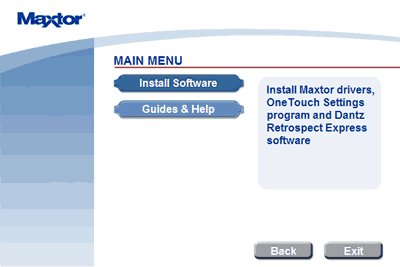
If you need more help, the wizard lists the Guide & help contents

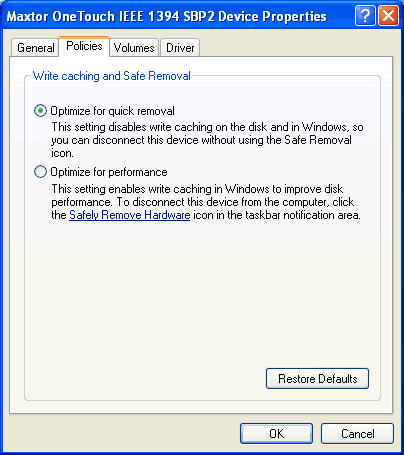
After windows restarted, we checked the drive's properties under Windows:

As we can see, WinXP SP1 has automatically chosen "Optimize for quick removal" since the drive is installed externally. The user can change to "optimize for performance" mode if he/she desires (restart is needed).
 

Review Pages

1. Introduction / Retail Package
2. Installation
3. Tests
4. Features
5. Conclusion


Pages

  • « first
  • ‹ previous
  • 1
  • 2
  • 3
  • 4
  • 5
  • next ›
  • last »

Tags:
Previous Post
Asus CRW-5232AS
Next Post
Laserlock MARATHON protection

Related Posts

2 Comments

  • Default User Picture
    Patrick W.Heben... (not verified) Jun 24, 2004

    "I love my "ONE TOUCH external HDD";I would soon have to replace my broken drive with a [NEW] one!"

    • Log in or register to post comments
  • Default User Picture
    Patrick W.Heben... (not verified) Jun 24, 2004

    "Good detailed review!"

    • Log in or register to post comments

Leave a Reply

Latest Reviews

Why Intelligent Firmware Matters More Than Peak Throughput in NAS Systems
Enterprise & IT

Why Intelligent Firmware Matters More Than Peak Throughput in NAS Systems

Fanxiang MP83 M.2 NVMe SSD Enclosure
Enterprise & IT

Fanxiang MP83 M.2 NVMe SSD Enclosure

Ugreen CM642 USB4.0 Enclosure
PC components

Ugreen CM642 USB4.0 Enclosure

be quiet! Dark Power 14 IO
PC components

be quiet! Dark Power 14 IO

SanDisk High Endurance 512GB microSDXC
Cameras

SanDisk High Endurance 512GB microSDXC

Popular News

MSI’s Latest AMD X870E MAX & EVO Series Motherboards

MSI’s Latest AMD X870E MAX & EVO Series Motherboards

COLORFUL Launches iGame B850M ULTRA Series Micro-ATX Motherboards

COLORFUL Launches iGame B850M ULTRA Series Micro-ATX Motherboards

COLORFUL Presents Limited Edition Chitu MAG-60 Magnetic Keyboard Inspired by the Year of the Horse

COLORFUL Presents Limited Edition Chitu MAG-60 Magnetic Keyboard Inspired by the Year of the Horse

COLORFUL Launches iGame B850I MINI OC V14 Motherboard

COLORFUL Launches iGame B850I MINI OC V14 Motherboard

COLORFUL Launches the iGame X870E VULCAN W OC Motherboard

COLORFUL Launches the iGame X870E VULCAN W OC Motherboard

COLORFUL Presents iGame Z890 ULTRA-S W and iGame Z890M ULTRA Z Motherboards

COLORFUL Presents iGame Z890 ULTRA-S W and iGame Z890M ULTRA Z Motherboards

COLORFUL Expands B850 Motherboard Lineup with New CVN, Battle-Ax, and MEOW Models

COLORFUL Expands B850 Motherboard Lineup with New CVN, Battle-Ax, and MEOW Models

ASRock Adds Support for One Sub-Channel DRAM Module on Intel DDR5 Motherboards

ASRock Adds Support for One Sub-Channel DRAM Module on Intel DDR5 Motherboards

Main menu

  • Home
  • News
  • Reviews
  • Essays
  • About
    • Submit News

    • Contact Us
    • Privacy

    • Promotion
    • Advertise

    • RSS Feed
  • About
  • Privacy
  • Contact Us
  • Promotional Opportunities @ CdrInfo.com
  • Advertise on out site
  • Submit your News to our site
  • RSS Feed


