Breaking News

ASUS Hardware Showcase: AI Accelerators, Collector GPUs, and Esport Monitors Apple Unveils Major Hardware and Creative Suite Ecosystem Updates XPG Launches Third-Generation CORE REACTOR III for Next-Gen Power Safety TCL’s New Monitor Range Fits Every Kind of Gaming Setup Viltrox Launches AF 35mm F1.4 Pro FE/Z

logo

  • Share Us
    • Facebook
    • Twitter
  • Home
  • Home
  • News
  • Reviews
  • Essays
  • About
    • Submit News

    • Contact Us
    • Privacy

    • Promotion
    • Advertise

    • RSS Feed

Search form

Asus P5WDH Deluxe

Feb 8,2007 0

2. The Package


Review Pages

1. Introduction
2. The Package
3. BIOS
4. Installation
5. Everest Ultimate Edition 2006
6. PCMARK - 3DMARK
7. Science Mark - Nero Digital
8. CINEBENCH -SuperPI
9. F.E.A.R - Prey
10. Splinter Cell Chaos Theory - Half Life
11. Overclocking
12. Conclusion


The Asus P5WDH Deluxe costs around US$219.99 - US$259.00 (€220~250), making it an affordable solution for medium level users. Of course, its unique features make it an appealing choice for all enthusiast users:

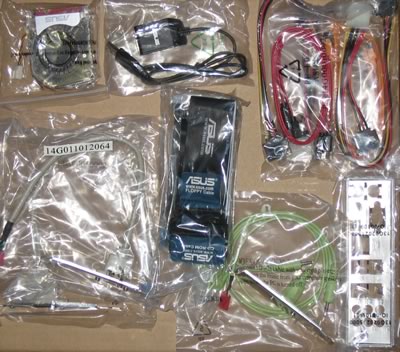
The package includes all the information about the board's design and special features. Below is a list of what's included at the retail package

  • 1x UltraDMA 133/100/66 cable
  • 1x FDD cable
  • 2x SATA cables
  • 2x SATA power cables
  • 1x I/O Shield
  • 1x printed user motherboard manual
  • 1x printed user WiFi-AP manual
  • 1x USB2.0 port module
  • 1x 3in1 Q-connector
  • 1 x Optional Fan
  • 1x IEEE1394a port module
  • 1x Serial port module
  • 1x MP3-In port module
  • 1x Sound-volume knob USB powered
  • 1x CD-ROM with InterVideo® Media Launcher (WinDVD Creator 2, InterVideo PhotoAlbum, DiscMaster 2.5 Platinum, DVD Copy 2.5 Platinum)
  • A flyer with installation and motherboard information
  • 1x CD-ROM with drivers

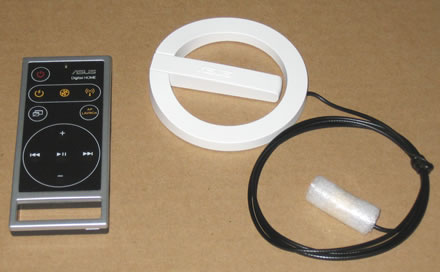
The included remote control can be used for the main functions of the PC, while the included AP antenna will improve the reception:
The board is densely packed with components but most parts can be identified easily:
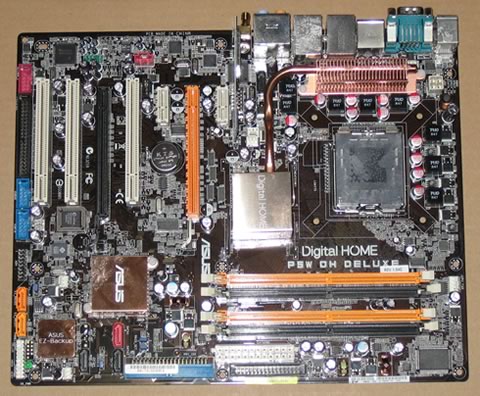
Asus uses a passive cooling solution for the southbridge and northbridge chipsets. Capacitors adjacent to the CPU socket are low profile so there shouldn't be any problem with some of the larger, 3rd party cooling solutions. The board has four banks for the memory modules, colour coded for dual-channel operation:
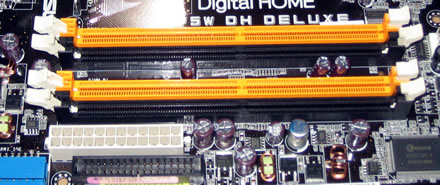
Click to Enlarge!

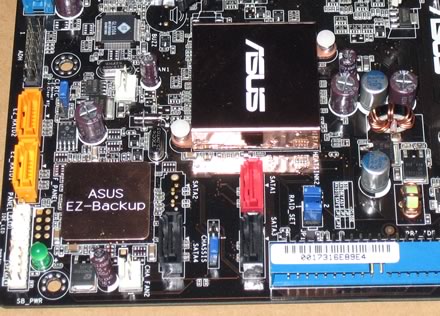
Moving to the southbridge area of the board, we can see the passive heatsink and the five SATA2 connectors
The Asus P5W DH Deluxe supports ATI's Crossfire. There are two PCI-E x16 slots for that purpose. The two PCI-E slots have plenty of space so there shouldn't be any problem with large sized VGA cards.
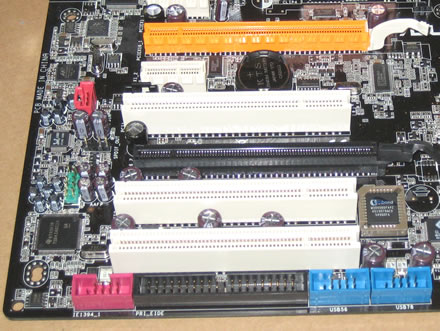
There are extra connections for USB, Front Panel Audio, COM2 and Firewire. Asus has activated all ports in the retail package. The back I/O panel has the usual array of connections

  • 1 x Serial Port
  • 1 x Optical + 1 x Coaxial S/PDIF Output
  • 1 x PS/2 Keyboard
  • 1 x PS/2 Mouse
  • 2 x 1GBit LAN (RJ45)
  • 4 x USB 2.0/1.1
  • 1 x IEEE1394a
  • 1 x External SATA port
  • 1 x WiFi-AP Solo antenna jack
  • 8-Channel Audio I/O


Review Pages

1. Introduction
2. The Package
3. BIOS
4. Installation
5. Everest Ultimate Edition 2006
6. PCMARK - 3DMARK
7. Science Mark - Nero Digital
8. CINEBENCH -SuperPI
9. F.E.A.R - Prey
10. Splinter Cell Chaos Theory - Half Life
11. Overclocking
12. Conclusion


Pages

  • « first
  • ‹ previous
  • 1
  • 2
  • 3
  • 4
  • 5
  • 6
  • 7
  • 8
  • 9
  • …
  • next ›
  • last »

ASUS

ATI

Intel

AMD

Tags: ASUS ATI Intel AMD
Previous Post
F-Tech Solar MT
Next Post
LG GBW-H10N

Related Posts

  • ASUS Hardware Showcase: AI Accelerators, Collector GPUs, and Esport Monitors

  • AMD FSR Upscaling 4.1 Boosts Frames and Image Quality on More Devices

  • ASUS Announces ExpertBook A7 (AMD)

  • AMD announces Ryzen AI Halo

  • ASUS ProArt RTX Spark Windows PCs Available for Immediate Pre-Order

  • ASUS Announces New 64GB Configuration of ASUS Ascent GX10

  • Announcing the New ASUS Googlebook 14

  • Akasa Launches Newton N16, Compact Fanless Case for ASUS NUC 16 Pro

Latest Reviews

be quiet! Light Wings Pro IO fan
Cooling Systems

be quiet! Light Wings Pro IO fan

Why Intelligent Firmware Matters More Than Peak Throughput in NAS Systems
Enterprise & IT

Why Intelligent Firmware Matters More Than Peak Throughput in NAS Systems

Fanxiang MP83 M.2 NVMe SSD Enclosure
Enterprise & IT

Fanxiang MP83 M.2 NVMe SSD Enclosure

Ugreen CM642 USB4.0 Enclosure
PC components

Ugreen CM642 USB4.0 Enclosure

be quiet! Dark Power 14 IO
PC components

be quiet! Dark Power 14 IO

Popular News

MSI’s Latest AMD X870E MAX & EVO Series Motherboards

MSI’s Latest AMD X870E MAX & EVO Series Motherboards

COLORFUL Launches iGame B850M ULTRA Series Micro-ATX Motherboards

COLORFUL Launches iGame B850M ULTRA Series Micro-ATX Motherboards

COLORFUL Presents Limited Edition Chitu MAG-60 Magnetic Keyboard Inspired by the Year of the Horse

COLORFUL Presents Limited Edition Chitu MAG-60 Magnetic Keyboard Inspired by the Year of the Horse

COLORFUL Launches iGame B850I MINI OC V14 Motherboard

COLORFUL Launches iGame B850I MINI OC V14 Motherboard

COLORFUL Launches the iGame X870E VULCAN W OC Motherboard

COLORFUL Launches the iGame X870E VULCAN W OC Motherboard

COLORFUL Presents iGame Z890 ULTRA-S W and iGame Z890M ULTRA Z Motherboards

COLORFUL Presents iGame Z890 ULTRA-S W and iGame Z890M ULTRA Z Motherboards

COLORFUL Expands B850 Motherboard Lineup with New CVN, Battle-Ax, and MEOW Models

COLORFUL Expands B850 Motherboard Lineup with New CVN, Battle-Ax, and MEOW Models

ASRock Adds Support for One Sub-Channel DRAM Module on Intel DDR5 Motherboards

ASRock Adds Support for One Sub-Channel DRAM Module on Intel DDR5 Motherboards

Main menu

  • Home
  • News
  • Reviews
  • Essays
  • About
    • Submit News

    • Contact Us
    • Privacy

    • Promotion
    • Advertise

    • RSS Feed
  • About
  • Privacy
  • Contact Us
  • Promotional Opportunities @ CdrInfo.com
  • Advertise on out site
  • Submit your News to our site
  • RSS Feed