Breaking News

ASUS Hardware Showcase: AI Accelerators, Collector GPUs, and Esport Monitors Apple Unveils Major Hardware and Creative Suite Ecosystem Updates XPG Launches Third-Generation CORE REACTOR III for Next-Gen Power Safety TCL’s New Monitor Range Fits Every Kind of Gaming Setup Viltrox Launches AF 35mm F1.4 Pro FE/Z

logo

  • Share Us
    • Facebook
    • Twitter
  • Home
  • Home
  • News
  • Reviews
  • Essays
  • About
    • Submit News

    • Contact Us
    • Privacy

    • Promotion
    • Advertise

    • RSS Feed

Search form

AOpen Aeolus FX 5900 XT

Jun 17,2004 0

12. Overclocking Capabilities


Review Pages

1. Introduction
2. Test Specifications
3. 3DMark 2003
4. Aquamark 3
5. Codecreatures
6. GLExcess
7. Farcry & Painkiller
8. Unreal Tournament 2004 & 2003
9. Halo & Tomb Raider:AOD
10. Anti-Aliasing Quality
11. Anisotropic Filtering Quality
12. Overclocking Capabilities
13. Conclusion


Overclocking Capabilities

We believe that there is no hardcore gamer who respects himself and hasn't overclocked his VGA card. Many believe there is no point in overclocking since there are no any visible performance differences. This assumption is wrong since some video cards have great overclocking abilities able to maximize their performance 20-30 frames higher! This of course is something to take into account and it appeals even the average user to tweak his card.

- NVidia overclocking

If you are the owner of an NVidia card you have 2 options: The first option is to download a registry file that unlocks a hidden option in NVidia's control panel. This option enables the user to adjust the core and memory clock speeds. An Auto Detect option is also included which tweaks the card automatically.

If the frequencies achieved with the auto detect option aren't sufficient for you then you will need RivaTuner. RivaTuner is a program with which you can change many settings of your card including the clock speeds. We recommend RivaTuner because Nvidia's control panel won't let you tweak your card over a fixed clock value.

The second option you have is NVHardpage. This application has everything and it is much easier to overclock you Nvidia card.

We should note here that GeForce cards after reaching a specific temperature value the default clock speeds are restored after having restarted your system. This of course is being done without the confirmation of the user, so always double check if the clock speeds are those you entered.

- Overclocking AOpen Aeolus FX 5900 XT

We downloaded the registry file to make the first step for overclocking Aeolus. When we installed the file, the contol panel popup had the following look:
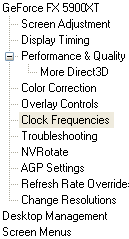

The new option is highlighted

Clicking on the Clock Frequencies and option the following window appeared:
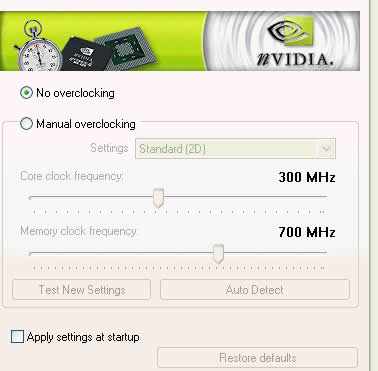
Selecting manual overclocking, 3D performance and clicking the Auto Detect button the clock speeds achieved are the following.

Having that the default frequencies of Aeolus FX 5900 XT are 390 and 700MHz for its core and memory respectively, those achieved with the Auto Detect didn't met our expectations. We were sure that Aeolus could do more than that and RivaTuner justified this:
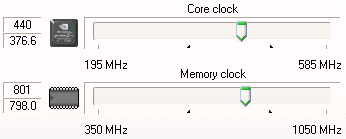
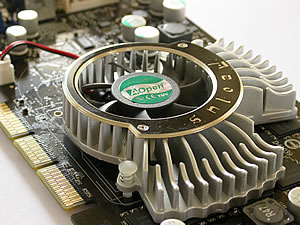
With RivaTuner we leveled up the clock speeds manually up to 440MHz for the core and the awesome 800MHz for the memory. It seems that AOpen's fansink cooling solution does a very good job. 3DMark, Codecreatures, Farcry, Halo and Unreal Tournament 2004 run flawlessly without any artifacts or other irritating defects. But to be honest we expected more from the fancy fan since setting the core speed more than 445 MHz we encountered some pyramids coming out from nowhere.

On the other hand the memory heatsinks do a good job. We haven't seen many GeForce XT models using memory heatsinks, but it seems that it is a very good idea after all since we managed to increase the frequency 100MHz higher!

- Overclock Performance

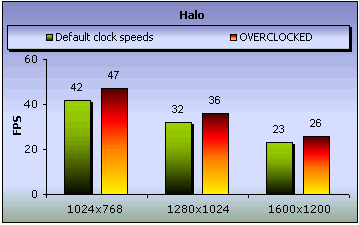
Now we'll see what 440/800 overclocking can do.
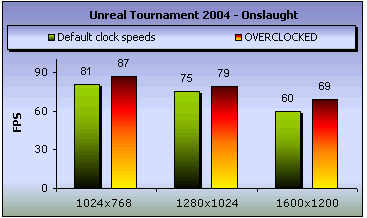


It seems that it worths overclocking Aeolus FX 5900 XT. On Unreal 2004 the performance difference was visible especially at the 1600x1200 resolution with 9 frames higher. On Farcry the difference wasn't much but in Halo Aeolus reached some good fps with the overclocking.


Review Pages

1. Introduction
2. Test Specifications
3. 3DMark 2003
4. Aquamark 3
5. Codecreatures
6. GLExcess
7. Farcry & Painkiller
8. Unreal Tournament 2004 & 2003
9. Halo & Tomb Raider:AOD
10. Anti-Aliasing Quality
11. Anisotropic Filtering Quality
12. Overclocking Capabilities
13. Conclusion


Pages

  • « first
  • ‹ previous
  • …
  • 5
  • 6
  • 7
  • 8
  • 9
  • 10
  • 11
  • 12
  • 13
  • next ›
  • last »

Tags:
Previous Post
AOpen COM5232 / AAH
Next Post
Plasmon UDO30I external SCSI Drive

Related Posts

Latest Reviews

be quiet! Light Wings Pro IO fan
Cooling Systems

be quiet! Light Wings Pro IO fan

Why Intelligent Firmware Matters More Than Peak Throughput in NAS Systems
Enterprise & IT

Why Intelligent Firmware Matters More Than Peak Throughput in NAS Systems

Fanxiang MP83 M.2 NVMe SSD Enclosure
Enterprise & IT

Fanxiang MP83 M.2 NVMe SSD Enclosure

Ugreen CM642 USB4.0 Enclosure
PC components

Ugreen CM642 USB4.0 Enclosure

be quiet! Dark Power 14 IO
PC components

be quiet! Dark Power 14 IO

Popular News

MSI’s Latest AMD X870E MAX & EVO Series Motherboards

MSI’s Latest AMD X870E MAX & EVO Series Motherboards

COLORFUL Launches iGame B850M ULTRA Series Micro-ATX Motherboards

COLORFUL Launches iGame B850M ULTRA Series Micro-ATX Motherboards

COLORFUL Presents Limited Edition Chitu MAG-60 Magnetic Keyboard Inspired by the Year of the Horse

COLORFUL Presents Limited Edition Chitu MAG-60 Magnetic Keyboard Inspired by the Year of the Horse

COLORFUL Launches iGame B850I MINI OC V14 Motherboard

COLORFUL Launches iGame B850I MINI OC V14 Motherboard

COLORFUL Launches the iGame X870E VULCAN W OC Motherboard

COLORFUL Launches the iGame X870E VULCAN W OC Motherboard

COLORFUL Presents iGame Z890 ULTRA-S W and iGame Z890M ULTRA Z Motherboards

COLORFUL Presents iGame Z890 ULTRA-S W and iGame Z890M ULTRA Z Motherboards

COLORFUL Expands B850 Motherboard Lineup with New CVN, Battle-Ax, and MEOW Models

COLORFUL Expands B850 Motherboard Lineup with New CVN, Battle-Ax, and MEOW Models

ASRock Adds Support for One Sub-Channel DRAM Module on Intel DDR5 Motherboards

ASRock Adds Support for One Sub-Channel DRAM Module on Intel DDR5 Motherboards

Main menu

  • Home
  • News
  • Reviews
  • Essays
  • About
    • Submit News

    • Contact Us
    • Privacy

    • Promotion
    • Advertise

    • RSS Feed
  • About
  • Privacy
  • Contact Us
  • Promotional Opportunities @ CdrInfo.com
  • Advertise on out site
  • Submit your News to our site
  • RSS Feed