Breaking News

Silicon Power Launches MP10 Magnetic 10,000mAh Power Bank Samsung Launches New SSD T7 Resurrected NIKON RELEASES FIRMWARE VERSION 3.00 FOR THE NIKON Z F WITH NEW IN-CAMERA FILM GRAIN FEATURE AND MORE COLORFUL Expands B850 Motherboard Lineup with New CVN, Battle-Ax, and MEOW Models HighPoint Unveils the MCIO-PCIEX16-G5

logo

  • Share Us
    • Facebook
    • Twitter
  • Home
  • Home
  • News
  • Reviews
  • Essays
  • Forum
  • Legacy
  • About
    • Submit News

    • Contact Us
    • Privacy

    • Promotion
    • Advertise

    • RSS Feed
    • Site Map

Search form

Windows Search to Show COVID19 Info in Search, Your Phone App Lets You Control Music Apps

Windows Search to Show COVID19 Info in Search, Your Phone App Lets You Control Music Apps

Enterprise & IT Apr 29,2020 0

Microsoft is releasing Windows 10 Insider Preview Build 19619.1000 to Windows Insiders in the Fast ring, and new features include easy access to COVID-19 info in your search box and the control of music and audio apps from within the Your Phone app.

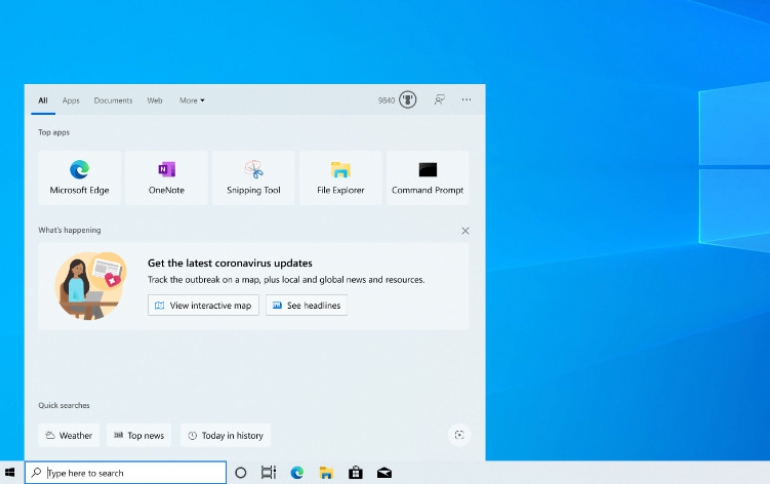
Now you can quickly access timely, trusted information about the coronavirus pandemic using the search bar in Windows. Starting this week, you’ll see a coronavirus info banner in Search Home.

Select View interactive map for fast access to the Bing COVID-19 Tracker, updated daily with the latest information both locally and around the globe. As you explore the tracker, you’ll also see stories from each region, as well as contact info for local and national health resources.

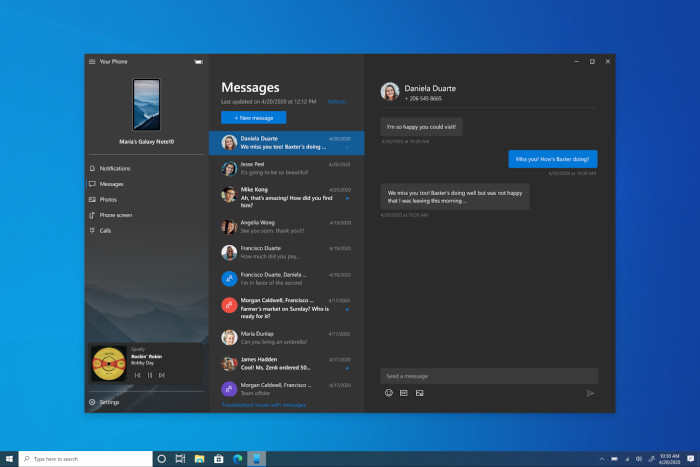
Another feature will allow you to control your music and audio apps from within the Your Phone app. Now you can access and control the audio apps playing from your phone directly within the app, without needing to split your attention between devices or breaking your workflow. Your audio tracks will remain in sync between your phone and PC, and you can switch between multiple sources using the dropdown in the player.
Key features

  • See and interact with the audio apps playing from your smartphone.
  • Audio title track details are displayed and remain in sync with what’s playing on your phone.
  • Control your tracks from your PC, including play, pause, previous/next.
  • Switch between multiple sources using the dropdown in the audio player.

Audio player control requirements

  • A PC running Windows 10 October 2018 Update or later.
  • Android phone running 7.0+.
  • Apps that support media controls in their Android notifications. Some examples of popular apps that are supported include Spotify, Pandora, Amazon Music, Google Play Music, YouTube Music, Xiami Music, and Google Podcast.
  • Show audio currently playing from my phone will be turned on by default in the Your Phone app settings if Your Phone Notifications permissions are granted.
  • Individual audio apps require notifications permissions granted on your Android phone. Turn these on through Android Settings > Notifications > select the audio app > turn Notifications on.

The feature is gradually rolling out, so it may take a few days to show up in the Your Phone app (YP version 1.20041.85 and YPC 1.20041.82. or newer).

Tags: windows 10
Previous Post
Qualcomm Forecasts High Revenue on 5G Chip Demand
Next Post
HBO Max Will be Available on Google Platforms at Launch

Related Posts

  • Microsoft Brings More Widgets for Apps to The Xbox Game Bar

  • Microsoft Says Hackers Take Advantage of Windows Vulnerability

  • Microsoft Says Coronavirus Will Impact Windows 10 Updates

  • Windows 10 is Powering 1 Billion Active Devices

  • Windows 10 Critical Security Update Patches SMB Vulnerability

  • Microsoft Discloses Unpatched Critical SMB Vulnerability in Windows

  • Microsoft Announces a Cloud-based Print Solution

  • New Cortana Coming to Windows 10 Focuses on Business Users

Latest News

Silicon Power Launches MP10 Magnetic 10,000mAh Power Bank
Consumer Electronics

Silicon Power Launches MP10 Magnetic 10,000mAh Power Bank

Samsung Launches New SSD T7 Resurrected
Consumer Electronics

Samsung Launches New SSD T7 Resurrected

NIKON RELEASES FIRMWARE VERSION 3.00 FOR THE NIKON Z F WITH NEW IN-CAMERA FILM GRAIN FEATURE AND MORE
Cameras

NIKON RELEASES FIRMWARE VERSION 3.00 FOR THE NIKON Z F WITH NEW IN-CAMERA FILM GRAIN FEATURE AND MORE

COLORFUL Expands B850 Motherboard Lineup with New CVN, Battle-Ax, and MEOW Models
PC components

COLORFUL Expands B850 Motherboard Lineup with New CVN, Battle-Ax, and MEOW Models

HighPoint Unveils the MCIO-PCIEX16-G5
Enterprise & IT

HighPoint Unveils the MCIO-PCIEX16-G5

Popular Reviews

be quiet! Dark Mount Keyboard

be quiet! Dark Mount Keyboard

Terramaster F8-SSD

Terramaster F8-SSD

be quiet! Light Mount Keyboard

be quiet! Light Mount Keyboard

Soundpeats Pop Clip

Soundpeats Pop Clip

Akaso 360 Action camera

Akaso 360 Action camera

Dragon Touch Digital Calendar

Dragon Touch Digital Calendar

Noctua NF-A12x25 G2 fans

Noctua NF-A12x25 G2 fans

be quiet! Pure Loop 3 280mm

be quiet! Pure Loop 3 280mm

Main menu

  • Home
  • News
  • Reviews
  • Essays
  • Forum
  • Legacy
  • About
    • Submit News

    • Contact Us
    • Privacy

    • Promotion
    • Advertise

    • RSS Feed
    • Site Map
  • About
  • Privacy
  • Contact Us
  • Promotional Opportunities @ CdrInfo.com
  • Advertise on out site
  • Submit your News to our site
  • RSS Feed