Breaking News

be quiet! enters high-end gaming mouse market with Dark Perk Ergo and Dark Perk Sym ASUS ROG announces ROG Strix GS-BE7200 Dual-Band WiFi 7 Gaming Router Transcend Launches RDE3 microSD Express Card Reader for Next-Generation High-Speed Performance Akasa Unleashes Six New Low-Profile CPU Coolers Up to 165W TDP Cooling in Compact Form Factors SWIT announces Powercell Battery Series for Sony, Canon, Nikon, and Fujifilm Cameras

logo

  • Share Us
    • Facebook
    • Twitter
  • Home
  • Home
  • News
  • Reviews
  • Essays
  • Forum
  • Legacy
  • About
    • Submit News

    • Contact Us
    • Privacy

    • Promotion
    • Advertise

    • RSS Feed
    • Site Map

Search form

Windows 7 Cannot Fully Burn BD-R Media

Windows 7 Cannot Fully Burn BD-R Media

Optical Storage Jul 29,2011 0

After receiving many complains from Windows 7 users, Microsoft confirmed that the biult-in optical disc burning application of the popular OS cannot correctly burn large amounts of data onto BD-R SL and DL discs. When attempting to burn 46GB of data to a BD-R Dual Layer disc, or 23GB to a BD-R Single Layer disc in master mode, the process fails and the following error message will be displayed:

"The disc wasn't burned successfully. Make sure that you have the latest firmware for your CD or DVD burner installed, and then try again."
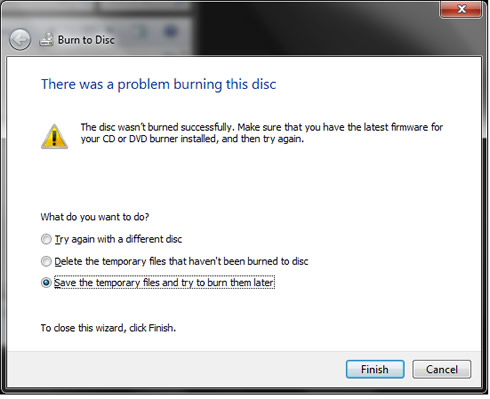


Microsoft confirmed that the the issue occurs because Windows 7 does not calculate the write capacity of BD-R correctly. To work around this issue, Microsoft suggests users not to attempt to write more than 22GB of data onto a BD-R Single Layer disc or 45GB for a BD-R Dual Layer disc.

Microsoft is not offering an update or even a hotfix designed to resolve the issue.

Tags: WindowsBD-R DL
Previous Post
Twitter to Offer Promoted Tweets
Next Post
Alibaba Unveils New OS For Mobiles

Related Posts

  • Microsoft latest update for Windows 11 includes support for Android applications

  • GIGABYTE Motherboards Feature TPM 2.0 + BIOS Function to Support Windows 11 Upgrade

  • Introducing Windows 11

  • Migrate Windows Installation to SSD

  • Microsoft Works on New Windows logo and App Icons

  • Microsoft Talks About a "Modern OS"

  • Visual Studio Supports Development of 64-bit Apps for Windows 10 on ARM

  • Next Windows version Coming In 2015: report

Latest News

be quiet! enters high-end gaming mouse market with Dark Perk Ergo and Dark Perk Sym
Gaming

be quiet! enters high-end gaming mouse market with Dark Perk Ergo and Dark Perk Sym

ASUS ROG announces ROG Strix GS-BE7200 Dual-Band WiFi 7 Gaming Router
Enterprise & IT

ASUS ROG announces ROG Strix GS-BE7200 Dual-Band WiFi 7 Gaming Router

Transcend Launches RDE3 microSD Express Card Reader for Next-Generation High-Speed Performance
Cameras

Transcend Launches RDE3 microSD Express Card Reader for Next-Generation High-Speed Performance

Akasa Unleashes Six New Low-Profile CPU Coolers Up to 165W TDP Cooling in Compact Form Factors
Cooling Systems

Akasa Unleashes Six New Low-Profile CPU Coolers Up to 165W TDP Cooling in Compact Form Factors

SWIT announces Powercell Battery Series for Sony, Canon, Nikon, and Fujifilm Cameras
Cameras

SWIT announces Powercell Battery Series for Sony, Canon, Nikon, and Fujifilm Cameras

Popular Reviews

be quiet! Dark Mount Keyboard

be quiet! Dark Mount Keyboard

Terramaster F8-SSD

Terramaster F8-SSD

be quiet! Light Mount Keyboard

be quiet! Light Mount Keyboard

Soundpeats Pop Clip

Soundpeats Pop Clip

Akaso 360 Action camera

Akaso 360 Action camera

Dragon Touch Digital Calendar

Dragon Touch Digital Calendar

be quiet! Pure Loop 3 280mm

be quiet! Pure Loop 3 280mm

Noctua NF-A12x25 G2 fans

Noctua NF-A12x25 G2 fans

Main menu

  • Home
  • News
  • Reviews
  • Essays
  • Forum
  • Legacy
  • About
    • Submit News

    • Contact Us
    • Privacy

    • Promotion
    • Advertise

    • RSS Feed
    • Site Map
  • About
  • Privacy
  • Contact Us
  • Promotional Opportunities @ CdrInfo.com
  • Advertise on out site
  • Submit your News to our site
  • RSS Feed