
Breaking News

Razer Unveils All-New Wolverine V4 Line ASUS Republic of Gamers Ships ROG Rapture GT-BN98 Router GMK Unveils TriggerKey, a New Mechanical Key System for Greater Precision and Comfort Akasa Unveils Euler MX2, Fanless Mini-ITX Case for Unattended Commercial and Industrial Computing Air Power G10 PC Case Now Available at Newegg with Three Tilting Front Fans

logo

  • Share Us
    • Facebook
    • Twitter
  • Home
  • Home
  • News
  • Reviews
  • Essays
  • About
    • Submit News

    • Contact Us
    • Privacy

    • Promotion
    • Advertise

    • RSS Feed

Search form

Sony NS955 DVD Player

Jun 1,2005 0

4. I/O Interface


Review Pages

1. Introduction - Features
2. Definitions
3. First Look
4. I/O Interface
5. Looking Inside
6. Menu 1
7. Menu 2
8. Error Correction Tests
9. Reading Tests
10. Summary
11. Appendix - Specs


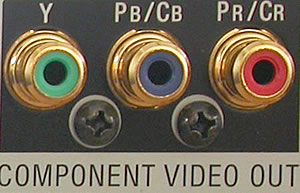
Component-video outputs

these outputs provide the highest quality video signal to your TV. They are quite rare right now; only the newest high-end TVs can support them. But, if you have such a TV, you'll definitely want a DVD player with component video outputs. There are three separate connectors (Y, Pb and Pr) for component video output. The player pictured below has one component video output.
S-video outputs

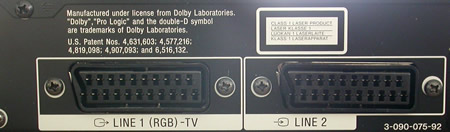
TVs with this type of connection are more common. S-video provides very good picture quality and every DVD player has at least one such output. The Sony DVD-NS955V has two.

Composite-video outputs

these are the most common types of output and they provide satisfactory picture quality. Usually, they have a yellow RCA connector. The Sony DVD-NS955V has two.
AUDIO OUTPUTS

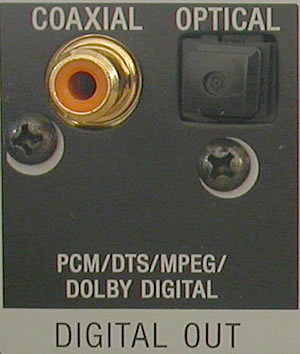
Coaxial digital output - Optical digital output.

These outputs provide the highest-quality audio. They send the digital sound information to the receiver for decoding. You can use either one of these if you have a Dolby Digital receiver.
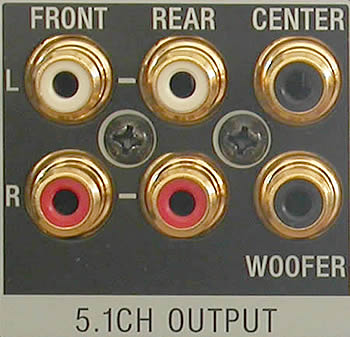
5.1 channel outputs

5.1 channel is a set of six analog outputs, one for each of the Dolby Digital channels (left front, center front, right front, left rear, right rear and subwoofer). The DVD player decodes the Dolby Digital signal and uses its own DAC to output an analog signal. These are the outputs you'll need to use if you are hooking the DVD player up to a "Dolby Digital ready" receiver. Players with 5.1 channel outputs will always have Dolby Digital decoders and they may or may not have DTS decoders. If you have a "Dolby Digital ready" receiver and you want DTS sound, you will need a DVD player with a built-in DTS decoder.
Stereo outputs

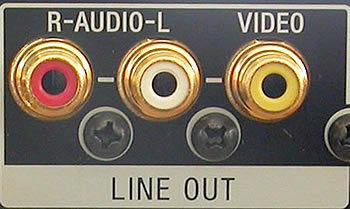
These outputs carry only the stereo music signal. You would use these if you were hooking your DVD player up to a TV that has only two speakers.

 

Review Pages

1. Introduction - Features
2. Definitions
3. First Look
4. I/O Interface
5. Looking Inside
6. Menu 1
7. Menu 2
8. Error Correction Tests
9. Reading Tests
10. Summary
11. Appendix - Specs


Pages

  • « first
  • ‹ previous
  • 1
  • 2
  • 3
  • 4
  • 5
  • 6
  • 7
  • 8
  • 9
  • …
  • next ›
  • last »

Tags:
Previous Post
Sapphire X800
Next Post
The Origins of the Internet

Related Posts

Latest Reviews

Fanxiang MP83 M.2 NVMe SSD Enclosure
Enterprise & IT

Fanxiang MP83 M.2 NVMe SSD Enclosure

Ugreen CM642 USB4.0 Enclosure
PC components

Ugreen CM642 USB4.0 Enclosure

be quiet! Dark Power 14 IO
PC components

be quiet! Dark Power 14 IO

SanDisk High Endurance 512GB microSDXC
Cameras

SanDisk High Endurance 512GB microSDXC

Samsung PRO Ultimate 512GB microSDXC
Cameras

Samsung PRO Ultimate 512GB microSDXC

Popular News

MSI’s Latest AMD X870E MAX & EVO Series Motherboards

MSI’s Latest AMD X870E MAX & EVO Series Motherboards

COLORFUL Launches iGame B850M ULTRA Series Micro-ATX Motherboards

COLORFUL Launches iGame B850M ULTRA Series Micro-ATX Motherboards

COLORFUL Presents Limited Edition Chitu MAG-60 Magnetic Keyboard Inspired by the Year of the Horse

COLORFUL Presents Limited Edition Chitu MAG-60 Magnetic Keyboard Inspired by the Year of the Horse

COLORFUL Launches iGame B850I MINI OC V14 Motherboard

COLORFUL Launches iGame B850I MINI OC V14 Motherboard

COLORFUL Presents iGame Z890 ULTRA-S W and iGame Z890M ULTRA Z Motherboards

COLORFUL Presents iGame Z890 ULTRA-S W and iGame Z890M ULTRA Z Motherboards

COLORFUL Launches the iGame X870E VULCAN W OC Motherboard

COLORFUL Launches the iGame X870E VULCAN W OC Motherboard

COLORFUL Expands B850 Motherboard Lineup with New CVN, Battle-Ax, and MEOW Models

COLORFUL Expands B850 Motherboard Lineup with New CVN, Battle-Ax, and MEOW Models

ASRock Adds Support for One Sub-Channel DRAM Module on Intel DDR5 Motherboards

ASRock Adds Support for One Sub-Channel DRAM Module on Intel DDR5 Motherboards

Main menu

  • Home
  • News
  • Reviews
  • Essays
  • About
    • Submit News

    • Contact Us
    • Privacy

    • Promotion
    • Advertise

    • RSS Feed
  • About
  • Privacy
  • Contact Us
  • Promotional Opportunities @ CdrInfo.com
  • Advertise on out site
  • Submit your News to our site
  • RSS Feed

