
Breaking News

Sony Expands Its Turntable Lineup with New Wireless Models ENDORFY introduces Atlas Electric desks Sony Unveils LinkBuds Clip Open Earbuds be quiet! enters high-end gaming mouse market with Dark Perk Ergo and Dark Perk Sym ASUS ROG announces ROG Strix GS-BE7200 Dual-Band WiFi 7 Gaming Router

logo

  • Share Us
    • Facebook
    • Twitter
  • Home
  • Home
  • News
  • Reviews
  • Essays
  • Forum
  • Legacy
  • About
    • Submit News

    • Contact Us
    • Privacy

    • Promotion
    • Advertise

    • RSS Feed
    • Site Map

Search form

ONES Software

Oct 18,2004 0

2. Usefull Wizards


Review Pages

1. Introduction
2. Usefull Wizards
3. Program Layout
4. Disc Copy - Audio Compilation - Data Mastering
5. Handling Image Files - Record Video_TS
6. Extraction and Tools
7. Conclusion


ONES Software Review - Page 2

Usefull Wizards

- Copy CD/DVD

After installing the program, two new icons are created on the desktop. The "Wizard" icon can be used to launch a user friendly wizard. This is very helpful for users new to CD/DVD recording that don't want to mess around with several advanced options. The wizard will guide you through the entire process and will close automatically when the burning process is complete.

You can copy directly from one disc to another, make Audio CD compilations or burn Data CD/DVD.
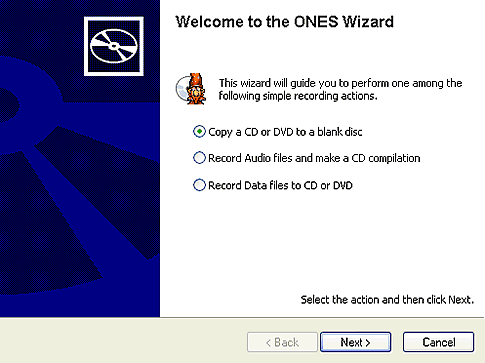
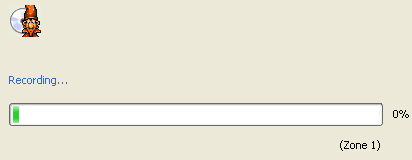
First off, we tried to copy a DVD Video disc to a blank DVD media. The software prompts you to choose the source drive, where the original media is inserted (the software lets you use the same "source" and "target" drive in cases for example where only one drive is available). To ensure a faster data transfer rate during the burning process, the wizard creates a temporary image file and then burns this file to the blank media. Of course, this image file is automatically erased when burning is complete.

When the temporary image file is created, you are free to choose your recorder where the blank media is inserted. You also can use the "overburning CD" option if you are copying CD media, or "Erase before RW" option if you are using DVD+RW, DVD-RW or CD-RW media.

- Audio-Data Compilations

We also used this helpful wizard to create simple audio or data compilations. The basic procedure is the same, with the wizard prompting the user to select the data to be written (or audio files to be compiled), and then burn them without any delay.

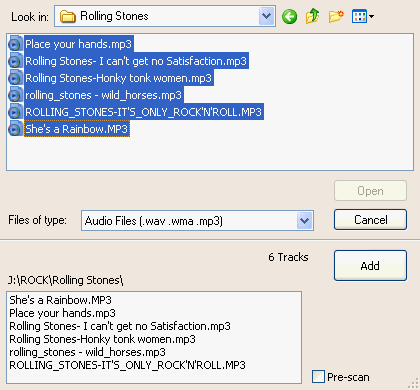
You can always use the "Add audio files" button which is located at the bottom left corner of the window, but you can also drag and drop all the audio files that you want to burn. Same thing applies when creating a Data compilation.
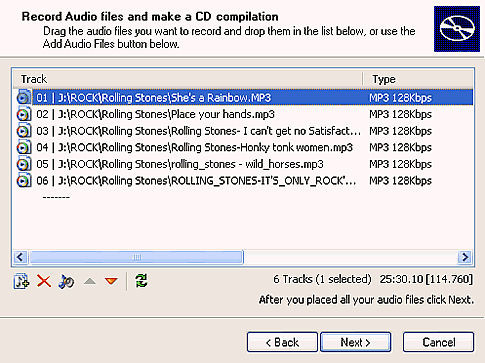
Remember that this wizard is intended for novice users, but more advanced users might find it too simple. On the following pages we will investigate further other uses and benefits of ONES.


 

Review Pages

1. Introduction
2. Usefull Wizards
3. Program Layout
4. Disc Copy - Audio Compilation - Data Mastering
5. Handling Image Files - Record Video_TS
6. Extraction and Tools
7. Conclusion


Pages

  • « first
  • ‹ previous
  • 1
  • 2
  • 3
  • 4
  • 5
  • 6
  • 7
  • next ›
  • last »

Prassi

Tags: Prassi
Previous Post
ONES - Simple AudioCD guide
Next Post
LG GSA-4160B

Related Posts

  • ONES recording software review

  • ONES - Simple DVD-Video guide

  • ONES - Simple AudioCD guide

  • January, 2003 - Prassi is back!

  • Prassi keeps "CD Rep" after the lawsuit settlement

  • Roxio settles Prassi lawsuit

  • VERITAS Software acquires Prassi Europe!

  • Hot news: Prassi USA has been acquired by ...?

Latest Reviews

The Difference Between American and European Stakes and Why It Changes How People Bet
Enterprise & IT

The Difference Between American and European Stakes and Why It Changes How People Bet

Endorfy Thock V2 Wireless Keyboard
PC components

Endorfy Thock V2 Wireless Keyboard

Noctua NH-D15 G2 Chromax.Black
Cooling Systems

Noctua NH-D15 G2 Chromax.Black

EnGenius ECW520 AP
Enterprise & IT

EnGenius ECW520 AP

Noctua NP-DM3 desk mat
Gaming

Noctua NP-DM3 desk mat

Popular News

COLORFUL Introduces CVN B850I GAMING FROZEN Motherboard

COLORFUL Introduces CVN B850I GAMING FROZEN Motherboard

COLORFUL Presents CVN X870 ARK FROZEN Motherboard for AMD Ryzen 9000 CPUs

COLORFUL Presents CVN X870 ARK FROZEN Motherboard for AMD Ryzen 9000 CPUs

TEAMGROUP Launches EXPERT P34F Find My External SSD

TEAMGROUP Launches EXPERT P34F Find My External SSD

ASRock AM5 Motherboards Now Fully Support AMD Ryzen 9 9950X3D & 9900X3D Processors

ASRock AM5 Motherboards Now Fully Support AMD Ryzen 9 9950X3D & 9900X3D Processors

Samsung announces Galaxy Tab S11 and Galaxy S25 FE series

Samsung announces Galaxy Tab S11 and Galaxy S25 FE series

Viltrox Showcases Upcoming Lens Lineup and New TTL Flash at IBC 2025

Viltrox Showcases Upcoming Lens Lineup and New TTL Flash at IBC 2025

CORSAIR announces Vanguard Pro 96 and Vanguard 96 Gaming Keyboards

CORSAIR announces Vanguard Pro 96 and Vanguard 96 Gaming Keyboards

Panasonic Introduces the First Ultra-Telephoto Zoom Lens in the LUMIX S Series

Panasonic Introduces the First Ultra-Telephoto Zoom Lens in the LUMIX S Series

Main menu

  • Home
  • News
  • Reviews
  • Essays
  • Forum
  • Legacy
  • About
    • Submit News

    • Contact Us
    • Privacy

    • Promotion
    • Advertise

    • RSS Feed
    • Site Map
  • About
  • Privacy
  • Contact Us
  • Promotional Opportunities @ CdrInfo.com
  • Advertise on out site
  • Submit your News to our site
  • RSS Feed



