Breaking News

KINGMAX Launches DDR5 Horizon II Overclocking Memory Module, Tailored for High-Load Scenarios DeepCool Unveils SPARTACUS 360 AIO Liquid Cooler for High-End Performance and Customization KINGMAX Launches New DDR4 Blade X Gaming RAM, Delivering Powerful Performance for Intel/AMD Platforms Corsair announces FRAME 4000D LCD RS ARGB PC Case Samsung Launches One UI 8.5 Beta for Next-Level Ease of Use

logo

  • Share Us
    • Facebook
    • Twitter
  • Home
  • Home
  • News
  • Reviews
  • Essays
  • Forum
  • Legacy
  • About
    • Submit News

    • Contact Us
    • Privacy

    • Promotion
    • Advertise

    • RSS Feed
    • Site Map

Search form

Nvidia GeForce Experience Adds OpenGL, Vulkan Support

Nvidia GeForce Experience Adds OpenGL, Vulkan Support

GPUs May 10,2017 0

Nvidia is expanding its GeForce Experience software to add gameplay recording and broadcasting support for OpenGL and Vulkan games.

In other words, you can now stream and record your Minecraft and Doom gameplay with the press of one hotkey, and use the built-in overlay to easily share to Facebook, Google, Twitch, and more. It's powered by Nvidia's ShadowPlay technology, so you can capture up to 4K 60 FPS and never miss a beat while you game.
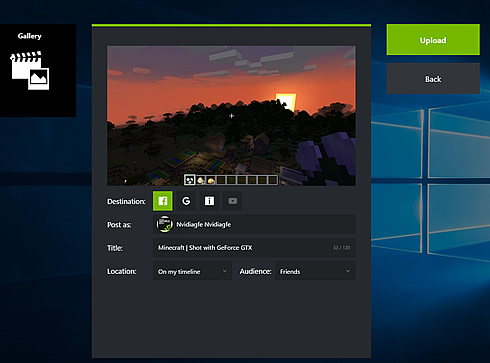

For those familiar with GeForce Experience already, Nvidia has also improved user controls for upload, broadcast, and gallery so sharing gameplay is even easier.

For starters, the Video and Screenshot upload interface is now unified, with identical controls and easy options to switch between supported sites and services. In addition, logging into sites can be done from the same screen, and options for privacy and sharing are all accessible and visible from one view.

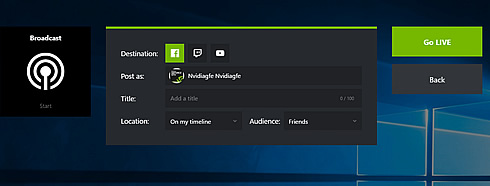
On the Broadcast screen, used for Facebook, Twitch and YouTube streaming, Nvidia has applied the same treatment, enabling you to control all broadcast options from a single screen, and to login to services from the same location.
The Gallery sees improvements too, with the addition of an 'upload history' screen showing all prior uploads, and the location they were uploaded to (accessible via a "Copy URL" button). And a button has been added to the Gallery that enables you to instantly jump to the file location of a screenshot or video in Windows Explorer.

Finally, all screenshot, video and broadcast functions are enhanced by the addition of support for native OpenGL and Vulkan capture in all screen modes, enabling you to capture content from games like Doom, Minecraft and No Man's Sky.

Tags: Nvidia
Previous Post
NVIDIA Launches Volta GPU Platform, Fueling AI and High Performance Computing
Next Post
Facebook to Reduce Links to Low-Quality Web Pages

Related Posts

  • Intel and NVIDIA to Jointly Develop AI Infrastructure and Personal Computing Products

  • MSI Expands NVIDIA RTX PRO Server Lineup

  • PNY Announces Support for the New NVIDIA RTX PRO Blackwell Graphics Card Family

  • KIOXIA flash memory and SSD solutions empower AI applications at NVIDIA GTC 2025

  • INNO3D GEFORCE RTX 50 SERIES IS HERE!

  • VENGEANCE Gaming PCs are Ready for NVIDIA GeForce RTX 50 Series GPUs

  • GeForce At Computex 2024

  • ASUS Presents ESC AI POD With NVIDIA GB200 NVL72 at Computex 2024

Latest News

KINGMAX Launches DDR5 Horizon II Overclocking Memory Module, Tailored for High-Load Scenarios
PC components

KINGMAX Launches DDR5 Horizon II Overclocking Memory Module, Tailored for High-Load Scenarios

DeepCool Unveils SPARTACUS 360 AIO Liquid Cooler for High-End Performance and Customization
Cooling Systems

DeepCool Unveils SPARTACUS 360 AIO Liquid Cooler for High-End Performance and Customization

KINGMAX Launches New DDR4 Blade X Gaming RAM, Delivering Powerful Performance for Intel/AMD Platforms
PC components

KINGMAX Launches New DDR4 Blade X Gaming RAM, Delivering Powerful Performance for Intel/AMD Platforms

Corsair announces FRAME 4000D LCD RS ARGB PC Case
Cooling Systems

Corsair announces FRAME 4000D LCD RS ARGB PC Case

Samsung Launches One UI 8.5 Beta for Next-Level Ease of Use
Smartphones

Samsung Launches One UI 8.5 Beta for Next-Level Ease of Use

Popular Reviews

be quiet! Dark Mount Keyboard

be quiet! Dark Mount Keyboard

Terramaster F8-SSD

Terramaster F8-SSD

be quiet! Light Mount Keyboard

be quiet! Light Mount Keyboard

Soundpeats Pop Clip

Soundpeats Pop Clip

Akaso 360 Action camera

Akaso 360 Action camera

Dragon Touch Digital Calendar

Dragon Touch Digital Calendar

Noctua NF-A12x25 G2 fans

Noctua NF-A12x25 G2 fans

be quiet! Pure Loop 3 280mm

be quiet! Pure Loop 3 280mm

Main menu

  • Home
  • News
  • Reviews
  • Essays
  • Forum
  • Legacy
  • About
    • Submit News

    • Contact Us
    • Privacy

    • Promotion
    • Advertise

    • RSS Feed
    • Site Map
  • About
  • Privacy
  • Contact Us
  • Promotional Opportunities @ CdrInfo.com
  • Advertise on out site
  • Submit your News to our site
  • RSS Feed