Breaking News

Akasa Announces Fermi CM5 Fanless Case for Raspberry Pi Compute Module 5 LG Electronics Advances the LG Sound Suite Experience With New DTS DJI Delivers First Drone Dock with Automated, 25-Second Battery Swaps ASUS Announces ExpertBook A7 (AMD) Kioxia Introduces Direct Liquid Cooling Support for Enterprise SSDs

logo

  • Share Us
    • Facebook
    • Twitter
  • Home
  • Home
  • News
  • Reviews
  • Essays
  • About
    • Submit News

    • Contact Us
    • Privacy

    • Promotion
    • Advertise

    • RSS Feed

Search form

Google Android 7+ Phone Becomes a FIDO2 Security Key

Google Android 7+ Phone Becomes a FIDO2 Security Key

Smartphones Apr 10,2019 0

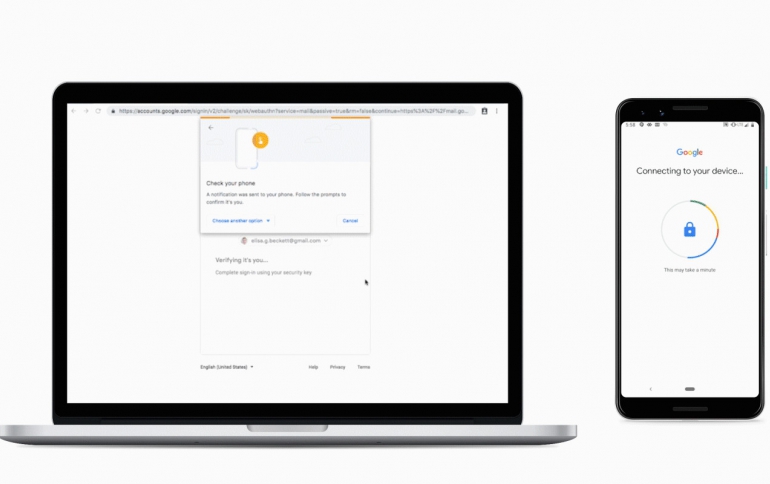
Starting today, any phone running Android 7+ can function as a FIDO2 security key.

Android users can now use their phones to log into their Google accounts on Windows, Chrome OS or macOS devices with phishing-resistant FIDO Authentication. Google’s Android platform was FIDO2 Certified in February.

While the WebAuthn component of FIDO2 enables FIDO Authentication to be built directly into browsers and platforms, Google’s newest offering utilizes the complementary component of FIDO2 — the Client to Authenticator Protocol (CTAP). CTAP is what facilitates the use of external devices like FIDO security keys or mobile devices for logins on FIDO2-enabled browsers and operating systems.

Now, users can add Android 7+ devices to the long list of options available to protect themselves from phishing and other credential-based attacks with FIDO Authentication. Currently, your Android phone can be a security key only for Google accounts. This means you can use your existing phone as your primary 2FA method for your work (G Suite, Cloud Identity, and GCP) and personal Google accounts to sign in on a Bluetooth-enabled Chrome OS, macOS X, or Windows 10 devices with a Chrome browser.

To activate your phone’s built-in security key, all you need is an Android 7.0+ phone and a Bluetooth-enabled Chrome OS, macOS X or Windows 10 computer with a Chrome browser. Here’s how to do it:

  • Add your Google Account to your Android phone.
  • Make sure you’re enrolled in 2SV.
  • On your computer, visit the 2SV settings and click "Add security key".
  • Choose your Android phone from the list of available devices—and you’re done.

When signing in, make sure Bluetooth is turned on on your phone and the device you are signing in on.

Tags: SecurityandroidFIDO
Previous Post
U.S. House Passes Bill to Restore ‘net neutrality’ Rules
Next Post
Google Announces Cloud Code to Accelerating Cloud-native Application Development

Related Posts

  • What’s new in Android 15, plus more updates

  • Connecting all things Android at MWC Barcelona

  • New features for businesses in Android 13

  • Lucky number Android 13: The latest features and updates

  • What’s beta than Android 13?

  • HP Threat Research Shows Attackers Exploiting Zero‐Day Vulnerability Before Enterprises Can Patch

  • HLDS UD Station DVDRW (Preview)

  • Samsung Develops New Security Chip For Mobile Devices

Latest News

Akasa Announces Fermi CM5 Fanless Case for Raspberry Pi Compute Module 5
Cooling Systems

Akasa Announces Fermi CM5 Fanless Case for Raspberry Pi Compute Module 5

LG Electronics Advances the LG Sound Suite Experience With New DTS
Consumer Electronics

LG Electronics Advances the LG Sound Suite Experience With New DTS

DJI Delivers First Drone Dock with Automated, 25-Second Battery Swaps
Drones

DJI Delivers First Drone Dock with Automated, 25-Second Battery Swaps

ASUS Announces ExpertBook A7 (AMD)
Enterprise & IT

ASUS Announces ExpertBook A7 (AMD)

Kioxia Introduces Direct Liquid Cooling Support for Enterprise SSDs
Enterprise & IT

Kioxia Introduces Direct Liquid Cooling Support for Enterprise SSDs

Popular Reviews

Endorfy Thock V2 Wireless Keyboard

Endorfy Thock V2 Wireless Keyboard

SoundPeats Cove Pro

SoundPeats Cove Pro

The Quiet Technology Behind the Spin

The Quiet Technology Behind the Spin

Akaso Brave 8 Lite

Akaso Brave 8 Lite

SoundPeats C30

SoundPeats C30

Kioxia Exceria Plus G3 512GB microSD

Kioxia Exceria Plus G3 512GB microSD

be quiet! Dark Perk Mice

be quiet! Dark Perk Mice

XbotGo Chamaleon

XbotGo Chamaleon

Main menu

  • Home
  • News
  • Reviews
  • Essays
  • About
    • Submit News

    • Contact Us
    • Privacy

    • Promotion
    • Advertise

    • RSS Feed
  • About
  • Privacy
  • Contact Us
  • Promotional Opportunities @ CdrInfo.com
  • Advertise on out site
  • Submit your News to our site
  • RSS Feed