Breaking News

Samsung Expands Its Audio Ecosystem for 2026 With Multi-Device Sound and Immersive New Designs Xiaomi Unveils Xiaomi 17 Ultra Firewalla App 1.67 Brings Enterprise Wi-Fi, RADIUS, and Advanced AP7 Controls to Small Businesses and Power Users Samsung To Unveil AI Vision Built With Google Gemini at CES 2026 Samsung Unveils New Odyssey Gaming Monitor Lineup

logo

  • Share Us
    • Facebook
    • Twitter
  • Home
  • Home
  • News
  • Reviews
  • Essays
  • Forum
  • Legacy
  • About
    • Submit News

    • Contact Us
    • Privacy

    • Promotion
    • Advertise

    • RSS Feed
    • Site Map

Search form

Microsoft Is Rolling Out First New Windows 10 Preview Build

Microsoft Is Rolling Out First New Windows 10 Preview Build

Enterprise & IT Oct 21,2014 0

Microsof is releasing a new build of its Windows 10 Preview program just three weeks after the nitiall release of the new OS. Build 9860 is the first update build to Windows 10 Technical Preview, and more are expected to follow as part of the Windows Insider Program, in order to offer changes and improvements, as well as bug fixes.

The latest build will come to you automatically via the magic of Windows Update.
The download will range between 2GB and 2.74GB depending on CPU architecture and language.


Microsoft says it has made nearly 7,000 improvements and fixes to the product between 9841 and 9860. Many of those fixes were based on problem reports that users submitted in the Community forum or through the Windows Feedback app.

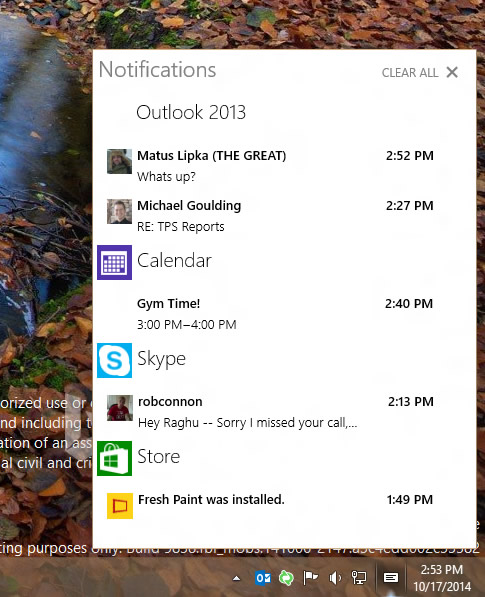
With this build, Microsoft is bringing "Action Center" from Windows Phone over to the PC as the place where you can see and follow up on all actionable items. This build is focused only on enabling basic notifications – quick actions and cleaner UI will come later. You’ll see notifications from the system and apps – from new emails and invites to IMs, Facebook posts and more – all in one place.
In addition, the new build brings easy movement of apps from one monitor to another. When you’re working on multiple monitors, use WIN+SHIFT+<arrow> to move the active app to another monitor.

In order to make it easier fo ryou to know when you are switching deskto, Microsoft has added an animation to make it clear that you are switching.

Microsoft is also adding an option to the Windows 10 Technical Preview to allow users to switch how often they receive new builds. You can now pick between slow and fast settings to get updates quickly with potential bugs, or slowly with a little more stability.

Tags: windows 10
Previous Post
G.Skill Introduces The Phoenix Blade 480GB PCIe SSD
Next Post
Yahoo Reports High Revenue and Profit

Related Posts

  • Windows Search to Show COVID19 Info in Search, Your Phone App Lets You Control Music Apps

  • Microsoft Brings More Widgets for Apps to The Xbox Game Bar

  • Microsoft Says Hackers Take Advantage of Windows Vulnerability

  • Microsoft Says Coronavirus Will Impact Windows 10 Updates

  • Windows 10 is Powering 1 Billion Active Devices

  • Windows 10 Critical Security Update Patches SMB Vulnerability

  • Microsoft Discloses Unpatched Critical SMB Vulnerability in Windows

  • Microsoft Announces a Cloud-based Print Solution

Latest News

Samsung Expands Its Audio Ecosystem for 2026 With Multi-Device Sound and Immersive New Designs
Consumer Electronics

Samsung Expands Its Audio Ecosystem for 2026 With Multi-Device Sound and Immersive New Designs

Xiaomi Unveils Xiaomi 17 Ultra
Smartphones

Xiaomi Unveils Xiaomi 17 Ultra

Firewalla App 1.67 Brings Enterprise Wi-Fi, RADIUS, and Advanced AP7 Controls to Small Businesses and Power Users
Enterprise & IT

Firewalla App 1.67 Brings Enterprise Wi-Fi, RADIUS, and Advanced AP7 Controls to Small Businesses and Power Users

Samsung To Unveil AI Vision Built With Google Gemini at CES 2026
Consumer Electronics

Samsung To Unveil AI Vision Built With Google Gemini at CES 2026

Samsung Unveils New Odyssey Gaming Monitor Lineup
Consumer Electronics

Samsung Unveils New Odyssey Gaming Monitor Lineup

Popular Reviews

be quiet! Dark Mount Keyboard

be quiet! Dark Mount Keyboard

Terramaster F8-SSD

Terramaster F8-SSD

be quiet! Light Mount Keyboard

be quiet! Light Mount Keyboard

Soundpeats Pop Clip

Soundpeats Pop Clip

Akaso 360 Action camera

Akaso 360 Action camera

Dragon Touch Digital Calendar

Dragon Touch Digital Calendar

Noctua NF-A12x25 G2 fans

Noctua NF-A12x25 G2 fans

be quiet! Pure Loop 3 280mm

be quiet! Pure Loop 3 280mm

Main menu

  • Home
  • News
  • Reviews
  • Essays
  • Forum
  • Legacy
  • About
    • Submit News

    • Contact Us
    • Privacy

    • Promotion
    • Advertise

    • RSS Feed
    • Site Map
  • About
  • Privacy
  • Contact Us
  • Promotional Opportunities @ CdrInfo.com
  • Advertise on out site
  • Submit your News to our site
  • RSS Feed