Breaking News

Greenliant heads to electronica 2026 with its full industrial SSD lineup CORSAIR Brings Comfort in Full Bloom with Dark Cherry Blossom TC500 and TC100 RELAXED Gaming Chairs ASUS Republic of Gamers Announces Availability of ROG Swift OLED PG259QWS Ace and Strix OLED XG259QWPG Ace ASUS Announces TUF Gaming Radeon RX 9070 XT Onimusha Special Edition ASUS Republic of Gamers Announces ROG XG Station 3

logo

  • Share Us
    • Facebook
    • Twitter
  • Home
  • Home
  • News
  • Reviews
  • Essays
  • About
    • Submit News

    • Contact Us
    • Privacy

    • Promotion
    • Advertise

    • RSS Feed

Search form

Maxtor OneTouch external HD

Jun 24,2004 2

3. Tests


Review Pages

1. Introduction / Retail Package
2. Installation
3. Tests
4. Features
5. Conclusion


Maxtor OneTouch HDD - Page 3

- Tests

  • Seek Times Test

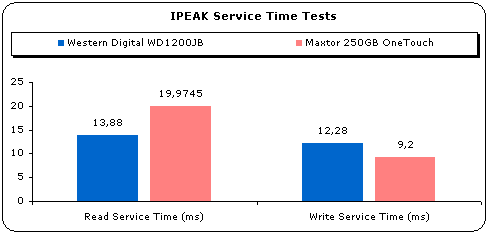
As the test results show, the Maxtor 250GB OneTouch has an access time of 19.97ms when reading and 9.2ms when writing. The drive didn't produce any outliers at both reading/writing service times.

Intel's IPEAK on-line help explains what outliers mean "...A well behaved storage subsystems should have any outliers in the service time distribution and the distribution should be narrow. Outliers in the distribution make the storage subsystem unsuitable for real-time applications, such as multi-media, where variations in service time are detrimental..."

Below are the Read/Write Service times as reported with Intel's IPeak Analyze software:

  • WinBench 99 Test Results

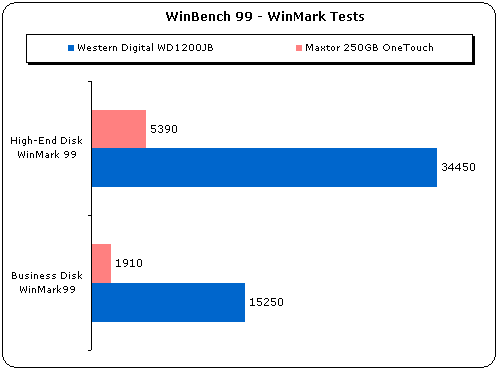
At both High-End and Business WinMark99 tests, the drive performed poorly. We don't know what the cause of this is, maybe the WinBench99 software doesn't support accurately external HDD drives.
  • WinBench99 Transfer Rate Tests

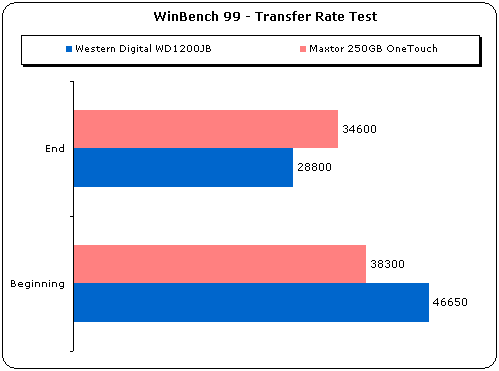
The WinBench99 transfer rate performance is quite good. The drive started at 38.3MB/S and ended at 34.6MB/s. This kind of performance bottlenecked with the FireWire interface. Certainly, performance would be better if the drive is connected as an interl IDE drive.
The "Data Density" graph gives more information about the drive's performance throughout the entire disk's capacity.

  • Intel's IPEAK Tests

Intel's IPEAK test results combine both reading/writing actions and give a weighted score based upon each drive's performance in each specific task. The height of each bar is the measured mean service time per disk access for a drive stimulated with I/Os from the given workload. Shorter bars represent better performance. As we will see, a drive that scores well in the "Desktop" test, doesn't mean that it will perform the same in the "Server" mode test, since the I/O operations are different.
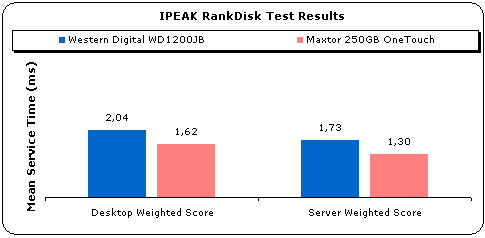
In the above picture you can see the weighted (average) score of all tested drives. Despite the fact that the Maxtor performed poorly in the WinBench99 scores, it showed very good performance in Intel's IPEAK RankDisk software. The high access times don't affect the desktop weighted score due to higher reads vs. writes. In the "Server" test, the drive delivers the lowest and best mark since its write access times are very low (9.2ms).


Review Pages

1. Introduction / Retail Package
2. Installation
3. Tests
4. Features
5. Conclusion


Pages

  • « first
  • ‹ previous
  • 1
  • 2
  • 3
  • 4
  • 5
  • next ›
  • last »

Tags:
Previous Post
Asus CRW-5232AS
Next Post
Laserlock MARATHON protection

Related Posts

2 Comments

  • Default User Picture
    Patrick W.Heben... (not verified) Jun 24, 2004

    "I love my "ONE TOUCH external HDD";I would soon have to replace my broken drive with a [NEW] one!"

    • Log in or register to post comments
  • Default User Picture
    Patrick W.Heben... (not verified) Jun 24, 2004

    "Good detailed review!"

    • Log in or register to post comments

Leave a Reply

Latest Reviews

The Best Online Casino Games to Play on a Browser
Enterprise & IT

The Best Online Casino Games to Play on a Browser

be quiet! Light Wings Pro IO fan
Cooling Systems

be quiet! Light Wings Pro IO fan

Why Intelligent Firmware Matters More Than Peak Throughput in NAS Systems
Enterprise & IT

Why Intelligent Firmware Matters More Than Peak Throughput in NAS Systems

Fanxiang MP83 M.2 NVMe SSD Enclosure
Enterprise & IT

Fanxiang MP83 M.2 NVMe SSD Enclosure

Ugreen CM642 USB4.0 Enclosure
PC components

Ugreen CM642 USB4.0 Enclosure

Popular News

MSI’s Latest AMD X870E MAX & EVO Series Motherboards

MSI’s Latest AMD X870E MAX & EVO Series Motherboards

COLORFUL Launches iGame B850M ULTRA Series Micro-ATX Motherboards

COLORFUL Launches iGame B850M ULTRA Series Micro-ATX Motherboards

COLORFUL Launches iGame B850I MINI OC V14 Motherboard

COLORFUL Launches iGame B850I MINI OC V14 Motherboard

COLORFUL Presents Limited Edition Chitu MAG-60 Magnetic Keyboard Inspired by the Year of the Horse

COLORFUL Presents Limited Edition Chitu MAG-60 Magnetic Keyboard Inspired by the Year of the Horse

COLORFUL Launches the iGame X870E VULCAN W OC Motherboard

COLORFUL Launches the iGame X870E VULCAN W OC Motherboard

COLORFUL Presents iGame Z890 ULTRA-S W and iGame Z890M ULTRA Z Motherboards

COLORFUL Presents iGame Z890 ULTRA-S W and iGame Z890M ULTRA Z Motherboards

COLORFUL Expands B850 Motherboard Lineup with New CVN, Battle-Ax, and MEOW Models

COLORFUL Expands B850 Motherboard Lineup with New CVN, Battle-Ax, and MEOW Models

ASRock Adds Support for One Sub-Channel DRAM Module on Intel DDR5 Motherboards

ASRock Adds Support for One Sub-Channel DRAM Module on Intel DDR5 Motherboards

Main menu

  • Home
  • News
  • Reviews
  • Essays
  • About
    • Submit News

    • Contact Us
    • Privacy

    • Promotion
    • Advertise

    • RSS Feed
  • About
  • Privacy
  • Contact Us
  • Promotional Opportunities @ CdrInfo.com
  • Advertise on out site
  • Submit your News to our site
  • RSS Feed