
PleXWriter PX-W4824A
1. Introduction
PleXWriter PX-W4824A IDE CDR-W - Page 1
- Introduction
 is
the latest recorder from Plextor supporting the fastest available recording/re-writing
speeds. Many other manufacturers have shipped drives supporting the same recording
speed (48X), but without the same re-writing speeds. The only drive that can
compete in the re-writing area is the YAMAHA F1 series, which however has lower
maximum recording speeds (44X). Our review plans to examine whether the new
Plextor drive is the "ultimate" recording machine, as many users expect,
or not.
is
the latest recorder from Plextor supporting the fastest available recording/re-writing
speeds. Many other manufacturers have shipped drives supporting the same recording
speed (48X), but without the same re-writing speeds. The only drive that can
compete in the re-writing area is the YAMAHA F1 series, which however has lower
maximum recording speeds (44X). Our review plans to examine whether the new
Plextor drive is the "ultimate" recording machine, as many users expect,
or not.
- Embedded Technologies
Most of the information is taken from Plextor's article "The Process of Writing(TPOW)".
- CAV Recording Technology
Plextor moved from Z-CLV to CAV with the PX-W4824 series. As Plextor says "...Until recently, Plextor opted for Z-CLV technology as the best compromise of quality over speed. The newest generations of components and technologies allow equal quality and performance to be achieved in CAV systems. CAV is the rotation scheme where the revolutions of the spindle motor (RPM) remain constant, independent of the position on the disc where the data is read. As a result, the data will appear faster at the Optical Pick-Up as the readout position is moved towards the outer radius of the disc..."

Plextor continues "…The greatest challenge of CAV recording lies in the fact that it is impossible to use a single write strategy and fixed laser power over the whole disc. Since the transfer speed constantly changes, this calls for a constantly changing write strategy and increasing laser power. In theory this would mean thousands of write strategies, which would make the database unrealistically large.
In Plextor recorders the database of write strategies for all CLV speeds per unique media has been expanded: every speed in the range from 20X up to 48X is covered in IX steps and all speeds have been assigned an optimised write strategy. Additionally the laser power is adjusted on every 1-minute address (position) increment on the disc. As such, the laser power will gradually grow as the rotation speed increases…"
- P-CAV Recording Technology
The PX-W4824A series not only support CAV but also P-CAV recording technology. At the outer position of the disc, more hardware limitations may force the drive to switch to a safer CLV mode in order to maintain a stable writing. Since only the first part of the disc is written in CAV, it is called Partial-CAV mode.

- PoweRec Technology
 comes
from Plextor Optimised Writing Error Reduction
Control. As Plextor commends "…The most important challenge
facing CD-Recorders is to write high-quality discs with perfect readability
on all available CD-ROM drives. But not every media is suitable for recording
at high speeds. For this reason, Plextor uses PoweRec that "guarantees"
the highest possible recording speed and quality.
comes
from Plextor Optimised Writing Error Reduction
Control. As Plextor commends "…The most important challenge
facing CD-Recorders is to write high-quality discs with perfect readability
on all available CD-ROM drives. But not every media is suitable for recording
at high speeds. For this reason, Plextor uses PoweRec that "guarantees"
the highest possible recording speed and quality.
In start, PoweRec will identify and test the target disc and select an optimised
write strategy for this media. Running OPC will overcome the variation in dye
characteristics over the disc. Start writing at 20X from 00:00:00mins. The write
strategy changes every 1X speed step while the laser power is adjusted every
1-minute position change. Besides this, PoweRec continuous monitoring of the
write result will cause the drive to switch to CLV mode if the error signals
exceed a certain threshold. In addition, simultaneously a thermistor-based circuit
will adjust the Laser Power should the drive's internal temperature rise too
much…"


Plextor offers the ability to disable PoweRec and write all media up to 48X recording speeds. However in this case, recording errors could occur causing un-readable CDs, with low quality media.
- VariRec Technology
 comes
from the "Variable Recording" words and allows the change
of the laser power when writing CD-DA or CD-R at 4X. (TAO or DAO). Users are
allowed to make slight adjustments to the default value (0). This will change
the quality of the sound and will also increase the playability or compatibility
(or in extreme cases in-compatibility) with the existing players. Plextor says
that the default setting (0) already reflects to the optimised laser power with
the lowest jitter.
comes
from the "Variable Recording" words and allows the change
of the laser power when writing CD-DA or CD-R at 4X. (TAO or DAO). Users are
allowed to make slight adjustments to the default value (0). This will change
the quality of the sound and will also increase the playability or compatibility
(or in extreme cases in-compatibility) with the existing players. Plextor says
that the default setting (0) already reflects to the optimised laser power with
the lowest jitter.
- Black Tray & improved PCB
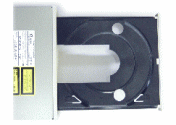 Plextor
already used black tray in the PX-W4012A series that is also present in the
new PX-W4824A series. As Plextor explains "...During recording a high-power
laser beam is directed to the CD surface. This light is reflected by various
objects: the mirror-like metal layer of the disc, but also the shiny metal screw
heads, the slider bars, the metal body of the pick-up, the pick-up lens, and
so on. This will cause a relative small but existing 'pollution' of reflected
light.
Plextor
already used black tray in the PX-W4012A series that is also present in the
new PX-W4824A series. As Plextor explains "...During recording a high-power
laser beam is directed to the CD surface. This light is reflected by various
objects: the mirror-like metal layer of the disc, but also the shiny metal screw
heads, the slider bars, the metal body of the pick-up, the pick-up lens, and
so on. This will cause a relative small but existing 'pollution' of reflected
light.
When these reflections find their way back into the detection circuit of the pick-up, they can cause distortion of the original signal. Plextor has decided to use a black tray design in order to absorb as much as possible of these reflections. As this decreases the disturbance of the original reflected light, it will result in a better-defined signal and less C1 errors. This greatly improves the write quality..."
In addition, the PX-W4824A series include an optimised PCB (power circuit board) that reduces the overall power supply induced noise. This greatly improves the jitter and deviation levels of the drive and produces higher quality writing results.
- 48X Reading Speed
Lastly, in the new PX-W4824A series, Plextor has kept the rotation speed below 9000 RPM (40X CAV) in order to avoid noise problems and/or possible CD destruction. A "turbo" mode is available with the use of SpeedRead option that allows users to reach the 48X reading speed for stamped and recorded data CD's (only). User cannot use the "turbo" mode with AudioCDs (including mixed mode) and CD-RW media (RW, HS-RW and US-RW). As a final precaution, Plextor has redesigned and reinforced the tray and drive's bezel preventing any particles of an exploding disc escaping from the drive.
- Specifications
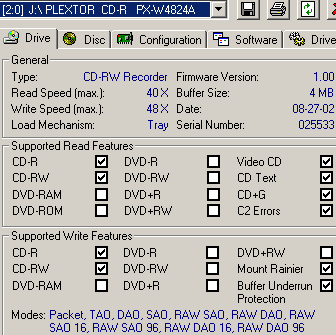
Using Nero Info Tool software, we can see the drive's properties/main features. The drive under the "normal" working mode supports 40X (CAV) reading speed. The firmware revision of the drive was 1.00 and as we can see the drive is "Mt. Rainier" ready:
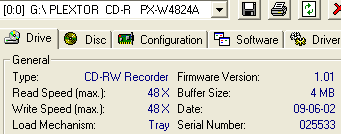
After the SpeedRead function is activated (either from PlexTools or by pressing the eject button for more than 3secs) the drive supports 48X reading. You can disable the SpeedRead option again, by pushing the eject button or by cutting off the power supply. Plextor send a newer firmware revision (V1.01), after most tests had finished. However didn't fix anything of our negative issues. Hopefully future firmware upgrades will fine tuning the drive's performance:


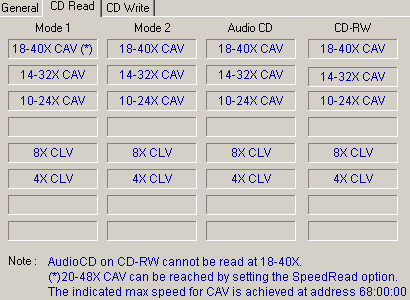
Below we can see the available reading speeds, according to the inserted disc. The drive normally can read up to 40X (CAV), all Mode1, Mode2, AudioCD and CD-RW discs. The "SpeedRead" option affects only Mode1 discs.
PleXTools also gives other information about the drive such as the supported reading/writing modes and as you can see it reveals the lowest access time of the industry (<65ms)





