Pioneer DVR-A08XLA
1. Introduction
Review Pages
2. DVD Recording Tests
3. CDSpeed/PlexTools Scans - Page 1
4. CDSpeed/PlexTools Scans - Page 2
5. CDSpeed/PlexTools Scans - Page 3
6. CDSpeed/PlexTools Scans - Page 4
7. CDSpeed/PlexTools Scans - Page 5
8. CDSpeed/PlexTools Scans - Page 6
9. CDSpeed/PlexTools Scans - Page 7
10. DVD+R DL - Page 1
11. DVD+R DL - Page 2
12. BookType Setting
13. QuietDrive Technology
14. Conclusion
Pioneer DVR-A08XLA DL Recorder - Page 1
 After
we finished testing the Pioneer DVR-108 drive, Pioneer sent us the
DVR-A08XLA (retail version) with a new firmware
(v1.10) that
promised a lot, with lowered writing times and improved writing quality.
In this review, we mainly test the DVR-A08's writing quality with
several DVD
recordable
media and we also check whether the various negative points mentioned
in the DVR-108 review, have been fixed with the new firmware.
After
we finished testing the Pioneer DVR-108 drive, Pioneer sent us the
DVR-A08XLA (retail version) with a new firmware
(v1.10) that
promised a lot, with lowered writing times and improved writing quality.
In this review, we mainly test the DVR-A08's writing quality with
several DVD
recordable
media and we also check whether the various negative points mentioned
in the DVR-108 review, have been fixed with the new firmware.
New readers are advised, before proceeding, to read the Pioneer DVR-108 review that contains the full reading tests.
- What are the main differences between the DVR-108 and DVR-A08XL series?
Probably, most users have this question in mind when reading the reviews. We have already answered this question in our Pioneer DVR-108 review, but we will repeat it one more time for new users. :-)
Generally speaking, the DVR-108 and DVR-A08XL drives have exactly the same reading/writing specs and performance but not the same "hardware". Pioneer manufactures the DVR-108 drives for other manufacturers (OEM), while it supplies the retail version as the DVR-A08 offering an advanced feature called "QuietDrive" technology. According to Pioneer, "...QuietDrive features a honeycomb design in the unit's top outer casing that reduces vibration from the drive mechanism. Together with noise dampening firmware and the lack of an integral fan, ambient noise from the DVR-A08XL is significantly reduced..."
Another difference is the front bezel design, which is very well designed for the DVR-A08XL series. Lastly, the OEM version (DVR-108A) does not include any kind of software (Recording/Authoring) nor any DVD-R/RW media.
If you are wondering which drive you should buy, we could say, the retail price will make your mind up for you. The DVR-108 is already being sold on the market for a low enough price, so the DVR-A08XL will be priced a little higher (you pay for QuietDrive feature and good looking design). But you won't notice any performance differences between the two:-)
- Specifications
The Pioneer DVR-A08 supports 16X DVD±R, 4X DVD±RW and 4X DVD+R DL writing according to the official specifications. As a CD recorder it supports 32X CD-R and 24X US-RW writing along with 40X CD-ROM reading. Below are the full specs for the drive:
Drive |
Pioneer DVR-108 |
|
Media |
DVD |
CD |
Transfer Rate Read |
16X CAV SL DVD-ROM 12X CAV DL DVD-ROM |
40X CD-ROM CAV |
12X CAV DVD±R |
||
8X CAV DVD±RW |
32X CD-RW CAV |
|
2X CLV DVD-RAM |
||
8X CAV DVD+R9 |
||
Transfer Rate Write |
16X DVD±R Z-CLV |
32X CD-R Z-CLV |
4X DVD±RW CLV |
24X CD-RW Z-CLV |
|
4 DVD+R9 CLV |
||
Access Time |
145ms |
125ms |
Mechanism |
motorized Tray load mechanism for horizonal and vertical use |
|
Interface |
IDE / ATAPI |
|
Burst Transfer Rate |
PIO mode 4 / Ultra DMA 33 |
|
Cashe Memory |
2MB |
|
Supported Media formats |
DVD-ROM, DVD-R, DVD-RW, DVD+R, DVD+RW, DVD-Video, DVD-RAM, CD-ROM, CD-ROM XA, CD-Audio, CD Extra, CD Text, CD-IReady, CD-Bridge, Photo-CD, VideoCD, Hybrid CD |
|
Audio |
headphone jack and volume control at front plus digital-out and line-out at the back (MPC compatible) |
|
Writing methods |
DAO(disc at once), SAO(session at once), TAO(track at once) with zero gap, variable or fixed packet, multisession |
|
Weight |
1.1kgr |
|
Dimensions |
148(W) × 42.3(H) × 198(D) mm |
|
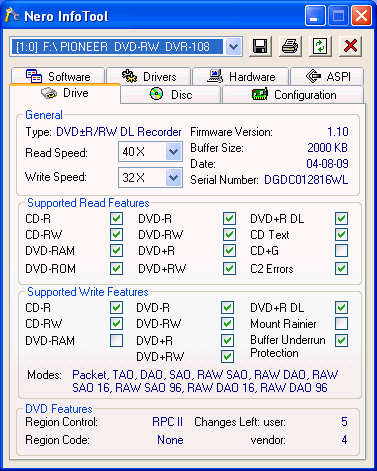
The drive does not support Mount Rainier, as is the case with most new DVD recorders, for either of the CD or DVD formats. It uses the well known RPC II region control, allowing a user to change the drive's region at most 5 times. Till now, there has been no known way to make the drive region free.
Below are the drive's main characteristics as given by NeroInfoTool. and DVDInfoPro:


- The Package
We received a retail Pioneer DVR-A08XLA from Pioneer.

The drive is also available with black bezel under a different code name (DVR-A08XLB):

All retail packages include MyDVD Deluxe v5.3, DLA (Drive Letter Access) v4.9, RecordNow! v7.2, Simple Backup v5.0 and CinePlayer software v2.0.1.
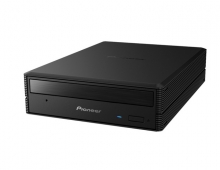
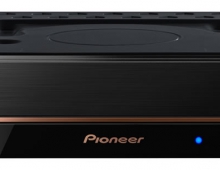
The front bezel on the drive is probably the nicest we have seen on an ODD device, with Pioneer's logo at the center as well as the DVD-R/RW, DVD+RW, DVD Multi and US-RW logos. Pioneer also includes the 16X16 logo that helps users distinguish the drive's main writing speeds.


On the rear you can find the analogue and digital audio outputs (SPDIF), the IDE master/slave/cs selection pins, the IDE connector and the power input. There are even vent holes for a fan, however one is not installed.

The top of the drive includes the identification sticker with the code number, serial number, manufacture date and place of manufacture ("Made in China"), as well as various approvals among other things:

The top also includes the honeycomb design in the unit's top outer casing that reduces vibration from the drive mechanism

Removing the screws and opening the drive's cover voids the drive's warranty. For reference reasons, we post the following pictures. Click on the photos for an enlarged view.

The main chipset is from NEC and its part number is NEC D63635GM, which is used in combination with the NEC C333500:

Model name |
C3335
|
|
Process |
Bi-CMOS 0.35
|
|
Voltage |
5V
|
|
Package |
120-pin TQFP (14x14mm)
|
|
Power consumption |
0.66W (8x DVD playback)
|
|
| 0.74W 8x DVD recording)
|
||
Speeds |
DVD playback |
16x CAV |
DVD-RAM playback |
4x |
|
DVD recording |
16x |
|
CD playback |
48x |
|
CD recording |
48x |
|
Model name |
D63635
|
|
Process |
CMOS 0.15
|
|
Voltage |
1.5V core, 3.3V I/O
|
|
Package |
216-pin LQFP (24x24mm)
|
|
Power consumption |
0.35W (8x DVD playback)
|
|
| 0.95W (8x DVD recording, LVDS)
|
||
Interface |
Host |
ATA/ATAPI5 |
Buffer |
16Mbit SDRAM |
|
Speeds |
DVD playback |
16x CAV |
DVD-RAM playback |
4x |
|
DVD recording |
16x |
|
CD playback |
48x |
|
CD recording |
48x |
|
- Installation
The device was connected to our test PC and was identified as "PIONEER DVD-RW DVR-108" under WinXP.

- Testing software
In order to perform our tests we used:
- Nero CD-DVD Speed v3.12
- CDVD Benchmark v1.21
- ExactAudioCopy v0.9 beta5
- Nero Info Tool v2.24
- PlexTools v2.16 (Reader: Plextor PX-712A firmware v1.05, Reading speed 8X CLV for CD-R)
- DVDInfoPro v2.64
- Nero Burning Rom v6.3.1.20
- DVD Decrypter 3.5.1.0
- CopyToDVD 3.0.30
Review Pages
2. DVD Recording Tests
3. CDSpeed/PlexTools Scans - Page 1
4. CDSpeed/PlexTools Scans - Page 2
5. CDSpeed/PlexTools Scans - Page 3
6. CDSpeed/PlexTools Scans - Page 4
7. CDSpeed/PlexTools Scans - Page 5
8. CDSpeed/PlexTools Scans - Page 6
9. CDSpeed/PlexTools Scans - Page 7
10. DVD+R DL - Page 1
11. DVD+R DL - Page 2
12. BookType Setting
13. QuietDrive Technology
14. Conclusion