
Pioneer DVR-A06 DVD±RW recorder
1. Introduction
Review Pages
Pioneer DVR-A06 DVD±RW recorder - Page 1
 Pioneer
Electronics is topping its already outstanding DVD burner (A05) with the new Pioneer
DVR-A06 DVD/CD writer. Being a "pioneer" in the area of DVD recording, this company decided to launch this multiformat drive
in order to take the confusion out of choosing your next DVD writer. The new burner supports
all major formats. It is remarkable, and thus a clear indication of the very advanced technology this company owns, the fact that it was again able to deliver to market drives supporting formats which their "inventors" thus so far proved unable to do so.
Pioneer
Electronics is topping its already outstanding DVD burner (A05) with the new Pioneer
DVR-A06 DVD/CD writer. Being a "pioneer" in the area of DVD recording, this company decided to launch this multiformat drive
in order to take the confusion out of choosing your next DVD writer. The new burner supports
all major formats. It is remarkable, and thus a clear indication of the very advanced technology this company owns, the fact that it was again able to deliver to market drives supporting formats which their "inventors" thus so far proved unable to do so.
- Features
The DVRA06 offers wider compatibility over the previous Pioneer DVD writers since it supports high speed writing with various format media. DVD±R writing is achieved at 4x and DVD±RW at 2x and 2.4x. Moreover, Pioneer has developed a series of technologies towards the improvement of final recording performance.
- Precision Recording Technology

DVR-A06’s development began by improving conventional algorithms and re-evaluating the record and overwrite characteristics of DVD-RW media to apply a sequence that optimizes recording conditions. The DVR-A06 achieves approximately ten times better overwrite performance than previous Pioneer recorders. It also uses an industry- first DRT-DM (Distributed Real Time Defect Management) offering a form of defect management that conforms to the DVD format without sacrificing write performance. The result is highly compatible writing even on discs that have been rewritten many times, without causing a degradation of actual disc quality.
Supposed that a DVD-RW disc is defected in some areas. Upon first encountering a problem area (e.g..fingerprint) the drive searches for the next rewritable area. In future instances when the media is used, drives/players will automatically skip the problem area. The defect management system is based on the UDF 2.00 file system.
The DVR-A06/106 has a small on-board memory IC named "DBI Chip". This stores the "Defective Block Information" that is returned from a disc with scratches, dust, fingerprints etc. Defective Block Information EDR (Enhanced Defect Reporting) reports the defective block and the level of the defect to the DBI memory.

The DBI memory enables the host to perform the defect management operation at a later time. Thus, no influence appears during the real time recording.
Software Defect Management
The DRT-DM is expected to be implemented into up-coming software applications (Ahead, Sonic, Pinnacle, Roxio, ArcSoft etc). The drive reports the location of any defective blocks. UDF File Driver performs the operation to “spare the defective block”. The device driver (EDR) transports the necessary information between them.
The DRT-DM commands for implementation can be found in the "Mt Fuji Commands for Multimedia Devices SFF8090i Version 5, Revision 1.49".
The interesting thing about DRT-DM is that it can be used in "Real-Time" video streaming operations. Since the defected areas have been spotted beforehand, no loss of speed is expected when rewriting on DVD-RW media. Which is especially suited for “seamless video recording”.
Pioneer's DRT-DM could be compared to Mt Rainier defect management in the following ways:
| DRT-DM (Software Defect Management) | Mt. Rainier ( Hardware Defect Management) |
DVD Forum Standard for DVD-RW media |
+RW Alliance Unique Local Standard for
+RW media |
Defect Management is controlled by the
software. The Host PC can adopt
flexibility accordingly to the defect level. |
Defect Management by the Control Driver
on the Hardware. |
DRT-DM is not only for Data Recording
but also a target for real-time Video
Recording which Includes the DVD-Video
Recording Format. |
Mt.Rainier is only for Data Recording.
No compatibility is expected for Video
Recording. |
| DRT-DM adopts UDF2.0 File System.
Host PC registers the address of the
defective blocks in the UDF file table
which enables any drives & players to
read the disc / contents |
The information of defective blocks
are registered on the special reserve area
which hinders general compatibility with
drives & players to read. |
| DRT-DM uses UDF2.0 platform, most
DVD-ROM Drives can read without any
drivers installed. |
DVD-ROM Drives are required to install
the Address Conversion Driver to read. |
- Ultra DRA (Dynamic Resonance Absorber)
 Poorly balanced discs can cause vibrations that affect performance during high
speed
recording and playback. The DVR-A06 significantly reduces the effects of these
vibrations with the implementation of Ultra DRA technology, allowing the high
precision servo system to remain stable during both high speed recording and
playback.
Poorly balanced discs can cause vibrations that affect performance during high
speed
recording and playback. The DVR-A06 significantly reduces the effects of these
vibrations with the implementation of Ultra DRA technology, allowing the high
precision servo system to remain stable during both high speed recording and
playback.
In the picture below you can see the Ultra DRA effect on the total vibrations of the drive. This feature reduces the vibrations by 65% at 9200rpm rotation speed.

- Smart laser drive technology
Pioneer’s advanced laser driver uses a pickup that incorporates a write strategy control circuit, ensuring stable write performance at high speed recording.
- Liquid crystal tilt technology
Pioneer’s liquid crystal tilt mechanism provides accurate and reliable operation with discs having uneven curvature or thickness. This mechanism is used for both recording and playback.
- Specifications
Write support |
DVD |
DVD-R 4.7GB, DVD-RW, DVD+R, DVD+RW |
CD |
CD-R 700 (type 80), 650MB (type 74),
CD-RW, Highspeed CD-RW |
|
|
Read support |
DVD |
DVD-ROM, DVD-VIDEO (Single & Dual
layer), DVD-R, DVD-RW, DVD+R, DVD+RW |
CD |
CD-ROM(Mode1&2), CD-ROM XA, CD-DA(CD
Audio), Video CD,
PhotoCD (single/multi-session), CD EXTRA(CD-Plus), CD-Text, CD-R, CD-RW |
|
Interface |
ATAPI(PIO Mode4)/Multi Word DMA Mode2) Ultra DMA33(Ultra DMA Mode2) |
|
Audio Interface |
Analog out |
|
Write Speed |
DVD-R |
4x, 2x, 1x CLV (5.54MB/s) |
DVD-RW |
2x, 1x CLV (2.77MB/s) |
|
DVD+R |
4x, 2.4x CLV (5.54MB/s) |
|
DVD+RW |
2.4x CLV (3.32MB/s) |
|
CD-R |
16x, 12x, 8x, 4x CLV (2.4MB/s) |
|
CD-RW |
10x, 4x CLV (1.5MB/s) |
|
Read Speed |
DVD-ROM (Single) |
Max 12x CAV (16.62MB/s) |
DVD-ROM (Dual) |
Max 8x CAV (11.08MB/s) |
|
DVD-R, DVD-RW |
Max 6x CAV ( 8.31MB/s) |
|
DVD+R, DVD+RW |
Max 6x CAV (8.31MB/s) |
|
CD-ROM |
Max 32x CAV (4.8MB/s) |
|
CD-R,CD-RW |
Max 32x CAV (4.8MB/s) |
|
CD-DA(DAE) |
Max 32x CAV (4.8MB/s) |
|
CD-DA |
Max 10x CAV (1.5MB/s) |
|
Video-CD |
4x CLV (0.6MB/s) |
|
| Access Time (Random Average) |
DVD-ROM |
140 msec |
CD-ROM |
130 msec |
|
Seek Time (Random Average) |
DVD-ROM |
130 msec |
CD-ROM |
120 msec |
|
Data Buffer (size) |
2Mbytes |
|
As you can see from the specifications of the drive, Pioneer supports writing of all DVD-R/RW, DVD+R/RW and CD-R/RW media. DVD-R and DVD+R writing can be achieved at 4x CAV maximum. Rewriting is allowed at 2.4x CLV for DVD+RW and 2x CLV for DVD-RW. The maximum reading speed for DVD-ROM is 12x CAV.
As for the CD-R media Pioneer supports 4x, 8x,12x and 16x CLV for CD-R and 4x, 10x CLV writing for the CD-RW. The CD-R/RW reading speed is 32x CAV.
Buffer Underun protection is also applied for both DVD-R/RW and CD-R/RW media.

Pioneer DVR-A06 uses the RPC II region control, allowing a user to change the drive's region 5 times in total. For our tests, we set the region code to 2 (Europe).
The drive supports reading of all the DVD recordable/rewritable discs except DVD-RAM. Video CD, CD+G and CD Text are also supported
RAW DAO 96 writing mode is included in the drive's capabilities. In addition, packet writing, SAO, TAO and RAW SAO 96 are supported as well.
- Unpacking
 The
retail package includes the Pioneer DVR-A06 IDE drive, one 4.7GB 4x DVD-R Ver.
2.0 disc for data/video by Maxell, one 4.7GB 1/2x DVD-RW disc by Maxell, a multilingual manual
with basic operating instructions, an audio cable and the accompanied mounting screws.
The
retail package includes the Pioneer DVR-A06 IDE drive, one 4.7GB 4x DVD-R Ver.
2.0 disc for data/video by Maxell, one 4.7GB 1/2x DVD-RW disc by Maxell, a multilingual manual
with basic operating instructions, an audio cable and the accompanied mounting screws.
The bundled software comes from Pinnacle, and includes the Pinnacle Instant CD/DVD v7.06 (OEM version), and Pinnacle Studio v. 8 SE.
Instant CD/DVD includes InstantDisc for CD/DVD creation, InstantWrite for "drag and drop" operations on CD/DVD, InstantCopy for one-to-one copies of CD's and DVD's, and InstantBackup for easy backup tasks. The software also offers a built-in DVD player for playback of DVD movies on the PC.
Pinnacle Studio v.8 SE is a video editing and authoring software with a user-friendly interface and advanced features like scene detection, title generation and scene transitions. The software also supports capturing from DV and Digital8 cameras through an IEEE1394 interface.
The front panel of the drive is white and the originate of the drive is easily identified by the Pioneer logo stamped on the right side of the disc tray.Two ventilation holes are placed on the front panel of the drive, right next to the Busy indicator.
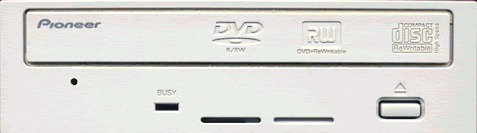
On the disc loading tray you can see both DVD-R/RW and DVD+Rewritable logos, revealing the dual DVD format support of the unit. Two operation LED are placed on the front panel. The Busy LED lights when the drive is accessing/reading a disc, while the Write LED is active while recording.

On the rear panel you can see the analog output, the ATAPI interface connector and the power input.
The mainboard of the drive is available in the following picture. You can click on the picture to see it in a higher resolution, but in case your internet access is rather slow, please be patient while it is loading.


- Installation
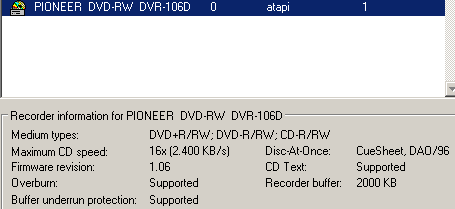
The Pioneer DVR-A06 drive was connected to our test PC and was identified as "PIONEER DVD-RW DVR-106D" under WinXP. All tests were done with firmware revision v1.06. In the test graphs, we compare the new drive with two other dual DVD recorders, the Optorite DD0203 (Sanyo CRD-BPDV2) and the Sony DRX-500UL.

Review Pages





