
52X CD-RW Roundup Vol2
1. Introduction - AOpen CRW5224
Review Pages
2. Introduction - Mitsumi CR-487ETE
3. Introduction - Teac CD-W552E
4. Introduction - Waitec STORM 52/2
5. Data Reading tests
6. Error Correction Tests page 1
7. Error Correction Tests page 2
8. CloneCD Reading Tests
9. DAE Tests
10. CD-R Writing Tests
11. Writing Quality Tests page 1 - AOpen CRW5224
12. Writing Quality Tests page 2 - AOpen CRW5224
13. Writing Quality Tests page 1 - Mitsumi CR-487ETE
14. Writing Quality Tests page 2 - Mitsumi CR-487ETE
15. Writing Quality Tests page 1 - Teac CD-W552E
16. Writing Quality Tests page 2- Teac CD-W552E
17. Writing Quality Tests page 1 - Waitec STORM 52/2
18. Writing Quality Tests page 2- Waitec STORM 52/2
19. RW Writing Tests
20. Conclusion
52X IDE CD-RW Recorder Roundup - Page 1
The 52X-recording race is already in full progress. Someone might say that this is a chipset competition, meaning that the manufacturers have to choose between the Ricoh or Mediatek solution for their 52X recorders. We have already tested the proposals of BTC, Asus, CyberDrive (Mediatek) and this time we present a huge-sized roundup, with four new drives from Aopen, Mitsumi, Teac and Waitec. Both Aopen CRW5224 and Waitec STORM 52/2 use Ricoh chipset while the Teac CD-W552E and Mitsumi CR-487ETE are based on Mediatek chipsets. Which recorder is the fastest and which produced the best writing quality/media compatibility?
- AOpen CRW5224
 The
CRW5224 is the fastest available recorder from AOpen. Some time ago we had the
chance to take a first look to the drive while it was an engineering sample.
Since the firmware was not finalized, we re-test the drive with the latest v1.06
firmware installed. Below you can see the drive's official specifications:
The
CRW5224 is the fastest available recorder from AOpen. Some time ago we had the
chance to take a first look to the drive while it was an engineering sample.
Since the firmware was not finalized, we re-test the drive with the latest v1.06
firmware installed. Below you can see the drive's official specifications:

The 52X CAV CD-R and 24X RW CAV writing speeds among with the 52X CAV reading speeds are possibly the most interesting features of the drive. Since AOpen choosen the CAV technology for the 24X US-RW format, we can expect the drive to give highest recording times in the corresponding tests. The maximum audio extraction speed is not limited to a lower speed and the supported cache buffer is 2MB. Nero Info Tool confirms the specifications above among with some more detailed information:

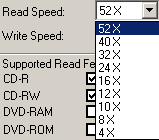
The drive also supports the JustLink Buffer Underun Protection, and the Mount Rainier format. The drive can also retrieve C2 error information. As with previous AOpen drives, the default read speed is 40X, and pushing Eject button for 5 sec will change the maximum reading speed to 52X. At that time operation LED blinks 2 times slowly. In order to change back to the 40X mode, you have to reboot the PC. The following pictures show the available reading/writing speeds for the 52X mode:

The JustSpeed function prevents writing error when high writing speed (24X or faster) is selected. When "Just Speed" is ON, the drive decides the most appropriate writing speed according to the result of medium calibration and writes with the speed. This function is changeable in "mode select command", and the default setting is "Just Speed" is ON. In the following screenshot you can see that the drive has reduced the maximum allowed writing speed to 40X, with non-certified 52X media inserted.

- Recording Technology
The drive supports the 52X recording speed with the use of CAV recording technology. As Nero CD Speed graph shows, the drive starts writing at 23.29X and accelerates to 52.81X by the end of the disc. That gives an average theoretical writing speed of 39.90X with 80min CD-R media.

- The package
 We
got the European retail package containing an application software disc with
Nero Burning Rom and Nero InCD, an application manual and the usual audio cable
and mounting screws. The package also includes one AOpen 52X CD-R and one 24X
US-RW disc. The drive is priced around 90 Euro making it a cheap drive.
We
got the European retail package containing an application software disc with
Nero Burning Rom and Nero InCD, an application manual and the usual audio cable
and mounting screws. The package also includes one AOpen 52X CD-R and one 24X
US-RW disc. The drive is priced around 90 Euro making it a cheap drive.
- Looking at the drive
On the front panel of the drive there are the eject/stop and play/skip buttons used for audio CD playback. The volume selector and the headphone jack are placed on the left side of the front panel. The AOpen drive is easily recognized from the logos on the disc tray. The operation LED behavior is explained below:
1. LED blinking - during track at once, disc at once, format, erase recording,
the blinking interval is 2 second including ON is 1 sec. and OFF is 1 sec..
2. LED ON - when device is busy status such as seek, audio play, read, packet
write,
load/eject TOC/PMA read and etc.
3. LED OFF - except for above status, led light is always off.

On the rear panel of the drive you will find the IDE connector, the configuration jumpers, the analogue and the digital audio output connectors and of course the power connector.


- Inside the drive
After removing the bottom screws we can see the internal of the drive. Note that by doing this the warranty becomes invalid. The drive uses Ricoh chipsets as well as the previous AOpen drives.


- Installation
The AOpen CRW5224 was installed as a Master device in the secondary IDE channel of our test PC, and worked at Ultra DMA mode. After booting, it identified itself as a "AOPEN CD-RW CRW5224". We used Nero v5.5.10, CloneCD v4.2.0.2 and Ahead InCD v3.51.91 for the recording tests. Within Nero, under drive properties you can disable "JustSpeed" to enable the maximum burning speed (52X) with all CD-R media.

Review Pages
2. Introduction - Mitsumi CR-487ETE
3. Introduction - Teac CD-W552E
4. Introduction - Waitec STORM 52/2
5. Data Reading tests
6. Error Correction Tests page 1
7. Error Correction Tests page 2
8. CloneCD Reading Tests
9. DAE Tests
10. CD-R Writing Tests
11. Writing Quality Tests page 1 - AOpen CRW5224
12. Writing Quality Tests page 2 - AOpen CRW5224
13. Writing Quality Tests page 1 - Mitsumi CR-487ETE
14. Writing Quality Tests page 2 - Mitsumi CR-487ETE
15. Writing Quality Tests page 1 - Teac CD-W552E
16. Writing Quality Tests page 2- Teac CD-W552E
17. Writing Quality Tests page 1 - Waitec STORM 52/2
18. Writing Quality Tests page 2- Waitec STORM 52/2
19. RW Writing Tests
20. Conclusion




