Lite-On iHAS324
1. Introduction, features
Review Pages
2. CD, DVD reading tests
3. CD error correction tests
4. DVD error correction tests
5. CD, DVD testing platform - The Quantized IQB Omni Analyzer
6. CD-R burning - Taiyo Yuden 48x
7. CD-R burning - Memorex (Ritek) 48x
8. CD-RW burning - Verbatim 32x
9. DVD-R burning - Verbatim MCC03RG20 16x
10. DVD-R burning - CMCMAG AM3 16x
11. DVD-R burning - RITEKF1 16x
12. DVD-R burning - TTH02 16x
13. DVD-R burning - Taiyo Yuden TYG03 24x
14. DVD+R burning - DAXON AZ3 16x
15. DVD+R burning - CMCMAG M01 16x
16. DVD+R burning - Verbatim MCC 004 16x
17. DVD+R burning - Moser Baer India MBIPG101 R05 16x
18. DVD+R burning - Taiyo Yuden YUDEN T03 24x
19. DVD-RW burning - Verbatim MKM01RW6X01 6x
20. DVD+RW burning - Verbatim MKM A03 8x
21. DVD+R DL burning - Verbatim MKM 003 8x
22. DVD-R DL burning - Verbatim MKM03RD30 8x
23. DVD-R DL burning - Verbatim MKM04RD30 12x
24. DVD-RAM burning - Maxel MXL22 12x
25. Summary of DVD burning tests, Overburning, Bit setting, SmartErase
26. Summary

The IHAS324 is the new LiteOn drive supporting 24X burning of DVD±R media. Being among the very few drives to support such speeds, along with the Optiarc AD7240S, it is a competition among the two brands for the domination of the high speed DVD burners market. This drive supports burning of DVD±R media at 24X, DVD±R DL media at 12X, DVD+RW at 8X, DVD-RW at 6X and DVD-RAM at 12X.
Features:
|
|
|
|
|

The drive came in in a red retail box :


The package includes:
- Internal 24x DVD burner
- Application software disc (Nero 8 Essentials - Express 8 Essentials, ShowTime 4 Essentials, Vision 5 Essentials, Recode 3 Essentials, InCD 5 Essentials, SmartErase disc erasing utility, Drivers and drive manuals)
- Quick user guide
- Mounting screws
- SATA cable

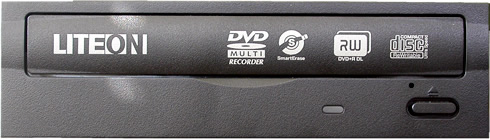
The rear panel is typical and has a power and SATA interfaces.


Let's take a look at the drive's internal board. It is recommended not to open the case of your drive since that would void the warranty.
You can click on each picture for a larger view:


The drive is based on the MediaTek MT1879E chipset.
The drive was connected to the PC via a typical SATA interface and was identified as "ATAPI IHAS324".

Review Pages
2. CD, DVD reading tests
3. CD error correction tests
4. DVD error correction tests
5. CD, DVD testing platform - The Quantized IQB Omni Analyzer
6. CD-R burning - Taiyo Yuden 48x
7. CD-R burning - Memorex (Ritek) 48x
8. CD-RW burning - Verbatim 32x
9. DVD-R burning - Verbatim MCC03RG20 16x
10. DVD-R burning - CMCMAG AM3 16x
11. DVD-R burning - RITEKF1 16x
12. DVD-R burning - TTH02 16x
13. DVD-R burning - Taiyo Yuden TYG03 24x
14. DVD+R burning - DAXON AZ3 16x
15. DVD+R burning - CMCMAG M01 16x
16. DVD+R burning - Verbatim MCC 004 16x
17. DVD+R burning - Moser Baer India MBIPG101 R05 16x
18. DVD+R burning - Taiyo Yuden YUDEN T03 24x
19. DVD-RW burning - Verbatim MKM01RW6X01 6x
20. DVD+RW burning - Verbatim MKM A03 8x
21. DVD+R DL burning - Verbatim MKM 003 8x
22. DVD-R DL burning - Verbatim MKM03RD30 8x
23. DVD-R DL burning - Verbatim MKM04RD30 12x
24. DVD-RAM burning - Maxel MXL22 12x
25. Summary of DVD burning tests, Overburning, Bit setting, SmartErase
26. Summary