AOpen XRecorder VX2000 - Page 1
 AOpen’s
Xrecorder VX2000S is an external TV tuner which can also perform still image
capture and video capture using MPEG2 hardware compression, so everything you
need is found in an external box rather than an add-in card.
AOpen’s
Xrecorder VX2000S is an external TV tuner which can also perform still image
capture and video capture using MPEG2 hardware compression, so everything you
need is found in an external box rather than an add-in card.
The
XRecorder easily connects to a PC with a
USB cable and offers IEEE 1394 (DV), S-Video and composite video inputs for
connecting video devices, cameras, TV, etc. The great benefit is that all processing
takes place in the XRecorder itself, which can output in both MPEG-1 and MPEG-2
formats, which means that the resulting video file is a lot smaller than raw
video.
Features
- Receive TV broadcasts: 158 channels cable/antenna
- External inputs for video capture: AV and S-video
inputs for external video resource like cameras and VCRs.
- 1394 inputs for external video resource
like DV and DV8.
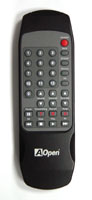
- Wireless remote control included: Channels up/down,
Volume up/down.
- Full motion video capture:
- Hardware MPEG1
352x240,320x240
- Hardware MPEG2 720x480,640x480,480x480,352x480
|
Specifications
- TV Function
158 channels cable/antenna
Re-Sizeable video window up to full screen
Auto scan to quickly scan available TV channels.
Favorite TV channel editing or rename.
- World Wide Television Video Standards
- USA, Canada, Middle America: NTSC-M
South America:
Chile: NTSC-M, Brazil: PAL-M(60MHz), Argentina: PAL-N(50MHz)
- England: PAL-I,
France: SECAM-L
Germany, South-North Europe: PAL-B,G
- Japan: NTSC-M
- Mideast: SECAM-B,G
Turkey, South Arabia peninsula: PAL-B,G
- Australia: PAL-B,G
- Capture Function (MPEG1/2 Hardware Encoder):
- Still image snapshot as JPG format.
- Fully compatible with Microsoft WDM.
- Full motion video capture up to 720x480 @ 30
fps (frame per second) interlaced.
- Mpeg video compression up to 15MB bitrate for
USB2.0 or 4MB bitrate for USB1.1
- Video format compatible to DVD, SVCD and VCD
- Dimension
18cm width x 12.5cm depth x 3.5cm height
- External inputs for video capture:
- AV and S-video inputs for external video resource like cameras
and VCRs.
- 1394 inputs for external video resource like
DV and DV8.
- Wireless remote control included:
- Power off, Numeric Keypad, Channels up/down,
Volume up/down, Mute....
- External interface:
- 75 ohm IEC coaxial input (cable TV), composite input (RCA), S-Video
input( SVHS), Audio input(RCA), and DV(1394) - USB2.0 / 1.0 interface
- Valuable Friendly Software Package:
- Ulead Video@Home
- Ulead VideoStudio 7.0SE DVD CD disc
- Ulead PhotoImpact 7.0 CD disc
- Regulatory Compliance:
FCC Class B
CE
C-Tick
- System Requirement:
- IBM PC Pentium III 500 MHz or higher
- Minimum 128 MB system memory
- Minimum 200 MB of free hard disk space
- VGA and with DirectDraw supporting 16 bit color
or higher
- Microsoft Windows 2000 / XP / ME
- USB 2.0 or USB 1.1
- Microsoft Windows compatible sound card
- Package Contents
- AOpen VX2000 Box
- AOpen VX2000 Case Stand
- AOpen VX2000 Manual and Quick
Guide
- AOpen VX2000 Driver and Ulead Video@Home CD disc
- Ulead VideoStudio 7.0SE DVD CD
disc
- Ulead PhotoImpact 7.0 CD disc
- 1394 Cable x1
- USB2.0 Cable x1
- 3RCA to 3RCA cable (Video and
Audio)
- Power
Adapter x1
- IR remote contoller
- battery AAA x2
|
 |
|
 The AOpen Xrecorder offers three choices of external input for video capture,
namely Composite video (RCA plug), S-Video and IEEE 1394 (also known as FireWire
or
i.link).
While we tried all three, for the purposes of these tests
we decided to use the S-video connection as it is the one most likely to be
used by most end users.
The AOpen Xrecorder offers three choices of external input for video capture,
namely Composite video (RCA plug), S-Video and IEEE 1394 (also known as FireWire
or
i.link).
While we tried all three, for the purposes of these tests
we decided to use the S-video connection as it is the one most likely to be
used by most end users.
Most TVs today offer both composite and S-Video
connections, but we would highly recommend that composite video
not be used with a DVD player for technical reasons that are explained
later on in this review.
Very briefly, with composite video, the luminance
and
colour
information are combined into one signal which must then be separated at
the receiveing end. This separation process invariably creates a slightly
degraded picture when compared to S-video, which carries the luminance and
colour information separately, thus producing a higher quality picture.
More information regarding the device is available here.
The latest drivers vR4.0 can be downloaded in Aopen's webite.
We connected the XRecorder
to our PC using the USB port (2.0), running under Windows
XP operating system.





