BenQ DW800A 8x DVD+RW
1. Package - Installation
Review Pages
2. Bundled software
3. Data CD Reading Tests
4. CD Error Correction Tests
5. DVD Reading Tests
6. DVD Error Correction Tests
7. Protected Data Disc Tests
8. DAE Tests
9. CD Recording Tests
10. 3T Jitter Tests
11. C1 / C2 Error Tests
12. DVD Recording Tests
13. KProbe PI/PO quality results
14. Conclusion
BenQ DW800A DVD+RW - Page 1
 One
more 8x DVD recorder has entered the dvd recording
market. BenQ, after the DRW400A 4x DVD recorder, reveals the new DW800A. The
technology behind the drive is build under the joint venture of BenQ and Philips,
based on Nexperia DVD+RW reference design.
One
more 8x DVD recorder has entered the dvd recording
market. BenQ, after the DRW400A 4x DVD recorder, reveals the new DW800A. The
technology behind the drive is build under the joint venture of BenQ and Philips,
based on Nexperia DVD+RW reference design.
Considering that the 8x DVD recording market has already reached a mature stage, the BenQ DW800A is going to confront some tough competition.
- Features
Smart writing control
To ensure optimal writing quality over the entire disc at higher writing speeds, BenQ uses the Walking OPC algorithm. For the first time it is possible to directly measure and optimise the actual writing quality during the writing process. As DVD writing consists of packet writing, seamless linking is not required in order to perform a WOPC.
At certain intervals, the writing process will be briefly interrupted, the writing quality directly evaluated and the writing power adjusted accordingly, if required.
 In
addition, the "Tilt Control" always keeps the writing angle
at 90 degrees on the
disc surface to ensure uniform writing.
In
addition, the "Tilt Control" always keeps the writing angle
at 90 degrees on the
disc surface to ensure uniform writing.
Near the end of the disc, the risk of warping is higher so the frequency of the tilt calibration will increase accordingly. The writing process will be briefly interrupted, the tilt measured and the OPU repositioned if required.
The best reading and writing quality can be obtained if the angle between the disc and the laser beam is 90 degrees. However, if the disc is warped, the laser beam will no longer be correctly positioned which will cause a distortion of the laser spot which will result in decreasing writing quality if it is not corrected.
Tilt Servo Control maintains the best writing angle, while the Walking OPC provides optimized writing power. Thus ensuring the best writing quality throughout the whole burning process.
 BenQ
DW800A also uses the Seamless Link technology. The technology
automatically monitors the recording status to prevent buffer under run from
occurring.
BenQ
DW800A also uses the Seamless Link technology. The technology
automatically monitors the recording status to prevent buffer under run from
occurring.
BenQ's Seamless Link allows the drive to store the RecEnd address, the point in the data to which the recording mechanism has progressed, and pause the recording before a buffer under run occurs. When the buffer is again full, a Seamless Link-enabled drive locates the RecEnd address and resumes the recording process. The gap between the stop and restart point is closed, while managing the recording process precisely and transparently-eliminating under run errors while maintaining recording accuracy.
Book Type Management
BenQ DRW800A allows the user to easily change the format to be more compatible with DVD readers. BenQ's Book Type Management enables you to manage the format between DVD R/+RW to DVDROM, the accepted standard format for DVD Players. The BookType can be either changed through Nero Burning Rom or via the BookType software bundled in the retail package. More information is available further on on this page.
As can be seen in the manufacturers specifications listed below, the drive supports 8x DVD+R, 4x DVD+RW, 24x CD-R and 10x HS-RW recording. While reading speeds supported are 40x for CD-ROM and 12x for DVD-ROM.
- Specifications
Model |
DW800A |
Writing Speed (max) |
DVD+R: 8X Z-CLV (10,800KBps) CD-R: 24X (3,600KBps) |
Rewriting Speed (max) |
DVD+RW: 4X CLV (5,400KBps) CD-RW: 10x CLV (1,500KBps) |
Reading Speed |
DVD: 12X CAV (16,620KBps)
CD: 40x CAV (6,000KBps) |
Interface |
ATA/ATAPI |
IDE Mode
|
PIO mode 0/1/2/3/4
DMA mode 0/1/2 UDMA mode 0/1/2 |
Data Buffer Size
|
8MB
|
Writing Mode
|
Disc-at-once
Track-at-once Multi-session Packet writing Raw writing Direct Over write Test Write |
Disc Formats
|
DVD
DVD single layer / Dual layer DVD+R (Ver.1.0) DVD+RW (Ver.1.1) DVD-R (Read Only) DVD-RW (Read Only)CD CD-DA CD-ROM XA (m1, m2f1/m2f2) CD-R CD-RW Bootable CD Photo CD (single & multi-session) Video CD Super Video CD CD-Extra Mixed-mode CD CD-Text CD-Graphics |
OS Compatibility
|
Windows 98/ ME / 2000/ XP
|
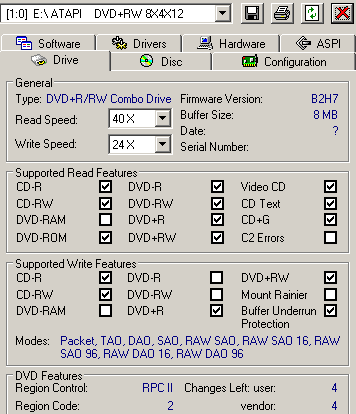
According to Nero Info Tool the drive has an 8MB buffer size. All media formats are supported by BenQ DW800A except DVD-RAM. RAW DAO 96 writing (CD) is also supported. The drive unfortunately is not compatible with Mount Rainier.
BenQ DW800A, as with most DVD drives, uses the RPC II region control allowing the user to change the drive's region 4 times. For our tests, we set the region code to 2 (Europe).
- The drive
In the front panel there are from left to right, the DVD rewritable logo, BenQ logo, and the CD rewritable logo, all on the loading tray. The supporting speeds are given below the manufacturers logo at centre. Below the tray are the headphone jack, volume control, and power indicator led located on the left. The led is green while reading and orange when burning. On the right you are the next track/skip and the stop/eject buttons. For emergency there is the usual eject hole, this time located in the middle.


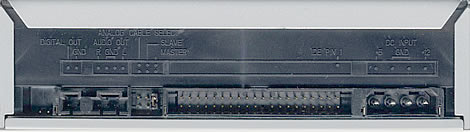
On the rear panel you can see the digital and analogue audio outputs (SPDIF), the IDE connector and the power input.
Removing the screws and opening the drive's cover voids the drive's warranty. For reference reasons, we post the following pictures. Click on the picture of the circuit board for a higher resolution image:

Below is shown the main chipset used in the drive, which is the Nexperia PNX7850 from Philips, which is the same as that used in Philips' latest DVD recorder, the DVDR824P and also CyberDrive's DX082D drive.

- Retail package
 The
retail package includes the DW800A recorder, an installation guide, the warranty,
four mounting
screws, a guide for InterVideo WinCinema software, an audio cable and two blank
media (one DVD+R and one DVD+RW).
The
retail package includes the DW800A recorder, an installation guide, the warranty,
four mounting
screws, a guide for InterVideo WinCinema software, an audio cable and two blank
media (one DVD+R and one DVD+RW).
As for software, there are the Sonic RecordNow v6.5.1, Sonic DLA v4.52, WinDVD Creator Plus v2.0, for editing, and WinDVD Player v4.0. The book type change software is also included.
- Installation
BenQ DW800A was connected to our test PC and it was identified as "DVD+RW 8X4X12" under WinXP OS. All tests were done with firmware revision vB2H7. By the time we write these lines, BenQ has launched firmware upgrade vB2I7.

On the following pages you can see all our test results and in addition a comparison with two other DVD burners, the Optorite DD0401 and LiteOn LDW-811S DVD±RW drives.
Review Pages
2. Bundled software
3. Data CD Reading Tests
4. CD Error Correction Tests
5. DVD Reading Tests
6. DVD Error Correction Tests
7. Protected Data Disc Tests
8. DAE Tests
9. CD Recording Tests
10. 3T Jitter Tests
11. C1 / C2 Error Tests
12. DVD Recording Tests
13. KProbe PI/PO quality results
14. Conclusion