Padus DJ .NET
1. Introduction
Padus DJ .NET - Page 1
Introduction
 at the ... of January 2001 a new version of the famous DJ called .NET. This
new version promises unique features that cover mostly networking capabilities
that the competition doesn't offer ,at least in the current status.
at the ... of January 2001 a new version of the famous DJ called .NET. This
new version promises unique features that cover mostly networking capabilities
that the competition doesn't offer ,at least in the current status.
- Overview
Using the new Padus Foundation Class (PFC) and additional components it is now possible to master a CD using a networked CD writing system. The system can be anything from a 16-drive autoloader w/printing solution or even a workstation with 2 drives. This will be referred to as a "DiscJuggler.NET Server" or "DJNS" (for short).
The DiscJuggler.NET Server, it is mainly used at WinNT/2k/XP systems. Any software using the PFC can utilize the Padus Network Service. The PNS is able to receive a job (image sent by a DiscJuggler client) and master that job. If the DJNS is connected to an autoloader and printer, it is able to automatically load discs, unload discs, and print individual labels to those discs. When all recording drives are busy a job will be created, making sure that the DJNS is always able to receive jobs. The DJNS Administrator has complete control over how many jobs can exist in the queue, along with a wide range of user-based controls.
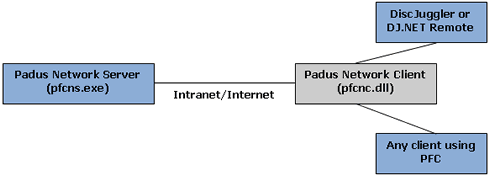
The client is able to send a job to the DJNS through the Padus Network Client
(PNC). This is a Windows .DLL file that enables connectivity with the Padus
Network Service. It is possible to call this .DLL from a program developed in
many environments (C++, Delphi, Visual Basic). One of the admin and user interfaces,
called DJ.NET Remote, was built upon this .DLL file. This is a small program
which operates separately from DiscJuggler and communicates with the PNS. In
effect, all communication between the client and the server occurs through this
.DLL file. Many client applications can use the PNC at the same time. (See below
for a simple diagram illustrating this client-server relationship).
With the DJ.NET Remote it is possible to monitor the status of jobs, the status of writers, and change all server parameters. Administrators can manage drives, jobs, queues, and users. Users can transfer jobs, track the status of the jobs, and even cancel jobs if necessary. All of these features are available based on the login provided when first connecting to a DJNS. Most of these features are available through the web using HTML and XML. There are plans for an ActiveX-based Web Remote which will allow all functionality through one web application.
PNS uses two protocols to communicate with clients. TCP is used for web communication (default: port 80) and service communication (default: port 3700). UDP is used for broadcast communication (default: port 3701).