Plextor PX-750A
1. Introduction
Review Pages
2. Reading Tests
3. CD Error Correction Tests
4. DVD Error Correction Tests
5. Protected Disc Tests
6. CD Recording Tests
7. CD Writing Quality - Plextools
8. CD Writing Quality - Clover System
9. DVD Recording Tests
10. DVD Writing Quality - Page 1
11. DVD Writing Quality - Page 2
12. DVD Writing Quality - Page 3
13. DVD Writing Quality - Page 4
14. DVD Writing Quality - Page 5
15. DVD Writing Quality - Almedio
16. DVD+R DL - Page 1
17. DVD+R DL - Page 2
18. Booktype Setting
19. Conclusion
 After the very successful release of Plextor's last drive, the 740A, the series continues with the release of yet another OEM drive, the PX-750A which bears the TEAC mark on it. The 750A is the "connecting bridge" to future Plextor releases, which are already well known in the DVD-Burner scene, and go by the model numbers of 755A and 760A, where we will be introduced to 10X +R DL speed and 18X+R writing speed with each release respectively.
But enough with the future and let us focus on the present release, the 750A. The drive supports all the fastest available speeds for all formats and on top, it is a multi drive, supporting reading and writing of DVD-RAM media at the fastest available speed of 5X.
Having got that out of the way, let's start the review rolling, where we'll see how the drive performs with our usual array of tests, well known by now to the larger section of the DVD community. We'll start with the drive's specs, as reported by the official Plextor page and various, well known tools.
- Specifications
| Model | Plextor PX-750A | |
| Write Speed | DVD+R 16X | |
| DVD-R 16X | ||
| DVD+RW 8X | ||
| DVD-RW 6X | ||
| DVD+R DL 8X | ||
| DVD-R DL 4X (6 & 8X-R by Firmware upgrade) | ||
| DVD-RAM 5X | ||
| CD-R 48X | ||
| CD-RW 24X | ||
| Read Speed | DVD-ROM 16X | |
| CD-ROM 48X | ||
| Technical Specifications | ||
| Interface | IDE/ATAPI | |
| Data buffer | 2 MB | |
| Access Time | <130ms (CD); <140ms (DVD) | |
| Mean time between failures (MTBF) | 60 000h | |
| Disc Loading | Tray (50.000 times) | |
| Bezel replaceable | Yes, black bezel included in retail version | |
| Digital Audio | Yes, S/P DIF output | |
| Dimensions | 146 x 42,5 x 170 mm | |
| Weight | < 800g | |
| Warranty | 2 year Fast Warranty Service (in EU, Norway and Switzerland: Collect & Return) 1 year in other countries |
|
| System Requirements | PC/AT compatible | |
| CPU: Pentium 4 - 1.4 GHz | ||
| RAM: 256MB | ||
| HDD: 10GB free space | ||
| OS: Windows 98SE/Me/2000/XP | ||
| Compatible Formats | DVD: DVD-RAM, DVD-ROM, DVD-Video, Multi-Border, Multisession, DVD+VR, DVD-VR | |
| CD: CD-DA, CD-ROM Mode-1, CD-ROM Mode-2, CD-ROM XA, CD-Extra, Photo-CD, Video-CD, Multisession, CD TEXT, CD-I, Mixed CD, CD+G (read only) | ||
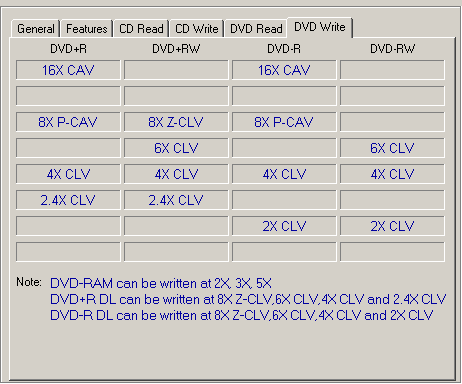
| Performance | DVD+R | 16x: 22,160KB/s (CAV), 8x: 11,080KB/s (PCAV), 4x: 5,540KB/s (CLV), 2.4x: 3,324KB/s (CLV) |
| DVD-R | 16x: 22.160KB/s (CAV), 8x: 11,080KB/s (PCAV), 4x: 5,540KB/s (CLV), 2x: 2,770KB/s (CLV) | |
| DVD+R DL | 8x: 11,080KB/s (ZCLV), 6x: 8,310KB/s (CLV), 4x: 5,540KB/s (CLV), 2.4x: 3,324KB/s (CLV) | |
| DVD-R DL | 8x: 11,080KB/s (ZCLV, 6x: 8,310KB/s (CLV), 4x: 5,540KB/s (CLV), 2x: 2,770KB/s (CLV) | |
| DVD+RW | 8x: 11,080KB/s (ZCLV), 6x: 8,310KB/s (CLV), 4x: 5,540KB/s (CLV), 2.4x: 3,324KB/s (CLV) | |
| DVD-RW | 6x: 8,310KB/s (ZCAV), 4x: 5,540KB/s (ZCAV), 2x: 2,770KB/s (CLV) | |
| DVD-RAM | 5x (CLV), 3x (CLV), 2x (CLV) | |
| DVD-ROM | 16x (CAV), 10x (CAV), 8x (CAV), 4x (CAV), 2x (CAV) | |
| CD-RW | 24x: 3,600KB/s (CAV), 10x: 1,500KB/s (CLV), 4x: 600KB/s (CLV) | |
| CD-ROM | 40x (CAV), 24x (CAV), 16x (CAV), 4x (CAV) | |
Below are the main specs for the drive as given by NeroInfoTool and DVDInfoPro, VSO Inspector and Plextools Pro:
- Nero InfoTool

- DVD InfoPro

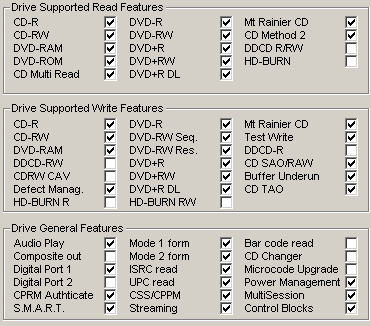
- VSO Inspector

- Plextools Professional


-Advanced Features
We checked the drive with Plextools Pro (bundled in the retail package) and this is what we got...

Unfortunately, the drive does not support the advanced features that Plextools Pro has to offer...
- Retail Package

The retail package is a complete one, with everything necessary. The usual mounting screws, audio cable, 80pin IDE cable, installation guide and Fast Warranty Service application, are in there, while the package also offers a variety of bundled software, as shown in the table below. Last but not least, the usual Black Bezel is included, to please those with a black case. Good retail package.

- Front panel view


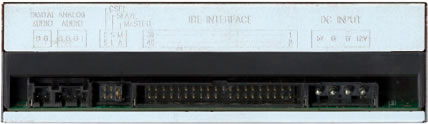
- Rear panel view
- Label

We opened the drive case to take a closer look at the interior of the drive. Opening the case, voids the drives warranty, so we strongly advise against it. By clicking on the image below, you can see a larger, more detailed picture...

The drive uses the Panasonic chipset. In fact, the drive is a TEAC OEM.

- Installation
The PX-750A came to our labs as the retail version and with firmware 1.00 installed, which is the default release for this drive. Plextor recently hosted a newer release, 1.01 firmware, but soon after that, the link to that page was removed and probably indicates that the particular firmware release has been removed. Note here, that firmware 1.01 was supposed to fix some issues concerning writing quality.

In this review, we compare the drive's results (reading-writing times and so on) with the results of two other latest release drives, of similar technology and specifications, the LiteOn 1635s and the BenQ 1640 drives.
Review Pages
2. Reading Tests
3. CD Error Correction Tests
4. DVD Error Correction Tests
5. Protected Disc Tests
6. CD Recording Tests
7. CD Writing Quality - Plextools
8. CD Writing Quality - Clover System
9. DVD Recording Tests
10. DVD Writing Quality - Page 1
11. DVD Writing Quality - Page 2
12. DVD Writing Quality - Page 3
13. DVD Writing Quality - Page 4
14. DVD Writing Quality - Page 5
15. DVD Writing Quality - Almedio
16. DVD+R DL - Page 1
17. DVD+R DL - Page 2
18. Booktype Setting
19. Conclusion