Plextor ConvertX PX-M402U
1. Installation - Retail Package
Review Pages
2. The Converter
3. Intervideo WinDVD Creator Software
4. Video/Audio files analysis
5. Video Quality Tests Page 1
6. Video Quality Tests Page 2
7. Video Quality Tests Page 3
8. Video Quality Tests Page 4
9. Video Quality Tests Page 5
10. Video Quality Tests Page 6
11. Video Quality Tests Page 7
12. Video Quality Tests Page 8
13. Video Quality Tests Page 9
14. Video Quality Tests Page 10
15. Video Quality Tests Page 11
16. Video Quality Tests Page 12
17. Audio Convertion
18. Conclusion
Plextor ConvertX PX-M402U - Page 1
 Plextor
is the leading manufacturer of DVD/CD Recorders. However, in an attempt to
provide more complete solutions covering from DVD creation to DVD recording,
Plextor has introduced the ConvertX series for real time video encoding. Their
latest
product
in this
series is the PX-M402U.
Plextor
is the leading manufacturer of DVD/CD Recorders. However, in an attempt to
provide more complete solutions covering from DVD creation to DVD recording,
Plextor has introduced the ConvertX series for real time video encoding. Their
latest
product
in this
series is the PX-M402U.
The PX-M402U follows on the footsteps of the M401U, but has real-time, hardware based MPEG-4 encoding, along with real-time Dolby Digital audio encoding. This external device is also suitable for laptop users, making encoding as easy as possible. It can capture DVD quality video from multiple sources, such as TVs, VCRs or camcorders.
- Features
 The
device uses the Hi-Speed USB2.0 interface, making it compatible with all
computers running Microsoft Windows XP. Of course, it can be connected to a
slower USB1.1 port, but this is not recommended, since the transfer rate on
such ports will not allow for real time video encoding. On the other hand,
USB2.0 connectivity allows high bitrate video capture using MPEG-2 compression,
maximizing
data throughput to the host computer.
The
device uses the Hi-Speed USB2.0 interface, making it compatible with all
computers running Microsoft Windows XP. Of course, it can be connected to a
slower USB1.1 port, but this is not recommended, since the transfer rate on
such ports will not allow for real time video encoding. On the other hand,
USB2.0 connectivity allows high bitrate video capture using MPEG-2 compression,
maximizing
data throughput to the host computer.
 Most
available encoders will encode audio in normal stereo or wide stereo 2-channel
format. Dolby Digital is a key feature of the M402U. It converts the audio
input to Dobly Digital channels, muxing them with the produced video stream.
However,
this is not hardware based real time encoding, but instead, the software handles
the audio signals in such a way that produces Dolby Digital audio.
Most
available encoders will encode audio in normal stereo or wide stereo 2-channel
format. Dolby Digital is a key feature of the M402U. It converts the audio
input to Dobly Digital channels, muxing them with the produced video stream.
However,
this is not hardware based real time encoding, but instead, the software handles
the audio signals in such a way that produces Dolby Digital audio.
 The PX-M402U is the first capture device to be officially DivX certified. This is a very interesting feature, since users can benefit from this popular format for sharing videos easily over the internet.
- Specifications
The device is compatible with both PAL and NTSC transmission formats, ensuring compatibility for all users around the world. The following table shows the main specifications of the ConvertX.
| Video Standards | PAL/SECAM (720 x 576, 352 x 576, 352 x 288) | |||
| NTSC (720 x 480, 352 x 480, 352 x 240) | ||||
| Video Input | S-Video or Composite (RCA connector) | |||
| Audio Input | Stereo audio (2 x RCA connectors) | |||
| PC Interface | USB 2.0 | |||
| Power Supply | 100 - 240 V, 50/60 Hz | |||
| Dimensions (WxHxD) | 184 x 32,4 x155 mm | |||
| Weight | 0,5 kg | |||
It should be noted that the video record time may vary based on the selected bitrate, frame size, disc capacity and video source.
| Compression Bit Rate | Video Record Times | |||
| Video Encoder/Decoder | Video (Kbps) | Audio (Kbps) | CD-R/RW | DVD±R/RW |
| MPEG-1 (VCD) | 1150 | 224 | 80 | - |
| MPEG-2 (DVD-Video) | 6000 - 2000 | 224 | 12 - 27 | 79 -169 |
| MPEG-4 | 4000 - 700 | 224 - 128 | 22 - 115 | 141-721 |
| DivX® | 4000 - 768 | 224 - 128 | 22 - 107 | 141 - 666 |
Unfortunately, the M402U will not work with operating systems prior to Microsoft Windows 2000, and it is not compatible with the Mac OS.
| CPU | Pentium III 800 MHz or higher (minimum configuration) | |||
| Pentium IV 1.6 GHz or higher (recommended configuration) | ||||
| Hard Disk Drive | 10 GB free disk space | |||
| RAM | 256 MB | |||
| Monitor Resolution | 1024 x 768,24-bit color | |||
| Graphics Card | Video card with 24-bit resolution capability and DirectX support | |||
| Sound | Windows compatible sound card that supports 48 KHz playback (PCI recommended) | |||
| DirectX | DirectX 9.0b (included in the WinDVD Creator application) | |||
| Interface | USB 2.0 | |||
| CD-ROM | A CD-ROM drive for installation (CD installation) | |||
| CD-RW | To burn CDs, Video CD or mini DVD (DVD format on CD) | |||
| DVD±RW | To burn DVDs | |||
| OS Support | Windows 2000/XP | |||
Users can select from a wide range of available video formats that the device will use to convert video. MPEG stands for Moving Pictures Experts Group. MPEG-1 is used for VideoCD creation and was the first format introduced by the group. The MPEG-2 format is used for DVD creation and offers advanced video encoding producing better quality. MPEG-4 is the latest format created by the group, providing high compression levels, making video sharing popular. The DivX codec is the most popular MPEG-4 based codec, created by DivX Networks.
The DivX codec has several coding profiles to ensure compatibility with most stand-alone DivX players. For example, the "DivX Home Theater" profile can be used to encode files that are meant to be played in stand-alone DivX players. On the other hand, the "DivX Portable" profile is used for creating video streams compatible with all portable devices, like palmtops. The following table is provided by Plextor, showing different recording formats.
Mode(click to view sample video) |
Video Size |
Video Bit rate |
Approx. File Size |
|||
Size |
Aspect Ratio |
Peak |
Average
(Mbit/s) |
MB/Minute |
||
MPEG-1 |
VCD | SIF |
0.9157 NTSC 1.0950 PAL |
1.5M |
1.15 |
10.3 |
MPEG-2 |
HQ (High Quality) | F-D1 |
4:3 |
9.8 |
6.0 |
46.7 |
| GQ (Good Quality) | F- D1 |
4:3 |
9.8 |
4.5 |
35.4 |
|
| SP (Standard Play) | 1/2 D1 |
4:3 |
9.8 |
3.0 |
24.2 |
|
| LP (Long Play) | 1/2 D1 |
4:3 |
6 |
2.0 |
16.7 |
|
| EP (Extend Play) | SIF |
4:3 |
6 |
2.0 |
16.7 |
|
MPEG-4 |
HQ (High Quality) | F-D1 |
4:3 |
6 |
4.0 |
31.7 |
| GQ (Good Quality) | F-D1 |
4:3 |
6 |
3.0 |
24.2 |
|
| SP (Standard Play) | F-D1 |
4:3 |
4 |
2.0 |
16.0 |
|
| LP (Long Play) | SIF |
4:3 |
4 |
1.5 |
12.2 |
|
| EP (Extend Play) | SIF |
4:3 |
4 |
0.7 |
6.2 |
|
DivX® |
Home Theater | F-D1 |
4:3 |
6 |
4.0 |
31.7 |
| Home Theater (Long Play) | F-D1 |
4:3 |
6 |
2.0 |
16.7 |
|
| Portable | SIF |
4:3 |
4 |
0.768 |
6.7 |
|
The following table shows the audio specifications of the device. The following table is provided by Plextor. Althouth the converter can encode mp3 audio, Plextor's web site does not provide any information regarding this. You will see a more detailed table about audio conversion later on in this review.
Video encoder |
Streaming |
Sampling |
Bit rate |
|
MPEG-1 |
VCD |
MP2 |
44.1KHz |
224 |
MPEG-2 |
HQ (High Quality) |
MP2 |
48KHz |
224 |
GQ (Good Quality) |
MP2 |
48KHz |
224 |
|
SP (Standard Play) |
MP2 |
48KHz |
224 |
|
LP (Long Play) |
MP2 |
48KHz |
224 |
|
EP (Extend Play) |
MP2 |
48KHz |
224 |
|
MPEG-4 |
HQ (High Quality) |
MP2 |
48KHz |
224 |
GQ (Good Quality) |
MP2 |
48KHz |
224 |
|
SP (Standard Play) |
MP2 |
48KHz |
128 |
|
LP (Long Play) |
MP2 |
48KHz |
128 |
|
EP (Extend Play) |
MP2 |
48KHz |
128 |
|
DivX® |
Home Theater |
MP2 |
48KHz |
224 |
Home Theater (Long Play) |
MP2 |
48KHz |
224 |
|
Portable |
MP2 |
48KHz |
128 |
- Retail Package
 The
retail package includes the PX-M402U, audio and video cables, s-video cable,
USB2.0 certified cable, power cable with AC adapter and scart adapter. The
audio and video cables provided are not high quality cables, but standard low
quality cables, 1 meter long. These cables may produce extra noise in the
video files created by the device, but this is something that only advanced
users should consider. Most end users will not have any problems with the provided
cables.
The
retail package includes the PX-M402U, audio and video cables, s-video cable,
USB2.0 certified cable, power cable with AC adapter and scart adapter. The
audio and video cables provided are not high quality cables, but standard low
quality cables, 1 meter long. These cables may produce extra noise in the
video files created by the device, but this is something that only advanced
users should consider. Most end users will not have any problems with the provided
cables.
The device comes with 2 years On-Site Collect&Return Warranty for all EU countries, Norway and Switzerland. For the U.S.A., the device is covered by a 1 year warranty.
The User's Manual in 4 language and a quick installation guide in 16 languages are also included. An additional applications CD is provided by Plextor with Intervideo WinDVD creator 2.0 and WinDVD player 4.0, along with the device drivers. You can read comments on this software by Intervideo in the following pages.

Video and audio connections are located on the front panel of the converter. The above picture shows a simple description of every connector shown. The device has two operation leds. The power led lights blue when the device is connected to a computer and is powered on. The recording led lights red when the device is converting/recording video and audio from any external source.

On the rear panel, we can see the power connector and the USB connector. You might notice that there is no control panel available. The device's control is handled through the bundled software included in the package.
- Installation
Video converter installation was never as easy as it was with the PX-M402U. The only thing you have to do is insert the disc provided by Plextor containing the device drivers and you are ready to go.

The following screen was shown, which helped us install the device drivers without the need to use Window's device manager. The whole procedure was like installing any ordinary software package.

Remember not to connect the device before installing the device drivers. The software checks to see if the device is connected and it warns you of every error found.

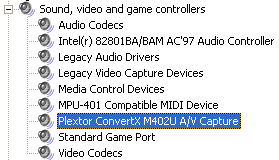
When the installation is complete, you can connect the device and it will be recognized automatically by the operating system. All you have to do from this point on is connect the appropriate cables and you are ready to go.

- Testing software/procedure
It should be noted that throughout this review, and especially on zoomed images, by clicking on images, a full sized high resolution picture will be shown for comparison reasons. In general, we were interested in capturing still images, moving pictures and test screens. These test screens are used mostly to investigate the clarity of the external converter. Of course, we used not only light images and scenes, but also darker ones. In any case, the created image files/snapshots are compared with the images included in the "Plasma TV Demo DVD" provided by Pioneer, without any kind of conversion or compression.
We tested the device on several computers, to ensure that the minimum requirments are correct. The device produced audio/video synchronization problems with CPUs lower than 800MHz. We also tested the device with several Pentium IV systems, but the results were the same, regardless of CPU speed. We decided to use the recommended configuration that Plextor suggested, i.e a Pentium IV at 1.6GHz.
In order to perform our tests we used:
Review Pages
2. The Converter
3. Intervideo WinDVD Creator Software
4. Video/Audio files analysis
5. Video Quality Tests Page 1
6. Video Quality Tests Page 2
7. Video Quality Tests Page 3
8. Video Quality Tests Page 4
9. Video Quality Tests Page 5
10. Video Quality Tests Page 6
11. Video Quality Tests Page 7
12. Video Quality Tests Page 8
13. Video Quality Tests Page 9
14. Video Quality Tests Page 10
15. Video Quality Tests Page 11
16. Video Quality Tests Page 12
17. Audio Convertion
18. Conclusion