Latest Nvidia Graphics Drivers Suppport Blu-ray 3D
NVIDIA is promoting its NVIDIA 3D Vision technology that brings support for 3D Blu-ray playback on the PC with the release of the first beta graphics driver.
The company today announced the first driver release from the new Release 256 family of drivers. Version 257.15 beta can be downloaded here for GeForce and ION GPUs (a WHQL-certified version is planned for early June).
This driver release comes just six weeks after the GTX 400 launch driver. Nvidia says that it has already achieved some performance optimizations. Here are a few examples of games which see the best improvement with the new driver:

This driver is also available for notebook PCs, including those with NVIDIA Optimus technology.
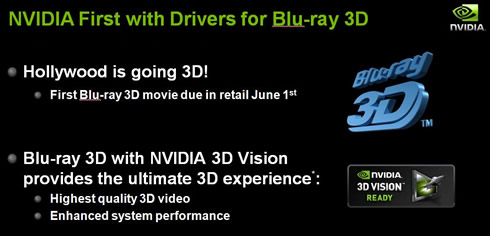
Blu-ray 3D through the Nvidia 3D Vision technology. 3D movies are making their way to Blu-ray disc thanks to NVIDIA 3D Vision technology. NVIDIA is the first to enable Blu-ray 3D acceleration for the PC. With the new drivers release 256, Nvidia supports playback of Check out the full system requirements here.
New Visual Quality Modes With this release, Nvidia is offering new settings in the NVIDIA Control Panel for 3-way SLI customers that enable 48x SLI Antialiasing (96x for 3-way GTX 400 series PCs). The company also added a new higher quality ambient occlusion setting in the NVIDIA Control Panel for more realistic scene shading.
New Multi-GPU Setup Controls For all those who have more than one NVIDIA GPU in their PC, Nvidia is offering detailed controls for them. Release 256 adds a new SLI and PhysX configuration page that not only makes setup easy but also gives users more control over how their GPUs are configured. For example, users will be able to to pair two GPUs in SLI mode and dedicate the third to PhysX, or activate all three of their displays and then optimize for highest performance in that configuration. The new page even has real-time visual feedback. And, finally, for those that want to select which GPU their CUDA applications run on, the Manage 3D Settings page now has a 'CUDA ? GPUs option to enable this.

CUDA 3.1 Release 256 drivers also add support for applications built using CUDA Toolkit 3.1. CUDA Toolkit 3.1 enables a significant performance increase for double precision math operations.
OpenGL 4.0 While Nvidia currently support OpenGL 4.0 in developer drivers, Release 256, brings full OpenGL 4.0 support to the company's unified consumer drivers. GeForce GTX 400 series users can immediately take advantage of the tessellation support in OpenGL 4.0 by downloading Unigine's latest release of their Heaven benchmark, version 2.1, which adds support for OpenGL 4.0 tessellation and 3D Vision technology. GeForce GTX 400 series GPUs are really tessellation monsters.

Nvidia also said that its 3D Vision Surround technology will be ready in the second release that is targeted for the end of June.
This driver release comes just six weeks after the GTX 400 launch driver. Nvidia says that it has already achieved some performance optimizations. Here are a few examples of games which see the best improvement with the new driver:
This driver is also available for notebook PCs, including those with NVIDIA Optimus technology.
Blu-ray 3D through the Nvidia 3D Vision technology. 3D movies are making their way to Blu-ray disc thanks to NVIDIA 3D Vision technology. NVIDIA is the first to enable Blu-ray 3D acceleration for the PC. With the new drivers release 256, Nvidia supports playback of Check out the full system requirements here.
New Visual Quality Modes With this release, Nvidia is offering new settings in the NVIDIA Control Panel for 3-way SLI customers that enable 48x SLI Antialiasing (96x for 3-way GTX 400 series PCs). The company also added a new higher quality ambient occlusion setting in the NVIDIA Control Panel for more realistic scene shading.
New Multi-GPU Setup Controls For all those who have more than one NVIDIA GPU in their PC, Nvidia is offering detailed controls for them. Release 256 adds a new SLI and PhysX configuration page that not only makes setup easy but also gives users more control over how their GPUs are configured. For example, users will be able to to pair two GPUs in SLI mode and dedicate the third to PhysX, or activate all three of their displays and then optimize for highest performance in that configuration. The new page even has real-time visual feedback. And, finally, for those that want to select which GPU their CUDA applications run on, the Manage 3D Settings page now has a 'CUDA ? GPUs option to enable this.
CUDA 3.1 Release 256 drivers also add support for applications built using CUDA Toolkit 3.1. CUDA Toolkit 3.1 enables a significant performance increase for double precision math operations.
OpenGL 4.0 While Nvidia currently support OpenGL 4.0 in developer drivers, Release 256, brings full OpenGL 4.0 support to the company's unified consumer drivers. GeForce GTX 400 series users can immediately take advantage of the tessellation support in OpenGL 4.0 by downloading Unigine's latest release of their Heaven benchmark, version 2.1, which adds support for OpenGL 4.0 tessellation and 3D Vision technology. GeForce GTX 400 series GPUs are really tessellation monsters.
Nvidia also said that its 3D Vision Surround technology will be ready in the second release that is targeted for the end of June.