Pioneer Ships First 12x BD Burner
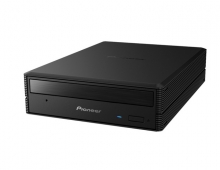
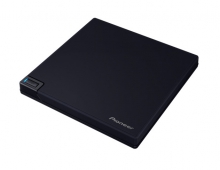
Pioneer today introduced the BDR-S05J-BK, a new Blu-ray disc burner capable of recording pon BD-R discs at 12x.
The Japanese company is expected to release the drive in Japan next month for about 38,000 Yen ($417). Pioneer is also expected offer an OEM version of the drive in the overseas markets (BDR-205). The drive will not be available in Europe since Pioneer Europe has withdrawn from the PC Components distribution business since the end of July 2009 for strategic reasons.
PLDS is also expected to release a 12x BD burner in the Q4 of 2009.
The BDR-S05J-BK is the first BD burner that supports the 12x recording with selected BD-R SL and DL media (6x- certified). The SATA drive also supports 6x recording with BD-R LTH discs, 2x with BD-RE/RE DL, 16x with DVD±R, 8x with DVD±R DL and DVD±RW discs, 40x with CD-R 40 X speed and finally 24x with CD-RW discs.
The 12x burning speed can be achived using 6x BD-R SL and DL discs by Panasonic. Other BD-R discs will be burned at 10x or 6x, according to the company.

Before writing on a BD-R the drive performs the typical "lookup" in the firmware in order to decide the maximum allowed speed for the inserted BD-R disc. In addition, for any disc that is not registered in the drive's firmware, the BD burner uses the 4x speed for writing.
Pioneer's drive also also It features a dustproof structure that keeps dust away from the internal of the drive's case, as well as Pioneer's Disc-Resonance Stabiliser technology. This controls the airflow generated by disc rotation in order to minimize disc warping, which can occur when media rotates at high speed. In addition, the airflow within the unit has been improved, enabling air to easily circulate around the internal chassis, reducing noise caused by the build-up of air. Finally, the drive's design prevents the escape of air, especially through the front bezel, that can create significant amounts of background noise.
Pioneer has also implemented its PowerRead and PureRead functions in the new drive.
There is a difference between how AV and PC handle discs that are difficult to read. In a standard PC environment, DVD-Video is treated as 1 type of data; therefore, if a section is deemed unreadable, playback will stop. With PowerRead, the user-experience is similar to the AV side, making it possible to play the remainder of the disc. Note that with PowerRead, unreadable DVD or Blu-ray disc contents remain unreadable. PowerRead skips to the next readable address. PowerRead can be used for BD/DVD media that have been recorded in the BDMV/BDAV and DVD video/VR formats.
In addition, the drive features the "PURE READ 2" function, to compensate the digital noise introduced when a scratched or dusty audio CD is reproduced. The idea behind PURE READ is to try and correct damaged sectors, which are read from the Audio-CD. The feature re-reads damaged sectors to see if it can recover them. When these damaged sectors are read in a normal scenario, the sector may well be read without any serious error, but sometimes pops or crackles can be heard in the final ripped file. When a sector that is difficult to read is detected, the laser tries to re-read the damaged sector. Not just re-reading the sector, but the drive will actually adjust its read parameters (I.E. higher or lower laser power and the angle of the laser beam are adjusted) to try and get the best possible read-back from that damaged sector. An algorithm calculates the "best" or "average" result it achieves, and that information (I.E. the best-possible result) is then used as part of the final file.

PLDS is also expected to release a 12x BD burner in the Q4 of 2009.
The BDR-S05J-BK is the first BD burner that supports the 12x recording with selected BD-R SL and DL media (6x- certified). The SATA drive also supports 6x recording with BD-R LTH discs, 2x with BD-RE/RE DL, 16x with DVD±R, 8x with DVD±R DL and DVD±RW discs, 40x with CD-R 40 X speed and finally 24x with CD-RW discs.
The 12x burning speed can be achived using 6x BD-R SL and DL discs by Panasonic. Other BD-R discs will be burned at 10x or 6x, according to the company.
Before writing on a BD-R the drive performs the typical "lookup" in the firmware in order to decide the maximum allowed speed for the inserted BD-R disc. In addition, for any disc that is not registered in the drive's firmware, the BD burner uses the 4x speed for writing.
Pioneer's drive also also It features a dustproof structure that keeps dust away from the internal of the drive's case, as well as Pioneer's Disc-Resonance Stabiliser technology. This controls the airflow generated by disc rotation in order to minimize disc warping, which can occur when media rotates at high speed. In addition, the airflow within the unit has been improved, enabling air to easily circulate around the internal chassis, reducing noise caused by the build-up of air. Finally, the drive's design prevents the escape of air, especially through the front bezel, that can create significant amounts of background noise.
Pioneer has also implemented its PowerRead and PureRead functions in the new drive.
There is a difference between how AV and PC handle discs that are difficult to read. In a standard PC environment, DVD-Video is treated as 1 type of data; therefore, if a section is deemed unreadable, playback will stop. With PowerRead, the user-experience is similar to the AV side, making it possible to play the remainder of the disc. Note that with PowerRead, unreadable DVD or Blu-ray disc contents remain unreadable. PowerRead skips to the next readable address. PowerRead can be used for BD/DVD media that have been recorded in the BDMV/BDAV and DVD video/VR formats.
In addition, the drive features the "PURE READ 2" function, to compensate the digital noise introduced when a scratched or dusty audio CD is reproduced. The idea behind PURE READ is to try and correct damaged sectors, which are read from the Audio-CD. The feature re-reads damaged sectors to see if it can recover them. When these damaged sectors are read in a normal scenario, the sector may well be read without any serious error, but sometimes pops or crackles can be heard in the final ripped file. When a sector that is difficult to read is detected, the laser tries to re-read the damaged sector. Not just re-reading the sector, but the drive will actually adjust its read parameters (I.E. higher or lower laser power and the angle of the laser beam are adjusted) to try and get the best possible read-back from that damaged sector. An algorithm calculates the "best" or "average" result it achieves, and that information (I.E. the best-possible result) is then used as part of the final file.