Breaking News

GAMEMAX Unveils NEX C53 Panoramic Chassis be quiet! announces new Power Zone 2 1200W and Pure Power 13 M 1200W Thypoch announces 21mm f/3.5 M Mount Lens ASUS showcases new AI technologies and celebrates 20 years of ROG gaming at CES Prograde Digital Announces Pro Card Caddy

logo

  • Share Us
    • Facebook
    • Twitter
  • Home
  • Home
  • News
  • Reviews
  • Essays
  • Forum
  • Legacy
  • About
    • Submit News

    • Contact Us
    • Privacy

    • Promotion
    • Advertise

    • RSS Feed
    • Site Map

Search form

Spire RocKeteer VI - SP-600W

May 4,2006 0

3. Installation


Review Pages

1. Introduction
2. A Closer Look
3. Installation
4. Performance
5. Conclusion


For the installation process, we used a full tower PC case from Antec. We firstly removed our previous power supply unit in order to install the Rocketeer 600W.

The size of the Rocketeer is bigger than a common PSU, especially in length. Below, you can see the difference between the Rocketeer and a standard PSU from Coolermaster.

The Rocketeer looks sturdier, while its cables are fewer and in consequence, tidier.

You install the Rocketeer in the appropriate position and screw the four screws on the back as you would any other power supply. Simple enough. Make sure the 120mm fan faces downwards into the case, in order to draw the hot air from the inside of the case.
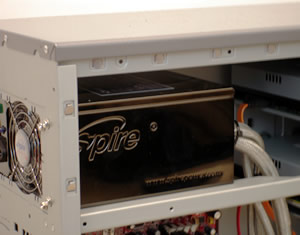
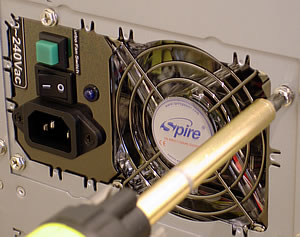
The Rocketeer fitted into our Antec case without any problem. On the back, you can see the 80mm fan, the power input connection, power on/off switch and the Turbo booster fan switch.

Next step is to install the 24pin motherboard power cable, and the 4pin ( or 8pin for P4 Dual Core) 12V cables.

The rest of the cables can be installed depending on your needs. In our example, we used one 6pin cable for our VGA card, two SATA cables and two 4pin cables. The shielded cables are thick and need some room in order to bend. Our only problem was with the plastic blue connectors, at the end of the SATA cables. These are attached to hard disk drives or the burners. But the SATA connectors are a bit fragile, and the plastic is not all that thick. After some plugging and unplugging, one of our SATA power connectors broke. We believe that a slightly more flexible plastic material might avoid this.

If you spend some time during the installation process, you will be rewarded with the outcome, as there are no useless cables hanging around, something that also helps create better airflow in your case.

At the back, the blue LED 80mm fan is continually lit, emitting a, what else, blue light. The Spire PSU will certainly add to the look of your PC case as well...

In contrast, the large 120mm on the underside, is also equipped with blue LEDs, but is not on all the time. The blue light you see in the picture below, comes from the rear, 80mm fan and shines through the 120mm. According to Spire, the 120mm fan kicks in at 45°C and above...

...or if you press the Turbo Fan switch, located on the back of the PSU. In either case, the 120mm fan starts up and fills the case with its strong, blue light.
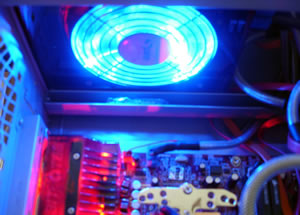
A good and impressive power supply in combination with an also impressive motherboard, such as our ABIT, will give your case a unique look.
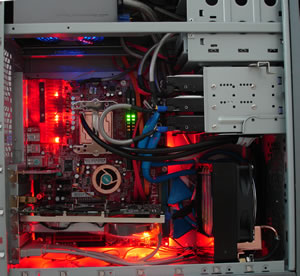
Now, everything is set up and we can test the Rocketeer.

 

Review Pages

1. Introduction
2. A Closer Look
3. Installation
4. Performance
5. Conclusion


Pages

  • « first
  • ‹ previous
  • 1
  • 2
  • 3
  • 4
  • 5
  • next ›
  • last »

Spire

Tags: Spire
Previous Post
Globalsat GH-601
Next Post
Pioneer DVR-111

Related Posts

  • Spire launches UD50C White PC chassis

  • Spire Unveils Cutting-Edge ARGB Cooling Fan Set: A 25-Year Legacy of Excellence in PC Cooling

  • Introducing Spire’s New Ergonomic Workstations and Desk Peripherals

  • SPIRE PC announces EagleForce series 80PLUS certified

  • Spire Thermal Stone Keeps Your Hands Warm

  • Spire Thermal Eclipse II review

  • Spire Previews Coolers For The Upcoming Intel 1156 Core i5 Platform

  • Spire PowerFuse

Latest Reviews

The Difference Between American and European Stakes and Why It Changes How People Bet
Enterprise & IT

The Difference Between American and European Stakes and Why It Changes How People Bet

Endorfy Thock V2 Wireless Keyboard
PC components

Endorfy Thock V2 Wireless Keyboard

Noctua NH-D15 G2 Chromax.Black
Cooling Systems

Noctua NH-D15 G2 Chromax.Black

EnGenius ECW520 AP
Enterprise & IT

EnGenius ECW520 AP

Noctua NP-DM3 desk mat
Gaming

Noctua NP-DM3 desk mat

Popular News

COLORFUL Introduces CVN B850I GAMING FROZEN Motherboard

COLORFUL Introduces CVN B850I GAMING FROZEN Motherboard

COLORFUL Presents CVN X870 ARK FROZEN Motherboard for AMD Ryzen 9000 CPUs

COLORFUL Presents CVN X870 ARK FROZEN Motherboard for AMD Ryzen 9000 CPUs

COLORFUL Presents the B860 Series Motherboards

COLORFUL Presents the B860 Series Motherboards

TEAMGROUP Launches EXPERT P34F Find My External SSD

TEAMGROUP Launches EXPERT P34F Find My External SSD

ASRock AM5 Motherboards Now Fully Support AMD Ryzen 9 9950X3D & 9900X3D Processors

ASRock AM5 Motherboards Now Fully Support AMD Ryzen 9 9950X3D & 9900X3D Processors

Samsung announces Galaxy Tab S11 and Galaxy S25 FE series

Samsung announces Galaxy Tab S11 and Galaxy S25 FE series

Viltrox Showcases Upcoming Lens Lineup and New TTL Flash at IBC 2025

Viltrox Showcases Upcoming Lens Lineup and New TTL Flash at IBC 2025

CORSAIR announces Vanguard Pro 96 and Vanguard 96 Gaming Keyboards

CORSAIR announces Vanguard Pro 96 and Vanguard 96 Gaming Keyboards

Main menu

  • Home
  • News
  • Reviews
  • Essays
  • Forum
  • Legacy
  • About
    • Submit News

    • Contact Us
    • Privacy

    • Promotion
    • Advertise

    • RSS Feed
    • Site Map
  • About
  • Privacy
  • Contact Us
  • Promotional Opportunities @ CdrInfo.com
  • Advertise on out site
  • Submit your News to our site
  • RSS Feed