Breaking News

ASUS Hardware Showcase: AI Accelerators, Collector GPUs, and Esport Monitors Apple Unveils Major Hardware and Creative Suite Ecosystem Updates XPG Launches Third-Generation CORE REACTOR III for Next-Gen Power Safety TCL’s New Monitor Range Fits Every Kind of Gaming Setup Viltrox Launches AF 35mm F1.4 Pro FE/Z

logo

  • Share Us
    • Facebook
    • Twitter
  • Home
  • Home
  • News
  • Reviews
  • Essays
  • About
    • Submit News

    • Contact Us
    • Privacy

    • Promotion
    • Advertise

    • RSS Feed

Search form

Gigabyte GV-NX86S256H

Nov 13,2007 0

3. TestBed DX9, DX10


Review Pages

1. Introduction
2. Tests & setup
3. TestBed DX9, DX10
4. 3D Mark 05 Hall Of Fame
5. Scalability AA/AF
6. Benchmarks DX9
7. Benchmarks DX10
8. Overclocking, final words


- Testbed DirectX9

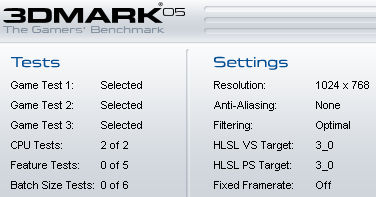
  • 3D Mark 05 (v1.2.0)

For all the test results we used the default settings of 3DMark05 as following:
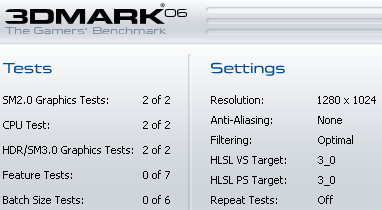
  • 3D Mark 06 (v1.1.0)

Again we left all settings in default:
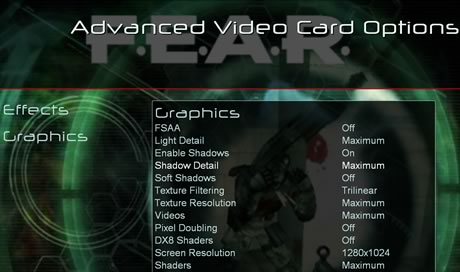
  • F.E.A.R (v1.08)

For all tests, we used the retail version with the v1.08 patch applied. We maxed all details for processor and we disabled Soft Shadows. AA/AF were set accordingly to each test.
  • Prey (v1.2.0)

We used the retail version with the v1.2.0 patch applied. For all tests we used hocbench with Guru3D timedemo

  • Half Life 2: Episode 2

  • Company Of Heroes (v1.7.1)

COF offers a build-in benchmark that was used to measure the performance of each graphic card. All visual quality settings are maxed out:

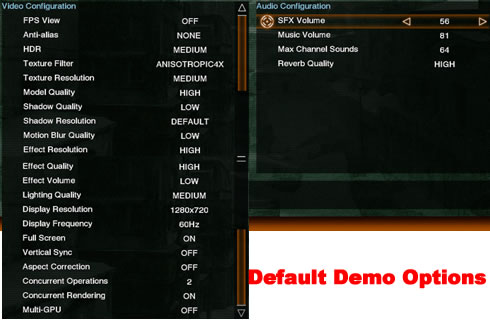
  • Lost Planet: Extreme Condition DX9 Demo

In order to benchmark graphic cards, we used the Demo version that includes a "Performance Test" function. There are two test results from two different animated courses that being reported as "Snow" and "Cave":

We used the following visual settings for all tests:
  • Unreal Tournament III Demo

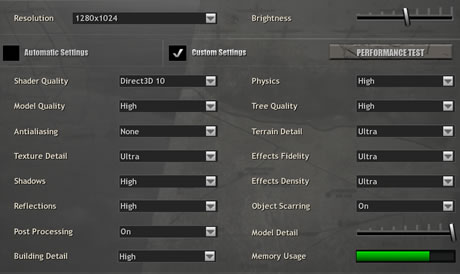
We set maximum details under game preferences:
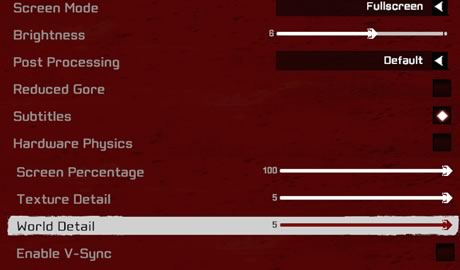
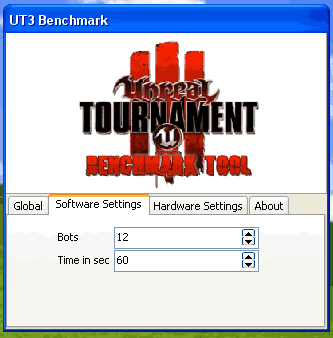
and used the Unreal Tournament III benchmark utility to measure the performance of each graphic card in several timedemo. Note that bSmoothFrameRate  was set to FALSE to disable frame-rate smoothing/ limiting.:

  • Crysis Demo

We used the build-in benchmark and set all details are set to HIGH

- Testbed DirectX10

  • Company Of Heroes (v1.7.1)

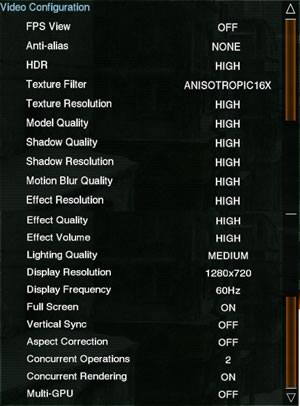
  • Lost Planet: Extreme Condition DX10 Demo
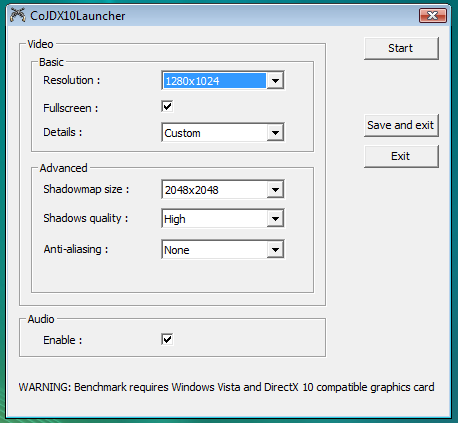
  • Call Of Juarez DX10 Demo

We used the build-in benchmark and we maxed out shadow details.
  • Crysis Demo


Review Pages

1. Introduction
2. Tests & setup
3. TestBed DX9, DX10
4. 3D Mark 05 Hall Of Fame
5. Scalability AA/AF
6. Benchmarks DX9
7. Benchmarks DX10
8. Overclocking, final words


Pages

  • « first
  • ‹ previous
  • 1
  • 2
  • 3
  • 4
  • 5
  • 6
  • 7
  • 8
  • next ›
  • last »

Gigabyte

Tags: Gigabyte
Previous Post
SuperTalent Vidego24
Next Post
MSI NX8600GTS-T2D256E-HD-OC

Related Posts

  • GIGABYTE Brings AORUS INFINITY to Gamescom 2026 with an Immersive Gaming Playground

  • GIGABYTE Announces the Availability of AORUS GeForce RTX 50 INFINITY Series Graphics Cards

  • GIGABYTE Brings Flagship Power to Enthusiast PC Builds and Local AI with AORUS P1600W

  • GIGABYTE announces AORUS GeForce RTX 50 Series AI BOX

  • GIGABYTE Showcases Sleek STEALTH and Elegant WOOD PC Builds at COMPUTEX 2026

  • GIGABYTE Showcases Industry-leading CQDIMM Performance and Ecosystem Expansion at COMPUTEX 2026

  • GIGABYTE Announces World's First DDR5-7200 at Full 256GB with CQDIMM at CES 2026

  • GIGABYTE Launches AORUS GeForce RTX 5090 INFINITY Graphics Card

Latest Reviews

be quiet! Light Wings Pro IO fan
Cooling Systems

be quiet! Light Wings Pro IO fan

Why Intelligent Firmware Matters More Than Peak Throughput in NAS Systems
Enterprise & IT

Why Intelligent Firmware Matters More Than Peak Throughput in NAS Systems

Fanxiang MP83 M.2 NVMe SSD Enclosure
Enterprise & IT

Fanxiang MP83 M.2 NVMe SSD Enclosure

Ugreen CM642 USB4.0 Enclosure
PC components

Ugreen CM642 USB4.0 Enclosure

be quiet! Dark Power 14 IO
PC components

be quiet! Dark Power 14 IO

Popular News

MSI’s Latest AMD X870E MAX & EVO Series Motherboards

MSI’s Latest AMD X870E MAX & EVO Series Motherboards

COLORFUL Launches iGame B850M ULTRA Series Micro-ATX Motherboards

COLORFUL Launches iGame B850M ULTRA Series Micro-ATX Motherboards

COLORFUL Launches iGame B850I MINI OC V14 Motherboard

COLORFUL Launches iGame B850I MINI OC V14 Motherboard

COLORFUL Presents Limited Edition Chitu MAG-60 Magnetic Keyboard Inspired by the Year of the Horse

COLORFUL Presents Limited Edition Chitu MAG-60 Magnetic Keyboard Inspired by the Year of the Horse

COLORFUL Launches the iGame X870E VULCAN W OC Motherboard

COLORFUL Launches the iGame X870E VULCAN W OC Motherboard

COLORFUL Presents iGame Z890 ULTRA-S W and iGame Z890M ULTRA Z Motherboards

COLORFUL Presents iGame Z890 ULTRA-S W and iGame Z890M ULTRA Z Motherboards

COLORFUL Expands B850 Motherboard Lineup with New CVN, Battle-Ax, and MEOW Models

COLORFUL Expands B850 Motherboard Lineup with New CVN, Battle-Ax, and MEOW Models

ASRock Adds Support for One Sub-Channel DRAM Module on Intel DDR5 Motherboards

ASRock Adds Support for One Sub-Channel DRAM Module on Intel DDR5 Motherboards

Main menu

  • Home
  • News
  • Reviews
  • Essays
  • About
    • Submit News

    • Contact Us
    • Privacy

    • Promotion
    • Advertise

    • RSS Feed
  • About
  • Privacy
  • Contact Us
  • Promotional Opportunities @ CdrInfo.com
  • Advertise on out site
  • Submit your News to our site
  • RSS Feed