
Breaking News

ADATA Launches URBAN TAPSAFE External SSD Sony Expands Gaming Gear Range with INZONE H6 Air and INZONE M10S II Transcend Launches RDE3 microSD Express Card Reader for Next-Generation High-Speed Performance PlayStation Plus Game Catalog for April 2026 Samsung Sets a New Standard of Color with Micro RGB TV Lineup

logo

  • Share Us
    • Facebook
    • Twitter
  • Home
  • Home
  • News
  • Reviews
  • Essays
  • Forum
  • Legacy
  • About
    • Submit News

    • Contact Us
    • Privacy

    • Promotion
    • Advertise

    • RSS Feed
    • Site Map

Search form

DVDFab Decrypter

Dec 2,2005 0

This guide is going to show you how to use DVDFab Decrypter in order to transfer your favorite movies to your hard disk, bypassing any type of protection.

First of all, you have to download DVDFab Decrypter. DVDFab Decrypter is a simple version of DVDFab Express. It copies the entire DVD movie to the hard disk and removes any protection scheme (CSS, RC, RCE, APS, UOPs and Sony ARccOS).

The version we installed is the free, v2.9.6.2.
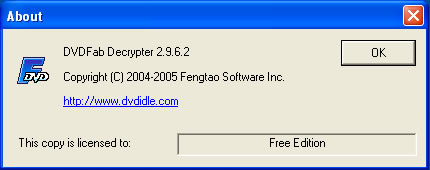
When you run DVDFab Decrypter for the first time, you will be asked to configure some settings. Choose your language and under the advanced section, choose your region. Since we are in Europe, we selected region 2, Western Europe, Japan and South Africa.

Click on OK and DVDFab Decrypter's main menu should appear.
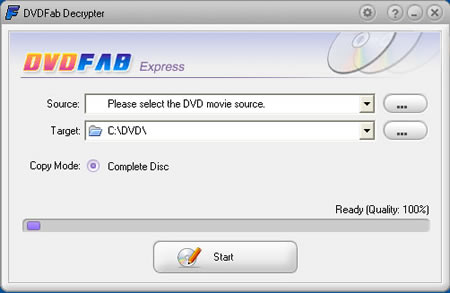
Insert your DVD movie into your DVD drive and DVDFab Decrypter should recognize the source drive.
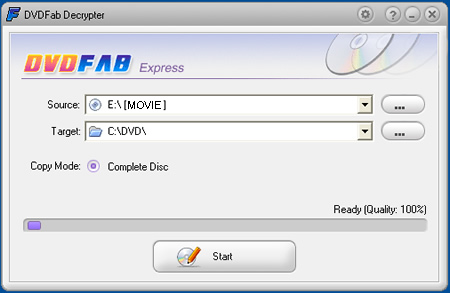
If not, simply click on the "..." button and select your DVD drive.

In the Target field, you need to specify where the movie should be saved. Make sure that you have plenty of free space on your Hard Disk, at least 5 to 9 GB are required.

We selected C:\DVD\ as our destination path.
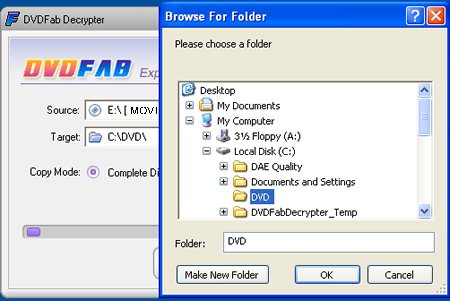
Click on start and you will receive a warning that any files in the selected target directory will be deleted (the message appears regardless of whether any files exist or not).

Click yes and the procedure should start.

Several minutes later, a message will appear, informing you that the back-up is completed. The time needed depends on your system, but mostly your drive's maximum reading speed and hard disk's writing speed.

Now we are ready to watch the movie from the Hard Disk or burn it on a blank DVD disk with the appropriate software, Nero Burning Rom for example.

In conclusion, this is as far as we know, the only software that successfully bypasses all the latest protection schemes, so we strongly recommend you give it a try.

DVDFab Decrypter

Tags: DVDFab Decrypter
Previous Post
Corsair CMX1024-4000P
Next Post
Teac MP-400 MP3 Player

Related Posts

Latest Reviews

In the Age of AI Phishing, the Best User Experience Might Be the One That Feels Safest
Enterprise & IT

In the Age of AI Phishing, the Best User Experience Might Be the One That Feels Safest

SoundPeats C30
Consumer Electronics

SoundPeats C30

Why Streaming Live Casino Games Demands Smarter Tech
Enterprise & IT

Why Streaming Live Casino Games Demands Smarter Tech

Kioxia Exceria Plus G3 512GB microSD
Cameras

Kioxia Exceria Plus G3 512GB microSD

SoundPeats Cove Pro
Consumer Electronics

SoundPeats Cove Pro

Popular News

TEAMGROUP Launches EXPERT P34F Find My External SSD

TEAMGROUP Launches EXPERT P34F Find My External SSD

Samsung announces Galaxy Tab S11 and Galaxy S25 FE series

Samsung announces Galaxy Tab S11 and Galaxy S25 FE series

Viltrox Showcases Upcoming Lens Lineup and New TTL Flash at IBC 2025

Viltrox Showcases Upcoming Lens Lineup and New TTL Flash at IBC 2025

CORSAIR announces Vanguard Pro 96 and Vanguard 96 Gaming Keyboards

CORSAIR announces Vanguard Pro 96 and Vanguard 96 Gaming Keyboards

Panasonic Introduces the First Ultra-Telephoto Zoom Lens in the LUMIX S Series

Panasonic Introduces the First Ultra-Telephoto Zoom Lens in the LUMIX S Series

MSI Launches DATAMAG 40Gbps Magnetic Portable SSD

MSI Launches DATAMAG 40Gbps Magnetic Portable SSD

MSI Launches FORGE GK600 TKL WIRELESS Special Edition Compact Mechanical Keyboard

MSI Launches FORGE GK600 TKL WIRELESS Special Edition Compact Mechanical Keyboard

Viltrox Joins the L-Mount Alliance, Expanding Creative Possibilities

Viltrox Joins the L-Mount Alliance, Expanding Creative Possibilities

Main menu

  • Home
  • News
  • Reviews
  • Essays
  • Forum
  • Legacy
  • About
    • Submit News

    • Contact Us
    • Privacy

    • Promotion
    • Advertise

    • RSS Feed
    • Site Map
  • About
  • Privacy
  • Contact Us
  • Promotional Opportunities @ CdrInfo.com
  • Advertise on out site
  • Submit your News to our site
  • RSS Feed
