
Breaking News

Apple Unveils Major Hardware and Creative Suite Ecosystem Updates XPG Launches Third-Generation CORE REACTOR III for Next-Gen Power Safety TCL’s New Monitor Range Fits Every Kind of Gaming Setup Viltrox Launches AF 35mm F1.4 Pro FE/Z Formula V Line Launches Crystal Z3 Panoramic PC Case Series with Rotatable GPU Bracket

logo

  • Share Us
    • Facebook
    • Twitter
  • Home
  • Home
  • News
  • Reviews
  • Essays
  • About
    • Submit News

    • Contact Us
    • Privacy

    • Promotion
    • Advertise

    • RSS Feed

Search form

F-Tech Solar 7

Apr 3,2006 0

3. Installation


Review Pages

1. Introduction
2. A Closer Look
3. Installation
4. The Tests
5. Conclusion


From our tests, to fully charge the device requires around 3 hours. It then takes a few simple steps on your PDA device to connect, in our case a Dell Axim x50V with Windows Mobile 2003 SE. Start by accessing the bluetooth manager and tap New->Connect

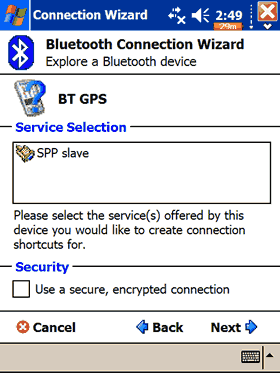
The F-Tech Solar 7 will show up with the ID "BT GPS":

Press Next->Select GPS OUTPUT-> Next
Done!

After accessing the BT Manager, right click on the BT GPS, select connect and that should be it.

Finally, our device was connected to the Dell Axim x50V PDA and ready to use! There are several details available about the activity of the BT port.

The device can be found at COM7 with 9600 communications speed. Press "Scan GPS" and if all goes well, you will see streams of numbers scrolling by.

Unfortunately, we couldn't check the device's firmware, since none of our software could switch to SiRF mode and perform/set all advanced functions.
 

Review Pages

1. Introduction
2. A Closer Look
3. Installation
4. The Tests
5. Conclusion


Pages

  • « first
  • ‹ previous
  • 1
  • 2
  • 3
  • 4
  • 5
  • next ›
  • last »

F-Tech

Tags: F-Tech
Previous Post
Plextor PX-755SA fw 1.02
Next Post
MobiTV

Related Posts

  • F-Tech Solar MT

Latest Reviews

be quiet! Light Wings Pro IO fan
Cooling Systems

be quiet! Light Wings Pro IO fan

Why Intelligent Firmware Matters More Than Peak Throughput in NAS Systems
Enterprise & IT

Why Intelligent Firmware Matters More Than Peak Throughput in NAS Systems

Fanxiang MP83 M.2 NVMe SSD Enclosure
Enterprise & IT

Fanxiang MP83 M.2 NVMe SSD Enclosure

Ugreen CM642 USB4.0 Enclosure
PC components

Ugreen CM642 USB4.0 Enclosure

be quiet! Dark Power 14 IO
PC components

be quiet! Dark Power 14 IO

Popular News

MSI’s Latest AMD X870E MAX & EVO Series Motherboards

MSI’s Latest AMD X870E MAX & EVO Series Motherboards

COLORFUL Launches iGame B850M ULTRA Series Micro-ATX Motherboards

COLORFUL Launches iGame B850M ULTRA Series Micro-ATX Motherboards

COLORFUL Presents Limited Edition Chitu MAG-60 Magnetic Keyboard Inspired by the Year of the Horse

COLORFUL Presents Limited Edition Chitu MAG-60 Magnetic Keyboard Inspired by the Year of the Horse

COLORFUL Launches iGame B850I MINI OC V14 Motherboard

COLORFUL Launches iGame B850I MINI OC V14 Motherboard

COLORFUL Launches the iGame X870E VULCAN W OC Motherboard

COLORFUL Launches the iGame X870E VULCAN W OC Motherboard

COLORFUL Presents iGame Z890 ULTRA-S W and iGame Z890M ULTRA Z Motherboards

COLORFUL Presents iGame Z890 ULTRA-S W and iGame Z890M ULTRA Z Motherboards

COLORFUL Expands B850 Motherboard Lineup with New CVN, Battle-Ax, and MEOW Models

COLORFUL Expands B850 Motherboard Lineup with New CVN, Battle-Ax, and MEOW Models

ASRock Adds Support for One Sub-Channel DRAM Module on Intel DDR5 Motherboards

ASRock Adds Support for One Sub-Channel DRAM Module on Intel DDR5 Motherboards

Main menu

  • Home
  • News
  • Reviews
  • Essays
  • About
    • Submit News

    • Contact Us
    • Privacy

    • Promotion
    • Advertise

    • RSS Feed
  • About
  • Privacy
  • Contact Us
  • Promotional Opportunities @ CdrInfo.com
  • Advertise on out site
  • Submit your News to our site
  • RSS Feed


