
Breaking News

Fanatec and Trak Racer showcase the future of simulation at SimRacing Expo Frankfurt 2026 Razer Unveils the Barracuda V2 Pro ASUS Republic of Gamers Announces Bulwark Dock DG310 Akasa Announces Fermi CM5 Fanless Case for Raspberry Pi Compute Module 5 LG Electronics Advances the LG Sound Suite Experience With New DTS

logo

  • Share Us
    • Facebook
    • Twitter
  • Home
  • Home
  • News
  • Reviews
  • Essays
  • About
    • Submit News

    • Contact Us
    • Privacy

    • Promotion
    • Advertise

    • RSS Feed

Search form

be quiet! Light Loop 360mm

Sep 13,2024 0

4. Tests


Review Pages

1. Introduction
2. Retail Package
3. Installation
4. Tests
5. Conclusion


For our tests we used an open test air test system, to avoid interference from case fans. Then we set the room temperature around 24 Celsius via A/C control. All tests are done with the same system, operating system, drivers, and software running in the background. CPU fans were controlled via software with the same curve fan and the following test system based upon AMD 7950X: 
  • CPU: AMD Ryzen 9 7950X
  • Thermal Paste: Noctua NT-H1 thermal compound
  • Open Case: StreaCom BC1 V2 Bench Table
  • Motherboard: Asus ProArt X670E-CREATOR WIFI with 2120 BIOS
  • Memory: 2x24GB Crucial DDR5-6000 CL48 (EXPO Profile)
  • PSU: be quiet! Dark Pro 13 1300Watt
  • Main Storage: Samsung 980Pro 1TB
  • VGA: MSI GeForce RTX 4090 SUPRIM X 24G
  • Operating system: Windows 11 x64 + latest motherboard/AMD chipset drivers installed (DirectStorage enabled drive)
  • Software: OCCT Enterprise Edition v13.1.17 (2 sec interval monitor)
  • Ambient room temperature ~ 24 Celsius (with AC climate control) - Environment Temperature measurements: Precision Gold N09AQ Envirometer Meter

We performed four tests depending on the CPU TDP load that can be set under Bios-> AI Tweaker-> Precision Boost Overdrive->AMD Eco Mode->

  • cTDP 65Watt (real 90Watt)
  • cTDP 105Watt (real 145watt)
  • cTDP ~ 222Watt (via PBO at auto)

while we set the following voltages for all tests.

  • CPU Core Voltage: Auto
  • CPU SOC Voltage: 1.25V
  • CPU VDDIO / MC Voltage: Auto
  • Misc Voltage: 1.10V

At the OCCT software, we performed the Stability Test->CPU Test 15mins duration with various settings to get the maximum thermal production from the AMD 7950X.

Tests Disclaimer: Despite placing CPU voltages manually, the motherboard may supply the CPU with slightly different voltages, resulting in some cases higher temperatures that also result in higher working temperatures. Our results are valid with the above test system and using other variations may result in different results. Using other stress test software may also introduce different test results.

Before each run, we clean the CPU surface with 95% isopropyl alcohol and paper roll and we apply each thermal paste with the same methodology (central dot, small X lines, and small dots) to cover the full surface of the CPU area.

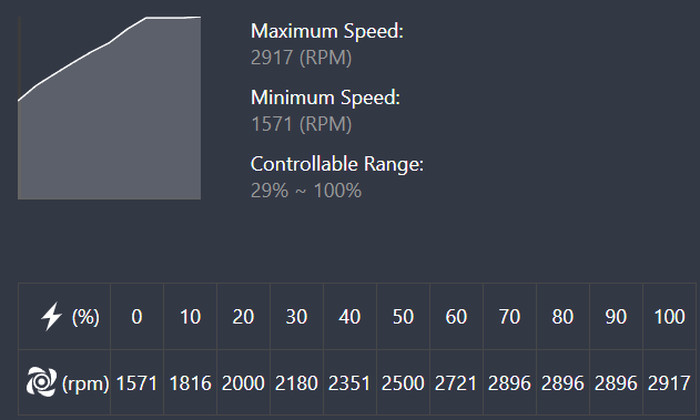
The Asus motherboard presented its rotation curve with a %10 gap, as we can see the maximum RPM.
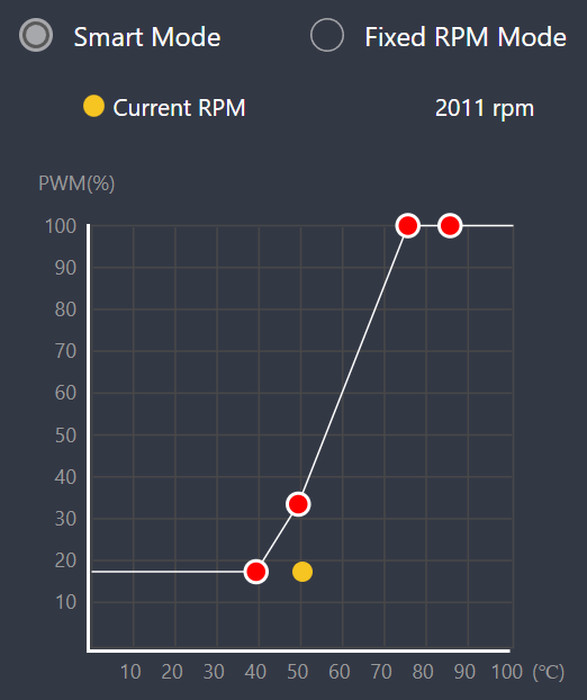
All of our tests are done with the default Asus PWM curve fan.
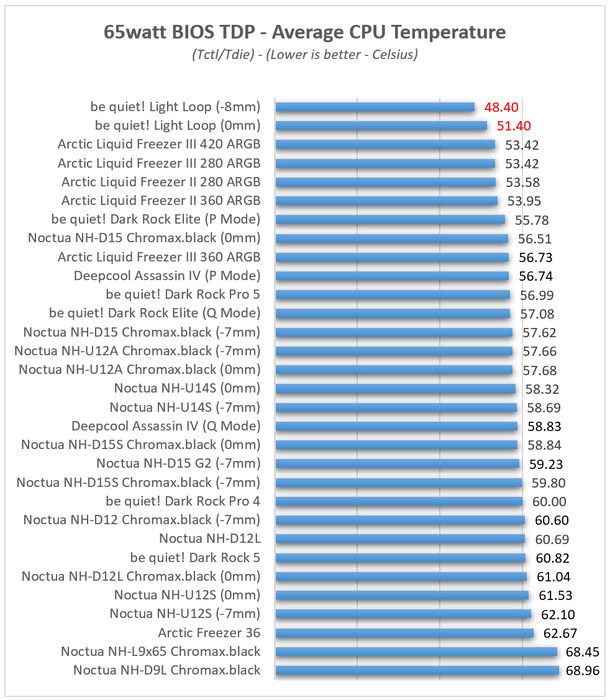
Starting from the low 65watt AMD Eco TDP, we used the following OCCT settings

  • Instruction Set: Auto
  • Data Set: Large
  • Mode: Normal
  • Load Type: Variable
  • Thread Settings: Auto

The be quiet! Light Loop 360mm despite its "smaller" size than bigger coolers, seems to manage to get good performance, probably due to its higher RPM 120mm fans that kick much faster so they keep everything cool.
At the 105watt AMD Eco TDP setting, we used the following OCCT settings

  • Instruction Set: Auto
  • Data Set: Large
  • Mode: Normal
  • Load Type: Variable
  • Thread Settings: Auto

Increasing TDP seems to not affect the be quiet! Light Loop performance, again very good results, and the -8mm offset seems to benefit by 2 Celsius.

At the 222watt AMD TDP setting, we used the following OCCT settings

  • Instruction Set: SSE
  • Data Set: Small
  • Mode: Extreme
  • Load Type: Steady
  • Thread Settings: Auto

At the maximum possible TDP with the AMD 7950X for our tests, the be quiet! Light Loop gave top performance reaching very good results, in fact, we double-checked them because we thought that something was wrong with the measurements.


Review Pages

1. Introduction
2. Retail Package
3. Installation
4. Tests
5. Conclusion


Pages

  • « first
  • ‹ previous
  • 1
  • 2
  • 3
  • 4
  • 5
  • next ›
  • last »

be quiet!

Tags: be quiet!
Previous Post
GameMax GX-1050 Pro PSU
Next Post
What Is the Best Platform for Casino Games

Related Posts

  • be quiet! launches Light Wings Pro IO all in one frame fan series with advanced lighting and cooling options

  • be quiet! Dark Power 14 IO

  • be quiet! Light Mount TKL

  • be quiet! raises the bar with the new Dark Power Pro 14 IO power supply series

  • be quiet! expands its peripheral lineup with Light Mount TKL and Mousepad XL

  • be quiet! Light Loop IO LCD

  • be quiet! introduces Light Loop IO LCD

  • be quiet! unveils new power, cooling, and peripheral lineup

Latest Reviews

Fanxiang MP83 M.2 NVMe SSD Enclosure
Enterprise & IT

Fanxiang MP83 M.2 NVMe SSD Enclosure

Ugreen CM642 USB4.0 Enclosure
PC components

Ugreen CM642 USB4.0 Enclosure

be quiet! Dark Power 14 IO
PC components

be quiet! Dark Power 14 IO

SanDisk High Endurance 512GB microSDXC
Cameras

SanDisk High Endurance 512GB microSDXC

Samsung PRO Ultimate 512GB microSDXC
Cameras

Samsung PRO Ultimate 512GB microSDXC

Popular News

MSI’s Latest AMD X870E MAX & EVO Series Motherboards

MSI’s Latest AMD X870E MAX & EVO Series Motherboards

COLORFUL Launches iGame B850M ULTRA Series Micro-ATX Motherboards

COLORFUL Launches iGame B850M ULTRA Series Micro-ATX Motherboards

COLORFUL Presents Limited Edition Chitu MAG-60 Magnetic Keyboard Inspired by the Year of the Horse

COLORFUL Presents Limited Edition Chitu MAG-60 Magnetic Keyboard Inspired by the Year of the Horse

COLORFUL Launches iGame B850I MINI OC V14 Motherboard

COLORFUL Launches iGame B850I MINI OC V14 Motherboard

COLORFUL Launches the iGame X870E VULCAN W OC Motherboard

COLORFUL Launches the iGame X870E VULCAN W OC Motherboard

COLORFUL Presents iGame Z890 ULTRA-S W and iGame Z890M ULTRA Z Motherboards

COLORFUL Presents iGame Z890 ULTRA-S W and iGame Z890M ULTRA Z Motherboards

COLORFUL Expands B850 Motherboard Lineup with New CVN, Battle-Ax, and MEOW Models

COLORFUL Expands B850 Motherboard Lineup with New CVN, Battle-Ax, and MEOW Models

ASRock Adds Support for One Sub-Channel DRAM Module on Intel DDR5 Motherboards

ASRock Adds Support for One Sub-Channel DRAM Module on Intel DDR5 Motherboards

Main menu

  • Home
  • News
  • Reviews
  • Essays
  • About
    • Submit News

    • Contact Us
    • Privacy

    • Promotion
    • Advertise

    • RSS Feed
  • About
  • Privacy
  • Contact Us
  • Promotional Opportunities @ CdrInfo.com
  • Advertise on out site
  • Submit your News to our site
  • RSS Feed