Breaking News

Gemtek Unveils Wi-Fi 8 Vision at MWC 2026, Advancing Intelligent, AI-Driven Connectivity Kioxia Sampling UFS 5.0 Embedded Flash Memory Devices for Next-Generation Mobile Applications Sandisk Introduces Next-Generation Portable SSD Portfolio Nikon announces NIKKOR Z 70-200MM F/2.8 VR S II Casio to Release Full-Metal G-SHOCK

logo

  • Share Us
    • Facebook
    • Twitter
  • Home
  • Home
  • News
  • Reviews
  • Essays
  • Forum
  • Legacy
  • About
    • Submit News

    • Contact Us
    • Privacy

    • Promotion
    • Advertise

    • RSS Feed
    • Site Map

Search form

Zidoo Z9S 4K Media Player review

Oct 29,2018 0

2. Package and design


Review Pages

1. Features, specs
2. Package and design
3. Powering on
4. Audio and VIdeo tests
5. Control Center
6. Home Theater app
7. ZDMC (KODI)
8. Final words


The Zidoo z9s retails at Alixpress.com at $168.00 and is backed by an 1-year of warranty from Zidoo and its distributors. Its price matches other popular Android players like the Nvidia Shield, but it is higher than what you had to spend for the previous Zidoo x9s series (RTD 1295 ~ $129).

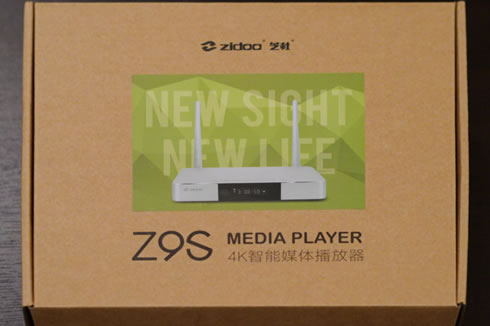
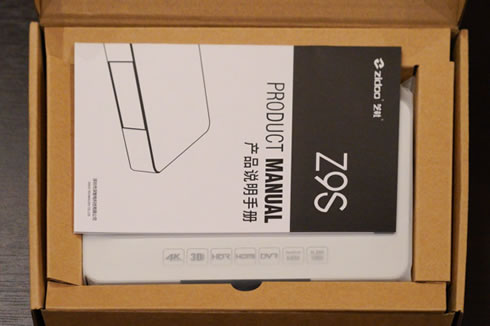
Below you see the player's package, which includes:

  • 1x player box
  • 1x Remote control (no batteries included)
  • 1x HDMI cable
  • 1x DC adapter
  • 1x sata cable
  • 1x User manual

The Zidoo Z9S is made of aeronautical quality aluminum and on the front we have an IR receiver and a display that gives us basic information about the connections or what we are playing. The box of this model is very similar to the previous Zidoo X9S, but this time the color is silver and has some connection, in the back we have two WIFI antennas. At the top side of the device there are several logos.

At the sides thee are data connectors; two connectors 2x USB 3.0, SATA on the left and 2x USB 2.0, SATA and the reset button on the right.

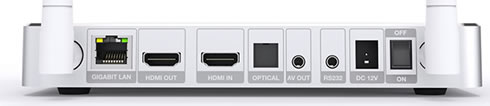
In the back we have the audio and video connections: 1x Fiber optic, 1x Gigabit LAN, 1x CVBS output, 1x RS232, 1x HDMI out 2.0a, 1x HDMI in 2.0
The remote control is complete, having almost any kind of shortcuts and copying keys for other controls. A learning function can be used in order to turn on/off your TV from one remote control. You can also use an app to assign functions to the color keys and another app called Control Center that allows you to connect from your mobile and control the ZIDOO Z9S using a smartphone. In addition, you can control the player remotely from your mobile or Android TV-Box using the Cetusplay app or even connect a flymouse, BT mouse or keyboard.

The overal remote control layout is not as simple as we typically see in other media players, but you you familiarize yourself with it afetr a while.


Review Pages

1. Features, specs
2. Package and design
3. Powering on
4. Audio and VIdeo tests
5. Control Center
6. Home Theater app
7. ZDMC (KODI)
8. Final words


Pages

  • « first
  • ‹ previous
  • 1
  • 2
  • 3
  • 4
  • 5
  • 6
  • 7
  • 8
  • next ›
  • last »

Zidoo

Media Player

Tags: Zidoo Media Player
Previous Post
Toshiba ExceriaPro N502 256GB SDXC UHS-II review
Next Post
Nvidia GeForce RTX 2080 Ti and GeForce 2080 Founder's Edition review

Related Posts

  • Zidoo Launches New ZIDOO Z9S and ZIDOO Z10 4K Android TV Media Players

  • Zidoo X7 TV quad core processor TV Box Debuts for $69

  • Zidoo's Android Media Players To Get Full Blu-Ray Menu Navigation

  • Zidoo X9S and Zidoo Media Players Will Be BaSed On New RTD1295 Processor

  • Zidoo X1II Android Media Player review

  • Zidoo X6 Pro Media Player review

  • New Zidoo X9S Android Media Player Coming Next Month

  • Zidoo X5 Android Media Player review

Latest Reviews

Kioxia Exceria Plus G3 512GB microSD
Cameras

Kioxia Exceria Plus G3 512GB microSD

SoundPeats Cove Pro
Consumer Electronics

SoundPeats Cove Pro

Asustor AS5404T 4-Bay NAS System
Enterprise & IT

Asustor AS5404T 4-Bay NAS System

be quiet! Pure Power 13M 1200W
PC components

be quiet! Pure Power 13M 1200W

Server-Side Gaming Why Canadian Online Casinos Are Abandoning Local Clients for HTML5 Clouds
Enterprise & IT

Server-Side Gaming Why Canadian Online Casinos Are Abandoning Local Clients for HTML5 Clouds

Popular News

COLORFUL Introduces CVN B850I GAMING FROZEN Motherboard

COLORFUL Introduces CVN B850I GAMING FROZEN Motherboard

COLORFUL Presents CVN X870 ARK FROZEN Motherboard for AMD Ryzen 9000 CPUs

COLORFUL Presents CVN X870 ARK FROZEN Motherboard for AMD Ryzen 9000 CPUs

TEAMGROUP Launches EXPERT P34F Find My External SSD

TEAMGROUP Launches EXPERT P34F Find My External SSD

Samsung announces Galaxy Tab S11 and Galaxy S25 FE series

Samsung announces Galaxy Tab S11 and Galaxy S25 FE series

Viltrox Showcases Upcoming Lens Lineup and New TTL Flash at IBC 2025

Viltrox Showcases Upcoming Lens Lineup and New TTL Flash at IBC 2025

CORSAIR announces Vanguard Pro 96 and Vanguard 96 Gaming Keyboards

CORSAIR announces Vanguard Pro 96 and Vanguard 96 Gaming Keyboards

Panasonic Introduces the First Ultra-Telephoto Zoom Lens in the LUMIX S Series

Panasonic Introduces the First Ultra-Telephoto Zoom Lens in the LUMIX S Series

MSI Launches DATAMAG 40Gbps Magnetic Portable SSD

MSI Launches DATAMAG 40Gbps Magnetic Portable SSD

Main menu

  • Home
  • News
  • Reviews
  • Essays
  • Forum
  • Legacy
  • About
    • Submit News

    • Contact Us
    • Privacy

    • Promotion
    • Advertise

    • RSS Feed
    • Site Map
  • About
  • Privacy
  • Contact Us
  • Promotional Opportunities @ CdrInfo.com
  • Advertise on out site
  • Submit your News to our site
  • RSS Feed