Breaking News

Viltrox to Showcase Expanding Imaging System at NAB Show 2026 Introducing the Lockerstor 24R Pro Gen2 ASUS Announces ProArt Router PRT-BE5000 and ProArt Switch PQG-U1080 CORSAIR Expands the Popular FRAME Series Case Lineup DeepCool Launches the LT360 VISION ARGB

logo

  • Share Us
    • Facebook
    • Twitter
  • Home
  • Home
  • News
  • Reviews
  • Essays
  • Forum
  • Legacy
  • About
    • Submit News

    • Contact Us
    • Privacy

    • Promotion
    • Advertise

    • RSS Feed
    • Site Map

Search form

Viewsonic VP930b

Jul 28,2006 0

2. Package


Review Pages

1. Introduction
2. Package
3. Installation
4. Using the device
5. Final thoughts


- The package

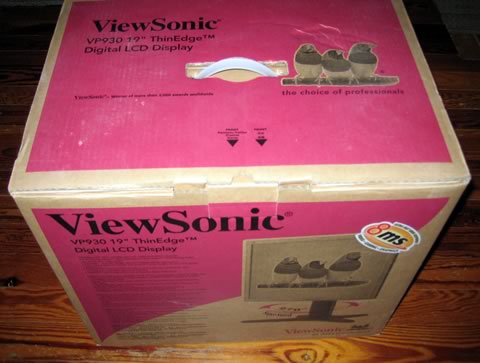
Our Viewsonic VP930b was bought at the retail price of €520 (including 19% VAT). The package was quite big for a 19" TFT monitor, but the LCD monitor was well packaged and secure.
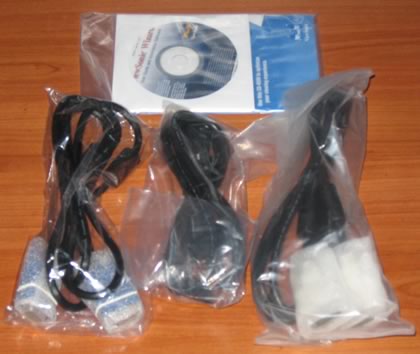
Package contents include a power cord, two connection cables (D-Sub15 and DVI), two CDs (Viewsonic Wizard and Perfect Suite) and quick start guide.
Looking at the screen, its design is very simple. The LCD display comes with its base included, which is quiet heavy, at least compared with other standard 19" TFT monitors. This is probably done to add stability since the height can be adjusted.

Click for hi-res!

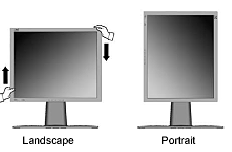
The major advantage of the display is its pivot mechanism. You can swivel, tilt, adjust the height with simple moves and the best part is that the mechanism operates very smoothly, at least for the moment. By applying little force, you can move the display up or down .

The LCD panel can be lowered down to the base or raised to a maximum of 16.5cm (table-top to bottom edge). As the Viewsonic specs indicate, the swivel range reaches 135° (from full left to full right), while tilt can be adjusted from 5° (forward) to 20° (backward).

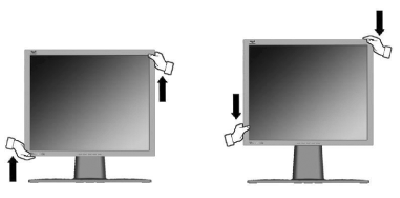
The Pivot action can be performed with a little force, while with Viewsonic's software you can enjoy full A4 page appearance on screen. Ideal for those who view documents, such as lawyers for example:
The OSD menu is complete with many options and information. It is very easy to understand and configure all functions.

At the back, you will find the connection and power ports. Viewsonic offers 1x DVI and 2x D-Sub15 inputs, which can rotated by pressing the "2" button at the front.

It would be great if the VP930b had PiP mode, but this isn't anything to worry over. In order to avoid cable chaos, the VP930b comes with three clips on the back of the stand, to help keep them organized. Very useful.


Review Pages

1. Introduction
2. Package
3. Installation
4. Using the device
5. Final thoughts


Pages

  • « first
  • ‹ previous
  • 1
  • 2
  • 3
  • 4
  • 5
  • next ›
  • last »

ViewSonic

Tags: ViewSonic
Previous Post
Evermore BT-R900
Next Post
OCZ PC2-5400

Related Posts

  • ViewSonic's Latest 4K Presentation Displays Harness Video Conferencing AI to Put the Focus on All Meeting Participants

  • ViewSonic Launches New Docking Monitor for Workspaces

  • ViewSonic Introduces the VX85 Series of Monitors for Home or Office

  • CES: ViewSonic Unveils New Gaming Monitors, Portable and 4K Projectors

  • ViewSonic Launches Two New Projectors for Home Theater and Gaming

  • ViewSonic Introduces the Ultra-Portable M1 Mini LED Projector

  • New ViewSonic ELITE Gaming Monitors Support G-SYNC IPS Nano Colour and 1ms Response Time

  • ViewSonic Launches New ViewSonic ELITE Sub-Brand of Monitors, X Series of Smart 4K Ultra HD LED Projectors

Latest Reviews

In the Age of AI Phishing, the Best User Experience Might Be the One That Feels Safest
Enterprise & IT

In the Age of AI Phishing, the Best User Experience Might Be the One That Feels Safest

SoundPeats C30
Consumer Electronics

SoundPeats C30

Why Streaming Live Casino Games Demands Smarter Tech
Enterprise & IT

Why Streaming Live Casino Games Demands Smarter Tech

Kioxia Exceria Plus G3 512GB microSD
Cameras

Kioxia Exceria Plus G3 512GB microSD

SoundPeats Cove Pro
Consumer Electronics

SoundPeats Cove Pro

Popular News

TEAMGROUP Launches EXPERT P34F Find My External SSD

TEAMGROUP Launches EXPERT P34F Find My External SSD

Samsung announces Galaxy Tab S11 and Galaxy S25 FE series

Samsung announces Galaxy Tab S11 and Galaxy S25 FE series

Viltrox Showcases Upcoming Lens Lineup and New TTL Flash at IBC 2025

Viltrox Showcases Upcoming Lens Lineup and New TTL Flash at IBC 2025

CORSAIR announces Vanguard Pro 96 and Vanguard 96 Gaming Keyboards

CORSAIR announces Vanguard Pro 96 and Vanguard 96 Gaming Keyboards

Panasonic Introduces the First Ultra-Telephoto Zoom Lens in the LUMIX S Series

Panasonic Introduces the First Ultra-Telephoto Zoom Lens in the LUMIX S Series

MSI Launches DATAMAG 40Gbps Magnetic Portable SSD

MSI Launches DATAMAG 40Gbps Magnetic Portable SSD

MSI Launches FORGE GK600 TKL WIRELESS Special Edition Compact Mechanical Keyboard

MSI Launches FORGE GK600 TKL WIRELESS Special Edition Compact Mechanical Keyboard

Viltrox Joins the L-Mount Alliance, Expanding Creative Possibilities

Viltrox Joins the L-Mount Alliance, Expanding Creative Possibilities

Main menu

  • Home
  • News
  • Reviews
  • Essays
  • Forum
  • Legacy
  • About
    • Submit News

    • Contact Us
    • Privacy

    • Promotion
    • Advertise

    • RSS Feed
    • Site Map
  • About
  • Privacy
  • Contact Us
  • Promotional Opportunities @ CdrInfo.com
  • Advertise on out site
  • Submit your News to our site
  • RSS Feed