
Breaking News

Acer Expands Gaming Handheld Portfolio with Predator Atlas 7 Sony Expands its ULT POWER SOUND series Lineup with 3 New Bass-Powered Speakers Sonos Introduces Sonos 27, the Next Generation of Its Audio Operating System EnGenius announces ECW560 Wi-Fi 7 Outdoor Router Club3D announces 40Gbps USB4 NVMe enclosure and Space-Saving dual port Wall Charger

logo

  • Share Us
    • Facebook
    • Twitter
  • Home
  • Home
  • News
  • Reviews
  • Essays
  • About
    • Submit News

    • Contact Us
    • Privacy

    • Promotion
    • Advertise

    • RSS Feed

Search form

Thermaltake ISGC-300

Jun 12,2009 0

2. A closer look


Review Pages

1. Features, specifications
2. A closer look
3. Testbed
4. Results
5. Final words


The medium-sized retail box gives us an idea of the real dimensions of the cooler. The graphics on it with the fighting figure makes it easily recognizable and tease the gamers. The retail price of the SpinQ is around $48, as found at several online stores.
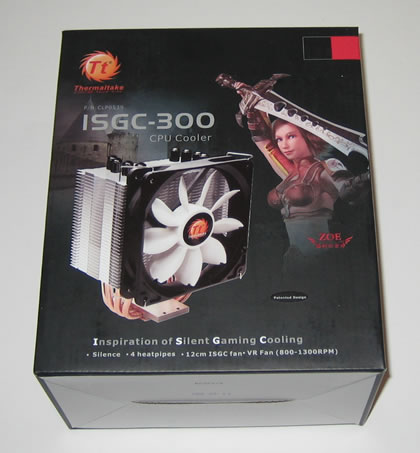
The cpu cooler is placed in a hard carton box and all accessories are found in a separate box. These include several clips for Socket 775/ LGA 1366 and AM2. The printed manual could be better but on the positive side, it comes in many languages.

The Thermaltake ISGC-300 comes with a big 120mm fan pre-installed. Four heatpipes with a diameter of 6mm each create heat transferring from the base to the the array of aluminum fins.

The specific U design is also met in many other CPU coolers. However, Thermaltake's fan should make the difference here at least in the performance an of course noise.

The 120mm fan spins at 800 ~ 1300 RPM . According to Thermaltake, the specific fan is very silent, but we have to find out it in practice later.

The base is made out of full copper:

Installing the Thermaltake ISGC-300 requires several steps. First you need to mount the correct clips for your system, in our case the LGA1366. You need to use the four mounting screws that are included in a plastic bag. Then you have to place the black washers into the pins and flip over motherboard.

At the back, place the four white washers and use the included nuts to secure the cpu cooler. While it sounds difficult, it isn't.

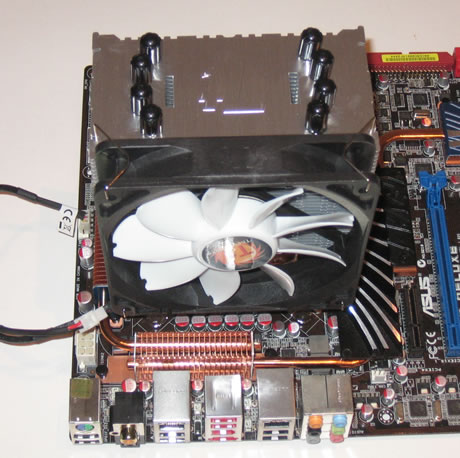
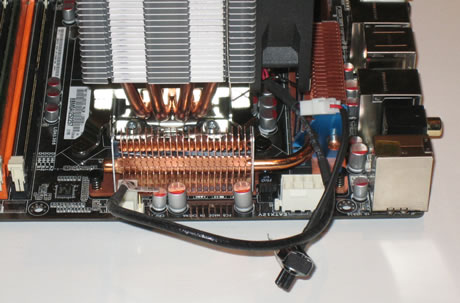
Here is how the system looks like after installation:
 

Review Pages

1. Features, specifications
2. A closer look
3. Testbed
4. Results
5. Final words


Pages

  • « first
  • ‹ previous
  • 1
  • 2
  • 3
  • 4
  • 5
  • next ›
  • last »

Thermaltake

Tags: Thermaltake
Previous Post
Blu-Ray Writing Quality Tests Vol 2
Next Post
Pioneer BDR-203BK

Related Posts

  • Thermaltake Launches AW360/420 AIO Liquid Cooler and WAir CPU Cooler for Workstations

  • Begin the Racing Journey with the Thermaltake GR300 Racing Simulator Cockpit

  • Thermaltake Unveils the Massive EXTREME with Cross-flow Fan

  • Thermaltake Releases the Toughpower TF3 1300W with Support for RTX50 Series GPUs

  • Thermaltake Unveils G6 Direct Drive Racing Wheel Bundle and GM5 3DOF Motion System

  • Thermaltake Launches the TT150 LED Bag in Different Sizes and New Colors

  • Thermaltake New TH V2 Ultra EX ARGB Sync AIO – Snow Edition is Now Available Worldwide

  • Thermaltake Coolers Support New-Gen Intel and AMD CPUs

Latest Reviews

be quiet! Dark Power 14 IO
PC components

be quiet! Dark Power 14 IO

SanDisk High Endurance 512GB microSDXC
Cameras

SanDisk High Endurance 512GB microSDXC

Samsung PRO Ultimate 512GB microSDXC
Cameras

Samsung PRO Ultimate 512GB microSDXC

be quiet! Light Mount TKL
Consumer Electronics

be quiet! Light Mount TKL

be quiet! Light Loop IO LCD
Cooling Systems

be quiet! Light Loop IO LCD

Popular News

CORSAIR announces Vanguard Pro 96 and Vanguard 96 Gaming Keyboards

CORSAIR announces Vanguard Pro 96 and Vanguard 96 Gaming Keyboards

MSI Launches FORGE GK600 TKL WIRELESS Special Edition Compact Mechanical Keyboard

MSI Launches FORGE GK600 TKL WIRELESS Special Edition Compact Mechanical Keyboard

TEAMGROUP Launches EXPERT P34F Find My External SSD

TEAMGROUP Launches EXPERT P34F Find My External SSD

Samsung announces Galaxy Tab S11 and Galaxy S25 FE series

Samsung announces Galaxy Tab S11 and Galaxy S25 FE series

Viltrox Showcases Upcoming Lens Lineup and New TTL Flash at IBC 2025

Viltrox Showcases Upcoming Lens Lineup and New TTL Flash at IBC 2025

Panasonic Introduces the First Ultra-Telephoto Zoom Lens in the LUMIX S Series

Panasonic Introduces the First Ultra-Telephoto Zoom Lens in the LUMIX S Series

MSI Launches DATAMAG 40Gbps Magnetic Portable SSD

MSI Launches DATAMAG 40Gbps Magnetic Portable SSD

MSI’s Latest AMD X870E MAX & EVO Series Motherboards

MSI’s Latest AMD X870E MAX & EVO Series Motherboards

Main menu

  • Home
  • News
  • Reviews
  • Essays
  • About
    • Submit News

    • Contact Us
    • Privacy

    • Promotion
    • Advertise

    • RSS Feed
  • About
  • Privacy
  • Contact Us
  • Promotional Opportunities @ CdrInfo.com
  • Advertise on out site
  • Submit your News to our site
  • RSS Feed