Breaking News

Samsung Showcases Glasses-Free 3D and HDR10+ GAMING ASRock Z890I Nova WiFi R2.0 Supports CQDIMM GoPro Unveils GP3 Lenovo Unveils Adaptive AI PCs, Modular Concepts, and Lenovo Qira Rollout at MWC 2026 Say hello to MacBook Neo

logo

  • Share Us
    • Facebook
    • Twitter
  • Home
  • Home
  • News
  • Reviews
  • Essays
  • Forum
  • Legacy
  • About
    • Submit News

    • Contact Us
    • Privacy

    • Promotion
    • Advertise

    • RSS Feed
    • Site Map

Search form

Stellar Data Recovery (Windows Edition)

Feb 21,2021 0

2. Getting familiar with the GUI


Review Pages

1. Introduction
2. Getting familiar with the GUI
3. Tests - Page 1
4. Tests - Page 2
5. Conclusion


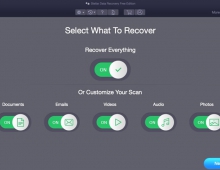
So lets start testing the software. After loading the software, you can select the file types you wish to retrieve from internal/external drives/devices. The next step is to select where the software should look for files, usually many users store their files over Desktop or Documents folders. Of course you can choose specific location or simply select any connected drives/volumes:

In our first test we selected the D: volume with "Deep Scan" selected. As the software author explains "...Deep Scan is a feature based on ‘file signature’ based search of the lost data. It allows the software to do a thorough scanning of the storage drive or media, allowing recovery of lost data in cases such as formatting..."

Pressing SCAN will start the search process.
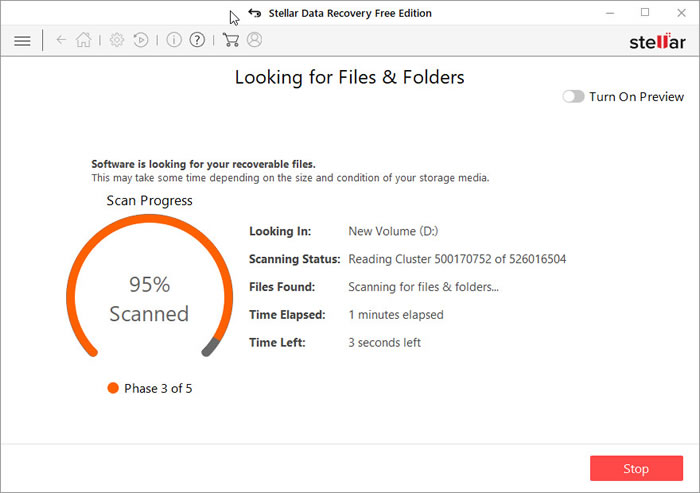
Depending your HDD capacity, size and speed the process will finish

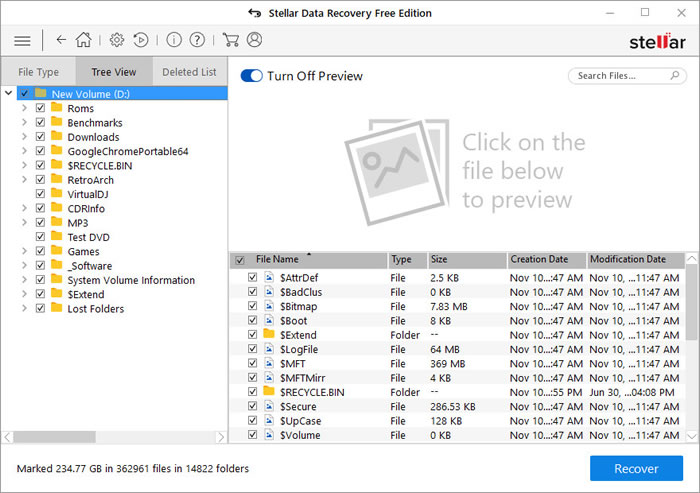
In our case the D: volume is an NVME drive so the process is rather fast. Users will be presented for all results with a either File Type/Tree View or Deleted List. You can view all files with the Preview for a quick look.
 

Review Pages

1. Introduction
2. Getting familiar with the GUI
3. Tests - Page 1
4. Tests - Page 2
5. Conclusion


Pages

  • « first
  • ‹ previous
  • 1
  • 2
  • 3
  • 4
  • 5
  • next ›
  • last »

Stellar Data Recovery

Tags: Stellar Data Recovery
Previous Post
External USB Slim Recorders Comparison
Next Post
Whats best for you MAC or PC?

Related Posts

  • Stellar Data Recovery For Mac

  • Stellar Data Recovery For Windows

  • Stellar Data Recovery MAC Edition

Latest Reviews

Why Streaming Live Casino Games Demands Smarter Tech
Enterprise & IT

Why Streaming Live Casino Games Demands Smarter Tech

Kioxia Exceria Plus G3 512GB microSD
Cameras

Kioxia Exceria Plus G3 512GB microSD

SoundPeats Cove Pro
Consumer Electronics

SoundPeats Cove Pro

Asustor AS5404T 4-Bay NAS System
Enterprise & IT

Asustor AS5404T 4-Bay NAS System

be quiet! Pure Power 13M 1200W
PC components

be quiet! Pure Power 13M 1200W

Popular News

COLORFUL Introduces CVN B850I GAMING FROZEN Motherboard

COLORFUL Introduces CVN B850I GAMING FROZEN Motherboard

COLORFUL Presents CVN X870 ARK FROZEN Motherboard for AMD Ryzen 9000 CPUs

COLORFUL Presents CVN X870 ARK FROZEN Motherboard for AMD Ryzen 9000 CPUs

TEAMGROUP Launches EXPERT P34F Find My External SSD

TEAMGROUP Launches EXPERT P34F Find My External SSD

Samsung announces Galaxy Tab S11 and Galaxy S25 FE series

Samsung announces Galaxy Tab S11 and Galaxy S25 FE series

Viltrox Showcases Upcoming Lens Lineup and New TTL Flash at IBC 2025

Viltrox Showcases Upcoming Lens Lineup and New TTL Flash at IBC 2025

CORSAIR announces Vanguard Pro 96 and Vanguard 96 Gaming Keyboards

CORSAIR announces Vanguard Pro 96 and Vanguard 96 Gaming Keyboards

Panasonic Introduces the First Ultra-Telephoto Zoom Lens in the LUMIX S Series

Panasonic Introduces the First Ultra-Telephoto Zoom Lens in the LUMIX S Series

MSI Launches DATAMAG 40Gbps Magnetic Portable SSD

MSI Launches DATAMAG 40Gbps Magnetic Portable SSD

Main menu

  • Home
  • News
  • Reviews
  • Essays
  • Forum
  • Legacy
  • About
    • Submit News

    • Contact Us
    • Privacy

    • Promotion
    • Advertise

    • RSS Feed
    • Site Map
  • About
  • Privacy
  • Contact Us
  • Promotional Opportunities @ CdrInfo.com
  • Advertise on out site
  • Submit your News to our site
  • RSS Feed